Accounting
ACCOUNTING Module (Navigation Menu)
General Description
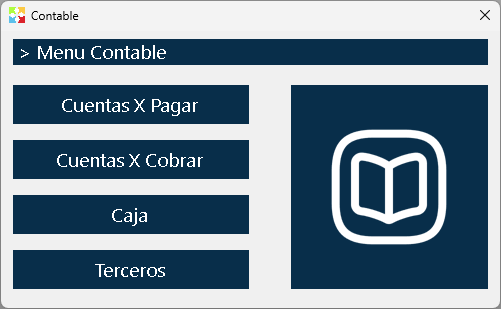
The Accounting Module is a navigation window that groups four submodules related to the financial and third-party aspects of the system. This window works as a quick-access menu to the basic accounting features that complement the inventory operation.
Important: Kardex Tauro is not accounting software and it does not intend to replace a professional accounting system. The modules included in this section are minimal and necessary tools that arise naturally from the daily work with the Kardex and inventory system. Their purpose is to fulfill the operational workflow, not the formal accounting of the company.
Why Does an Accounting Module Exist?
Although Kardex Tauro is designed as an inventory system, daily operation naturally generates financial movements that require basic control:
- Cash: When money is received from a cash sale, that money must be recorded and controlled somewhere.
- Accounts Receivable: When selling on credit, a pending balance remains that must be tracked and managed.
- Accounts Payable: When buying on credit, a debt with the supplier is generated that must be controlled and paid.
- Third Parties: Customers, suppliers, and other actors are indispensable for any inventory operation.
These modules do not aim to do complete accounting (there is no journal, general ledger, balance sheet, financial statements, etc.), but rather to provide the minimum tools to control the financial aspects that arise directly from inventory operations.
Module Access
The Accounting Module is available from the main window of the program.
When clicking the button Accounting, the window with the four available navigation buttons is displayed.
Available Submodules
1. Accounts Payable
Purpose: Control the debts with suppliers derived from credit purchases.
When it is generated: When finalizing a purchase invoice with partial or credit payment, the system automatically creates a pending balance in accounts payable for the corresponding supplier.
Basic functionality:
- View the pending balance by supplier
- Register payments to suppliers
- Reconcile payments with purchase invoices
- Generate pending debt reports
Relationship with inventory: Accounts payable are generated automatically when receiving merchandise purchased on credit. This module allows you to control when and how those debts are paid.
📖 For more details: Consult the specific technical help of the window "Accounts Payable".
2. Accounts Receivable
Purpose: Control the pending payment balances of customers derived from credit sales.
When it is generated: When finalizing a sales invoice where the cash received is less than the total sale, the system automatically creates a pending balance in accounts receivable for the corresponding customer.
Basic functionality:
- View the pending balance by customer
- Register customer payments or credits
- Reconcile payments with sales invoices
- Generate receivable balance reports
- Aging control of balances
Relationship with inventory: Accounts receivable are generated automatically when selling products on credit. This module allows you to control when and how those payments are received.
📖 For more details: Consult the specific technical help of the window "Accounts Receivable".
3. Cash
Purpose: Control the cash received from sales and used for payments.
When it is generated: Every time cash is received from a sale, that money goes into Cash. Every time something is paid in cash, it comes out of Cash.
Basic functionality:
- Record cash receipts (cash sales)
- Record cash payments (payments in cash)
- Control the cash balance in real time
- Perform cash count
- Generate cash movement reports
- Cash opening and closing
Relationship with inventory: Cash is the point where the money from cash sales accumulates. Without this module, there would be no way to control how much cash is physically in the business.
📖 For more details: Consult the specific technical help of the window "Cash".
4. Third Parties
Purpose: Manage the information of all the people and entities with which the company interacts: customers, suppliers, employees, carriers, etc.
When it is generated: Third parties are created as they are needed for inventory operations (customers to sell, suppliers to buy, employees to record consumptions, etc.).
Basic functionality:
- Create and edit third party information
- Classify third parties by type (customer, supplier, employee, etc.)
- Search and filter third parties
- View the transaction history with each third party
- Consolidate contact information
Relationship with inventory: Without third parties there would be no way to record to whom you sell, from whom you buy, who consumes products internally, etc. They are the basis of every transaction in the system.
📖 For more details: Consult the specific technical help of the window "Third Parties".
Relationship with the Inventory Module
The accounting modules are intimately related to inventory operations:
Each inventory operation can generate automatic accounting movements that are reflected in these modules.
Accounting Module Limitations
It is important to understand what NO this module does:
❌ It does not generate complete accounting entries (debits and credits according to PUC)
❌ It does not produce financial statements (balance sheet, income statement, cash flow)
❌ It does not handle accrual accounting (only records cash flows and balances)
❌ It does not generate formal accounting reports for control entities
❌ It does not replace professional accounting software
What It DOES do:
✅ Controls pending balances of customers and suppliers
✅ Records cash movements (cash inflows and outflows)
✅ Manages third party information
✅ Reconciles payments with invoices
✅ Generates basic accounts payable and receivable reports
✅ Provides basic financial information derived from inventory operations
Usage Recommendations
Use these modules for operational control:
The accounting modules of Kardex Tauro are excellent for controlling cash flow and the pending balances derived from daily inventory operations.
Do not use them for formal accounting:
If your company requires complete accounting with financial statements, official books, and reports for regulatory entities, you need complementary professional accounting software.
Keep synchronization:
The accounting modules are updated automatically according to inventory operations. Do not try to manually record movements that were already generated automatically from sales or purchases.
Reconcile periodically:
Regularly review accounts payable and receivable to ensure that the balances match reality. Perform frequent cash counts to detect differences.
Integrate with external accounting:
If you have an accountant or external accounting software, periodically export the information from these modules so that it is incorporated into the formal accounting of the company.
Train staff:
Make sure that the personnel who operate sales and purchases understand how their actions generate movements in these accounting modules.
Use the reports for decision making:
Although they are not formal accounting reports, the accounts payable, receivable, and cash reports provide valuable information for business management.
Respect permissions:
Not all users should have access to all accounting modules. Configure the permissions appropriately to maintain control and security.
Executive Summary
The Accounting Module of Kardex Tauro is a minimal set of financial tools designed to complement the inventory operation. It is not a complete accounting system, but a necessary extension to control:
✅ Accounts Payable: Debts with suppliers
✅ Accounts Receivable: Pending customer balances
✅ Cash: Control of cash received and paid
✅ Third Parties: Information of customers, suppliers, and other actors
These modules are automatically fed by inventory operations (purchases, sales, consumptions) and provide the basic financial control necessary for the daily operation of the business.
For formal and complete accounting, it is recommended to use complementary professional accounting software.
Kardex Tauro - Professional Inventory Management System
Created with HelpNDoc's Personal Edition: Write eBooks for Kindle