Kits - BOM
KITS Window - Product Component List - BOM
GENERAL DESCRIPTION
The window KITS is the configuration module where the "recipe" or composition of the products of type Kit/Combo and Production Line. Here all the subcomponents (child products) that make up a main product (parent product) are established, along with the exact quantities needed of each one.
This window is essential for the system to be able to:
- Automatically break down a composite product into its parts at the time of a sale.
- Verify sufficient stock on hand of each component.
- Discount the correct items from inventory in the appropriate quantities.
- Keep statistics on production and consumption of raw materials.
WINDOW INTERFACE
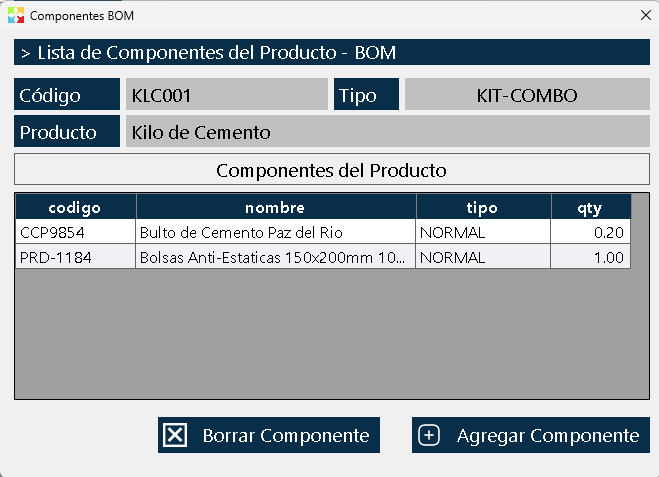
The window is divided into two clearly differentiated zones:
Upper Zone - Main Product (Parent)
Shows the information of the product being configured:
- Product code: Unique identifier of the parent product.
- Product type: Indicates whether it is "Kit/Combo" or "Production Line".
- Product name: Trade name of the composite product.
Lower Zone - Component List (Children)
Presents a table with all the products that make up the main product. The columns of the list are:
- Code: Component identifier.
- Name: Component description.
- Product type: Classification of the component (Normal, Nested Kit, etc.).
- Quantity: Number of units of this component required to assemble one unit of the main product.
ADD AND MANAGE COMPONENTS
Add a Component
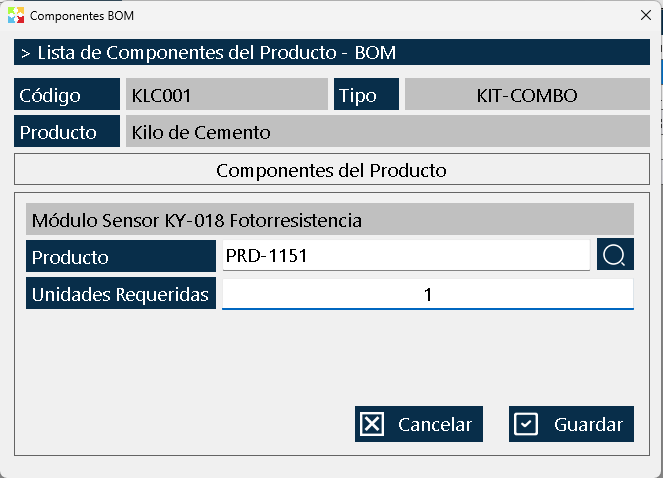
To add a new product to the component list:
- Click the button "Add component".
- A selector with the complete list of inventory products will open.
- Select the product that will be part of the kit or production line.
- Specify the required quantity of that product to make up one unit of the parent product.
- Confirm the operation.
Composition Rules
- No component limit: You can add as many products as needed to make up the main product.
- Nesting allowed: A Kit-type product can in turn contain other Kit-type products inside it (up to 3 levels deep), allowing the creation of complex "Russian doll" type structures.
- Stock on hand validation: When selling a Kit, the system will recursively verify that the necessary units of all the components exist, including the components of the nested kits.
CRITICAL DIFFERENCE: KIT-COMBO VS PRODUCTION LINE
Although both types of products use this same window to define their components, their behavior in the system is radically different. Understanding this difference is essential for a correct configuration.
KIT / COMBO Type Product
Behavior: Strict and automatic.
- Stock requirement: To sell, consume or transfer a Kit, it is mandatory that the complete quantities exist in the warehouse of all its subcomponents.
- Automatic discount: When making the sale, the system automatically discounts the units of each component from inventory.
- Real-time validation: If even one component is missing, the system will prevent the sale of the Kit.
- Typical use cases:
- Gift baskets and Christmas gifts.
- Promotional combos (e.g., "Burger + Soft Drink + Fries").
- Pre-assembled product packages.
- Technical service kits (pre-packaged spare parts).
PRODUCTION LINE Type Product
Behavior: Informational and statistical.
- No stock blocking: The component list works as a theoretical guide or manufacturing recipe. It does not block the sale or production if materials are missing.
- No automatic discount: The system does not automatically discount the components from inventory when producing or selling.
- Statistical use: It is used for:
- Know theoretically how much material is needed to produce one unit.
- Record how much material was actually used in a specific production.
- Generate raw material consumption reports.
- Calculate real vs. theoretical production costs.
- Typical use cases:
- Bakeries (bread, pastries, empanadas).
- Furniture factories.
- Manufacturing workshops.
- Artisanal or industrial production.
BUSINESS CONTEXT: BOM (BILL OF MATERIALS)
The KITS functionality in Kardex Tauro implements the industrial concept known as BOM (Bill of Materials) or Bill of Materials, a fundamental tool in modern production and inventory management.
What is a BOM?
A BOM is a structured list that details all the raw materials, components, subassemblies, and quantities needed to manufacture, assemble, or provide a finished product. It is, in essence, the complete "recipe" of a product.
BOM types supported by Kardex Tauro
|
BOM Type |
Equivalent in Kardex Tauro |
Main Feature |
|
Sales BOM / Kit |
Kit/Combo type product |
Mandatory list, automatic stock discount |
|
Production / Manufacturing BOM |
Production Line type product |
Informational list, statistical control |
|
Multilevel BOM |
Nested kits (up to 3 levels) |
Allows components that in turn have their own components |
Parent-Child Hierarchy
In BOM terminology:
- Parent Product: The final product (Kit or Product to Manufacture).
- Child Product: Each of the components that make it up.
- Level: The depth in the hierarchy. A kit inside another kit represents different levels of the BOM.
BUSINESS BENEFITS OF USING KITS AND BOM
Correctly implementing composite product management in Kardex Tauro generates significant competitive advantages for any company:
Accurate Inventory Control
- Full traceability: Knowing exactly which components were consumed in each sale or production.
- Early alerts: When selling a Kit, the system can warn about the need to replenish specific components before they run out.
- Reduction of shrinkages: Controlling theoretical vs. actual quantities helps detect waste or pilferage.
Optimization of Sales Processes
- Speed at the point of sale: Instead of selling 5 individual products, the salesperson sells a single Kit, reducing transaction time.
- Error prevention: The system guarantees that a Kit is not sold without having all its components available.
- Commercial strategies: It makes it easier to create promotional combos without the need to physically repackage the products.
Cost and Price Control
- Automatic cost calculation: The cost of a Kit is the sum of the costs of all its components, guaranteeing real profit margins.
- Cascade update: If the price of a component rises, the system can automatically recalculate the cost of the parent product.
- Profitability analysis: Identifying which composite products are more profitable and which are not.
Production Efficiency
- Standardization: Each manufactured product follows the same "recipe", guaranteeing consistent quality.
- Purchasing planning: Knowing which raw materials are needed to produce a certain quantity of finished product.
- Time estimation: With a well-defined BOM, more accurate production times can be estimated.
PRACTICAL USE CASES BY INDUSTRY
Retail and Supermarkets
- Christmas baskets: Fruits, sweets, liquors, and decorations grouped into a single SKU.
- Cleaning combos: Soap + detergent + bleach + sponge at a special price.
- Breakfast packages: Cereal + milk + coffee + sugar.
Technology and Electronics
- Assembled computers: CPU + monitor + keyboard + mouse + software.
- Installation kits: Security camera + cable + connectors + power supply.
- Cell phones with accessories: Phone + case + tempered glass + earphones.
Food and Beverages
- Restaurant menus: Starter + main course + drink + dessert.
- Bakery production: Flour + water + yeast + salt = Bread (Production Line).
- Gourmet gift boxes: Cheeses + wines + cookies + jams.
Technical Services
- PC maintenance kit: Thermal paste + compressed air + brush + isopropyl alcohol.
- Electrical installation kit: Cable + outlet + insulating tape + staples.
Manufacturing and Production
- Furniture: Wood + screws + hinges + paint = Finished furniture.
- Garment making: Fabric + thread + buttons + zipper = Garment.
- Chemical products: Base + essence + colorant + preservative = Final product.
USAGE RECOMMENDATIONS
- Prior design: Before creating a Kit, draw the component structure on paper. Identify whether you need nesting (kits inside kits).
- Descriptive names: Use clear names for the components, especially if the same product participates in several different Kits.
- Periodic validation: Review the BOMs of your products monthly to ensure that the quantities and components remain correct.
- Tests before production: Before launching a new Kit for sale, make a test sale to verify that the system correctly deducts all the components.
- Use of the Production Line for manufacturing: If your company manufactures products, use this type instead of Kit, since it will allow you to keep real statistics of raw material consumption.
- Staff training: Make sure the salespeople understand the difference between a Kit (which requires stock on hand) and a normal product.
- Maximum nesting: Respect the limit of 3 nesting levels. Deeper structures can complicate the maintenance and understanding of the BOM.
FREQUENTLY ASKED QUESTIONS
Q: Can I convert a Normal product into a Kit after having sold it?
A: Yes, but keep in mind that historical sales will not be recalculated. Only future sales will apply the Kit logic.
Q: What happens if I modify a Kit that already has recorded sales?
A: You can modify it freely. Past sales keep their original record, and new sales will apply the new composition.
Q: Can I use the same product as a component in multiple Kits?
A: Absolutely yes. A product (e.g. a box of chocolates) can be part of several different gift baskets simultaneously.
Q: Why does it not let me sell a Kit if I have stock on hand of the parent product?
A: Because in Kit-type products, the parent stock on hand is virtual. The system verifies the real stock on hand of each individual component. You must have stock of ALL the components in the required quantities.
Q: Can I have a Kit that contains a Service-type product?
A: Technically yes, but it is not recommended. Service-type products do not manage inventory, which can generate inconsistencies in the Kit stock on hand validation.
Kardex Tauro - Professional Inventory Management System
Created with HelpNDoc's Personal Edition: Free Kindle producer