Warehouse Location
PRODUCT WAREHOUSE LOCATION Window
GENERAL DESCRIPTION
The window Product Warehouse Location it is the module in charge of assigning and consulting the exact physical position of each product within the storage facilities. This functionality turns the digital inventory into a real physical map, allowing any person (even without prior knowledge of the warehouse) to locate a product accurately and quickly.
The location works as a coordinate system similar to the one used in professional WMS (Warehouse Management System) systems, where each product has a unique "address" within the warehouse.
WINDOW INTERFACE
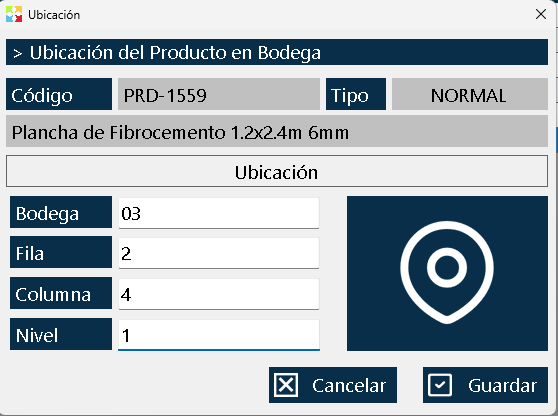
The window is divided into two clearly differentiated zones:
Upper Zone - Product Identification
Shows the information of the product whose location is being consulted or defined:
- Product code: Unique identifier.
- Product type: Classification (Normal, Kit, Service, Production Line).
- Product name: Commercial description of the item.
Lower Zone - Location Coordinates
Four fields that make up the physical "address" of the product:
|
Field |
Description |
Example |
|
Warehouse |
Number or identifier of the specific warehouse within the cost center |
Warehouse 1, Warehouse A, Cold Warehouse |
|
Row |
Row number within the warehouse (horizontal axis) |
Row 3, Row A |
|
Column |
Column number within the row (longitudinal axis) |
Column 5, Column C |
|
Level |
Height or specific shelf where the product is located (vertical axis) |
Level 2, High Level, Floor Level |
Save Button
Located at the bottom of the window, it allows updating and persisting the new location assigned to the product.
RELATIONSHIP WITH COST CENTERS
⚠️ IMPORTANT: The location is dependent on the cost center.
- Each cost center (warehouse, branch, store) manages its its own independent location system.
- The same product can have completely different locations in different cost centers.
- When opening this window, the system shows and allows editing only the location corresponding to the current cost center where the user is logged in.
- If a product is distributed in multiple warehouses, each warehouse will have its own registered location coordinate.
Practical example:
- Product: Soda 400ml
- Cost Center 1 (Main Location): Warehouse 2, Row 3, Column 5, Level 1
- Cost Center 2 (North Branch): Warehouse 1, Row 1, Column 2, Level 3
- Cost Center 3 (Central Warehouse): Warehouse A, Row 15, Column 8, Level 2
BUSINESS CONTEXT: WMS SYSTEMS AND LOCATION MANAGEMENT
The location functionality of Kardex Tauro implements the fundamental principles of the WMS (Warehouse Management Systems) or Warehouse Management Systems, used by world-class logistics companies.
The Concept of "Directionality" in Warehouses
Assigning locations to products is equivalent to assigning postal addresses. Without an address system, finding a package in a city would be chaotic; without locations, finding a product in a warehouse with hundreds or thousands of items is equally chaotic.
ABC Coordinate System
The four-field structure (Warehouse → Row → Column → Level) follows the industry standard model. This system allows:
- Logical navigation: Following a predictable sequence (like reading a book).
- Scalability: Adding more warehouses, rows, columns or levels without breaking the structure.
- Route optimization: Planning efficient routes inside the warehouse.
BUSINESS BENEFITS OF LOCATION MANAGEMENT
Implementing a location system in Kardex Tauro transforms warehouse operations, generating measurable benefits in multiple areas:
Reduction of Search Time (Picking)
- Before: The employee walks around the warehouse looking for the product from memory or asking coworkers.
- After: The employee goes directly to the indicated coordinate (eg. "Warehouse 2, Row 3, Column 5, Level 1").
- Impact: Reduction of up to 70% in order preparation time.
Independence from Tribal Knowledge
- It eliminates dependence on "veteran employees" who are the only ones who know where everything is.
- Allows any new employee operate with the same efficiency as a veteran from their first day.
- It reduces operational risk when there is staff turnover, vacations or sick leave.
Optimization of Staff Turnover
- Accelerated onboarding: New employees are productive in hours, not weeks.
- Simplified training: It is enough to teach them to read the location coordinates.
- Flexibility: Employees can move between different areas or warehouses without losing efficiency.
Reduction of Operational Errors
- It reduces incorrect picking (taking the wrong product).
- It reduces downtime caused by "lost products" that were actually misplaced.
- It makes cycle counts and inventory audits easier.
Optimization of Physical Space
- It allows identifying underused areas of the warehouse.
- It makes strategic reorganization easier (high-turnover products near the dispatch area).
- It helps plan inventory growth and the need for more space.
Improvement in Customer Experience
- Faster orders = more satisfied customers.
- Fewer errors = fewer returns and complaints.
- Predictable response times.
USE CASES BY TYPE OF COMPANY
Chain Stores and Supermarkets
- Usage: Locating products by aisle, gondola and shelf.
- Benefit: Fast shelf replenishment and efficient preparation of online orders.
Hardware Stores and Spare Parts Distributors
- Usage: Organizing thousands of small references (screws, nuts, tools).
- Benefit: Precise location of items that look similar but have different specifications.
Pharmacies and Drugstores
- Usage: Location by type of medication, laboratory and shelf level.
- Benefit: Fast dispatch of medical formulas and control of products with different batches and expiry dates.
E-commerce Warehouses
- Usage: Location system optimized for mass picking.
- Benefit: Fulfillment of fast delivery promises (same-day or next-day delivery).
Workshops and Industrial Maintenance
- Usage: Location of spare parts, tools and consumables.
- Benefit: Reduced machine downtime by quickly locating the necessary spare parts.
Restaurants and Bars
- Usage: Location of supplies in the warehouse, refrigerators and freezers.
- Benefit: Accurate inventories and efficient replenishment during service.
WHEN IS IT WORTH IMPLEMENTING LOCATIONS?
Not all companies need a detailed location system. Implementation depends on the size, complexity and operational dynamics of the business.
Situations WHERE IT IS worth implementing locations
✅ More than 100 different products in inventory
When human memory is no longer enough to remember where everything is.
✅ Frequent staff turnover
If new employees constantly arrive who must operate the warehouse from their first day.
✅ Warehouse with multiple areas or levels
When there are several warehouses, mezzanines, separate refrigerators or differentiated areas.
✅ Frequent order preparation (picking)
If the business regularly dispatches orders to customers, distributors or branches.
✅ Visually similar products
When there are references that are easily confused (different sizes, colors, models).
✅ Audits and cycle counts
If periodic physical inventories are carried out that require fast location.
✅ Projected business growth
Implement the system before the operational chaos becomes unmanageable.
Situations WHERE IT IS NOT a priority to implement locations
❌ Fewer than 50 products
If everything fits in a small space and is easily visible.
❌ Single-counter businesses
Where the customer sees the product and the salesperson takes it directly from the shelf.
❌ Warehouses with a single permanent employee
If the same person always operates it and knows the inventory perfectly.
❌ Products with very high turnover
Where products move constantly and do not have a fixed place.
CORRECT USE: BEST PRACTICES
To make the most of the location functionality, it is recommended to follow these practices:
Coordinate System Design
For the WAREHOUSE field:
- Use short, clear identifiers: Numbers (1, 2, 3) or letters (A, B, C).
- If you have only one warehouse in the cost center, always use the same identifier.
- For specialized warehouses, use descriptive names: "COLD", "DRY", "CHEMICAL".
For the ROW field:
- Number the rows sequentially from a fixed reference point (eg. from the entrance).
- Use letters if the rows are identified with physical signs (A, B, C...).
- Keep consistency: if you start with numbers, continue with numbers.
For the COLUMN field:
- Number the columns from left to right (or following a logical pattern).
- Combine with the row to create coordinates like "A-1, A-2, B-1, B-2".
For the LEVEL field:
- Number from the floor upward: Level 1 = floor, Level 2 = first shelf, etc.
- Use descriptive names if applicable: "FLOOR", "MIDDLE", "HIGH".
- Consider ergonomics: high-turnover products at easily accessible levels (eye and hand height).
Physical Warehouse Signage
CRITICAL RULE: System locations must match exactly with the physical warehouse signage.
- Label each shelf with its location code (Row-Column-Level).
- Mark the aisles with large, visible letters or numbers.
- Mark the start of each row to make orientation easier.
- Use color codes to distinguish zones or product types.
- Keep the signage clean and up to date after any reorganization.
Location Assignment Strategy
By turnover (ABC Method):
- Products A (high turnover): Place near the dispatch area, at ergonomic levels.
- Products B (medium turnover): Intermediate locations.
- Products C (low turnover): Distant locations or high/low levels.
By family or category:
- Group related products to make multiple picking easier.
- Example: All personal hygiene products in the same area.
By compatibility:
- Separate products that should not be together (chemicals from food, for example).
- Respect temperature requirements (frozen, refrigerated, ambient).
System Maintenance
- Immediate update: When a product changes location, update the system at that same moment.
- Periodic audit: Check monthly that the system's locations match the physical reality.
- Continuous training: Make sure all staff know how to query and interpret the locations.
- Structure backup: Document the numbering system so it is replicable if the warehouse expands.
TYPICAL WORKFLOW
Location Query (Warehouse Employee)
- Receive an order or product request.
- Open the inventory window and search for the product (by code, name or brand).
- Right-click on the product and select "Location".
- Note down or memorize the coordinates: Warehouse, Row, Column, Level.
- Physically go to the location and pick up the product.
Initial Location Assignment (Administrator)
- Identify the product that needs a location.
- Open the inventory window and select the product.
- Right-clicks and selects "Location".
- Define the physical coordinates where the product will be placed.
- Clicks on "Save" to persist the information.
- Physically label the location in the warehouse.
Product Relocation
- Due to reorganization, seasonality or a change of strategy, the product is physically moved.
- The Location window is immediately updated with the new coordinates.
- The physical signage is also updated if necessary.
FREQUENTLY ASKED QUESTIONS
Q: Should I assign a location to all products in the inventory?
A: It is not mandatory, but it is highly recommended. You can start with the highest-turnover products or the hardest to locate, and expand gradually.
Q: What happens if a product is in multiple locations within the same warehouse?
A: The system allows you to record a main location. If you need to manage multiple locations per product, consider using that additional functionality or recording the most representative location.
Q: Can I change the location of a product that already has recorded sales?
A: Yes, you can change it as many times as you need. The sales history is not affected by location changes.
Q: What do I do if my warehouse has no shelves, it is just an open space?
A: You can use the coordinate system to define imaginary "zones". For example: Zone A (entrance), Zone B (center), Zone C (back), with levels "FLOOR" or "PALLET".
Q: Is it mandatory to fill in all four fields?
A: It depends on the configuration, but it is recommended to complete all four fields to make the most of the system's precision. If a field does not apply, use standard values (eg. "0" or "N/A").
Q: Can I use the location for Service or Production Line type products?
A: Technically yes, but it only makes practical sense for physical products that actually take up space in the warehouse.
Q: How do I handle products that move constantly (on display, in a showcase, in the warehouse)?
A: Assign the location of their main position (usually the warehouse). For products on display, you can create a virtual "warehouse" called "SHOWCASE" or "DISPLAY".
FINAL RECOMMENDATIONS
- Start small: Do not try to locate all products on the first day. Start with the 20 or 50 most important products.
- Involve the team: The employees who operate the warehouse daily know the physical logic of the space better than anyone.
- Be consistent: Once the numbering system is defined, keep it over time.
- Invest in signage: A digital system without physical signage is useless. Label your warehouse.
- Document the system: Create a map or layout of the warehouse with the locations as a reference.
- Review and optimize: Every 6 months, evaluate whether the current layout is still efficient.
- Train everyone: From the warehouse keeper to the salesperson, everyone must know how to query locations.
Kardex Tauro - Professional Inventory Management System
Created with HelpNDoc's Personal Edition: Maximize your documentation capabilities with HelpNDoc's easy-to-use user interface