Payment voucher template in Excel: free download

Payment voucher template in Excel: free download
In the day-to-day running of a business, money does not only come in: it also goes out, and every outflow has to be explainable. You pay a supplier for merchandise, you cover the repair of a piece of equipment, you replenish the petty cash fund, you reimburse an employee who advanced an expense, or you settle an obligation from a previous month. The payment voucher is the internal document that backs up that kind of movement: it records who was paid, how much, for what concept, through which payment method, and with whose authorization. Without that record, a payment becomes a gap that is hard to explain in the accounting records and, worse, an open door for duplicate, inflated, or unjustified payments.
In this article I explain what a payment voucher is, which payments need one, why three people should sign it, and how to fill it out without mistakes. You can also download the payment voucher template in Excel for free: a ready-to-use file that includes the one-page printable form and an instructions sheet with a worked example. All you have to do is enter the data of each payment, print, sign, and file the document together with its supporting paperwork.
⬇ Download payment voucher template in Excel (.xlsx)What the payment voucher template includes
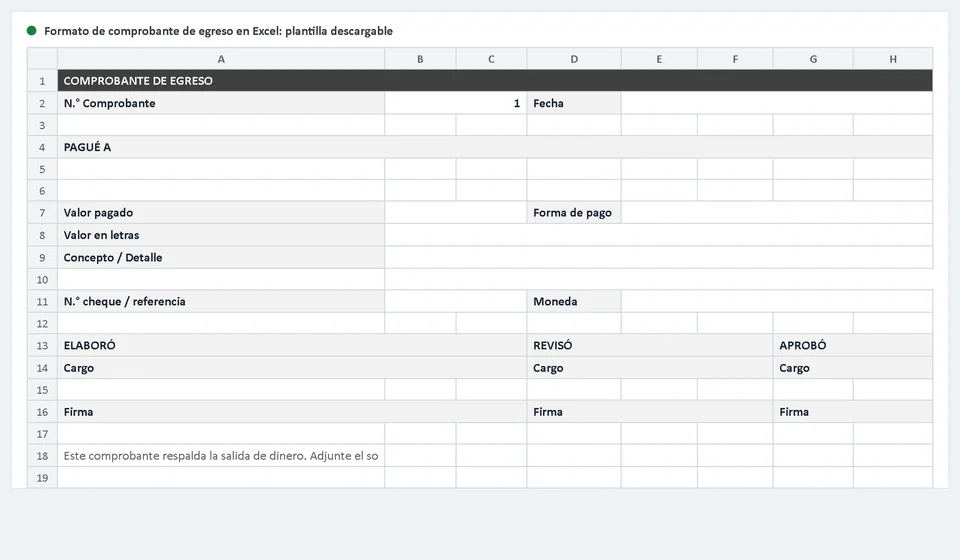
The template is designed as a one-page form, very similar to the traditional paper voucher, but with the advantage that the date, the lists, and the layout are already solved. This is what you find when you open the file:
| Form section | What it does |
|---|---|
| Header with voucher number | Identifies the document with a sequential number and a date that fills in automatically with the current day. |
| PAID TO block | Large field for the name of the payee: the supplier, the contractor, or the person receiving the money. |
| Amount paid and currency | Numeric field for the exact amount plus a space to state the currency in which the payment is delivered. |
| Amount in words | Space to write the amount out in words so that it matches the numeric value. |
| Payment method | Drop-down list with the usual options: cash, check, bank transfer, card, or other. |
| Concept or details | Wide area to describe what is being paid: invoice number, service received, advance, or another reason. |
| Check number or reference | Box for the check number or the bank transfer reference. |
| Prepared, Reviewed, Approved blocks | Three areas with job title and signature space to record who prepared, who reviewed, and who authorized the payment. |
| Supporting document note | Permanent reminder to attach the invoice, purchase order, or bill that originated the outflow of money. |
The sheet is configured to print on a single page: when you send it to the printer it comes out tidy, with defined borders and room for the signatures. You can also keep a digital copy of every voucher and organize the folders by month; that simple habit turns any later review into a matter of minutes instead of days.
Which payments need a payment voucher
A payment voucher documents any outflow of money from the business, although in practice five uses account for the vast majority of documents:
- Payments to suppliers: purchases of inventory, raw materials, supplies, or professional services that have already been invoiced.
- Operating expenses: rent, utilities, transportation, maintenance, stationery, and the other costs required to run the business.
- Petty cash: replenishing the fixed fund when the person in charge reports the small expenses of the period with their receipts.
- Employee reimbursements: returning money that a team member paid out of pocket for an expense authorized by the company.
- Accounts payable: partial payments or the full settlement of obligations recorded in earlier periods.
The rule is simple: if money leaves the cash box or the bank account and the movement is not a transfer between your own accounts, it most likely needs a payment voucher. That includes electronic payments: the bank statement shows who received the money, but it does not explain the reason for the payment or who authorized it, and that explanation is exactly what this document provides.
Why three people sign: prepared by, reviewed by, approved by
Having three signature blocks on a payment voucher is not bureaucracy: it is the most practical way to apply the internal control principle known as segregation of duties. The idea is that the person who prepares the document is not the same person who reviews it, and that the person who approves it has the authority to commit the company's money. When those three functions are separated, it is much harder for a fake invoice to be paid, for a payment to be duplicated, or for someone to authorize an outflow without supporting evidence.
| Signature | Who signs | What they validate |
|---|---|---|
| Prepared by | The person who fills out the voucher: accounting assistant, office manager, or cash handler. | That the payee, the amount, and the concept match the invoice or the bill received. |
| Reviewed by | The immediate supervisor or the accountant. | That the supporting document exists and is valid, that the data is complete, and that the amount in words is identical to the numeric amount. |
| Approved by | The manager, owner, or representative authorized to approve expenses. | That the payment responds to a real need of the business and stays within what is authorized; their signature releases the money. |
Each signature adds a layer of protection: the first one guards the accuracy of the data, the second one guards the validity of the supporting document, and the third one guards the purpose of the expense. In very small businesses the three roles usually fall on one person; in that case, keep the discipline of signing the voucher at the moment of the payment and filing the receipt the same day, because a future review does not distinguish between large and small companies.
How to fill out the voucher step by step
The order in which the form is completed matters more than it seems, because each field builds on the previous one. This is the recommended flow:
- Assign the next sequential number in the series and confirm that it is not repeated or left blank.
- Check the date: the template enters it automatically, but confirm that it matches the day the money actually leaves.
- Write the full name of the payee in the PAID TO block: the legal name of the supplier or the name of the person receiving the payment.
- Enter the amount paid and the currency. If the payment is 1,250.75, type it exactly like that in the numeric field, without spaces.
- Write the amount in words: one thousand two hundred fifty and 75/100. The written figure and the numeric figure must be identical.
- Choose the payment method from the drop-down list: cash, check, bank transfer, card, or other. If you pay by check or bank transfer, note the check number or the reference in the box provided.
- Describe the concept in the details area: the invoice number, the service period, or a short description of what is being paid.
- Attach the supporting document: invoice, purchase order, or bill. No support, no payment; if you do not have it yet, wait before recording the voucher.
- Have the voucher signed by whoever prepared, reviewed, and approved it, and file the original together with its support. Also keep a digital copy organized by month.
Common mistakes when recording outgoing payments
Most cash problems are not born from sophisticated fraud but from carelessness that repeats itself over and over. These are the most frequent mistakes:
- Payments without support: cash is handed over and the invoice stays in a pocket or in the car. Without the attached document, the accounting records have no way to prove the payment was real.
- Incomplete signatures: vouchers that leave with the prepared-by signature but without the approved-by one, or worse, documents signed blank and completed later.
- Amounts that do not match: the numeric amount says one figure and the amount in words says another. When there are differences, the bank or the accountant sends the document back.
- Messy numbering: vouchers whose dates do not follow the order of the numbers, or gaps in the sequence that raise awkward questions in any review.
- Incomplete records: the transfer reference is missing, the payee name is half-written, or the concept does not say which invoice was paid.
- Misspelled payees: a typo in the name or an incomplete legal name turns a valid receipt into a problem at the end of the month.
If a quick look at your latest vouchers shows several of these symptoms, do not treat it as something minor: it is the sign that the process needs a standard form like this template and a fixed time each week to bring the documents up to date.
Tracking outgoing payments with software
An Excel template handles manual payment control very well when the volume is low, but it has a structural limit: every voucher lives in isolation and nothing connects the purchase order with the invoice received, the account payable, and the final payment automatically. All of those connections depend on people's memory and discipline, and when the business grows, that memory becomes the weakest link in the operation. A management system such as Kardex Tauro organizes the whole process from the origin: the purchase order creates the obligation, the obligation is recorded as an account payable, and at the moment of paying, the system leaves a trace of which document was settled, through which method, and with which support. That way, any outflow can be traced backward to its cause and forward to its effect on the bank account.
To be honest: for a business that issues a few vouchers per month, the Excel template is enough and is the right starting point. Software makes sense when you want the record to happen without depending on someone typing the same data twice.
Money control starts with the simplest document and, at the same time, the easiest one to neglect: the payment voucher. Download the template for free, use it on your next payment, and verify that the whole flow —supporting document, signatures, and filing— is solved on a single sheet. Keep in mind that the formal requirements for vouchers (which fields they must contain and which documents the regulations require) depend on the country where your business operates; the universal rule, in the meantime, is this: no support, no payment. When the volume of payments grows and you want every outflow traced from the purchase order to the bank, a system like Kardex Tauro is the natural next step.
Frequently asked questions
What is the difference between a payment voucher and a cash receipt?
A payment voucher records money going out; a cash receipt records money coming in. They are the two sides of the same book and each should carry its own numbering.
What should a payment voucher contain?
Date, consecutive number, who was paid, the amount in figures and in words, the concept, and the signatures of whoever authorises and whoever receives the money.
Can it be used as accounting support?
Yes: it is the support for the payment. File it with the invoice or the bill that originated it and with the bank confirmation when the payment was a transfer.