Warehouse operations kit in Excel: issue slips, transfers and returns

Warehouse operations kit in Excel: issue slips, transfers and returns
The warehouse is not just where products rest: it is the point where purchases, sales, production and deliveries all meet. Every time goods come in or go out, the business must be able to answer three questions: what moved, how much moved and who authorised the movement. When those answers are not recorded, the inventory shown on paper starts to drift away from what is actually on the shelves, and those differences eventually turn into lost money.
This warehouse operations kit brings together three Excel spreadsheets designed for the day-to-day running of a stockroom: the warehouse issue slip, the inter-warehouse transfer and the returns register. They are internal control tools, not official fiscal documents: they do not replace invoicing or any legal requirement in your country, but they give you the administrative evidence to know exactly what happened to every unit that moved within your operation.
The three files are designed with no currency symbol, so they work with any currency and in any kind of business: retail, distribution, workshop, restaurant or supplies warehouse. Download the template you need for today's operation:
⬇ Download warehouse issue slip (.xlsx) ⬇ Download inter-warehouse transfer (.xlsx) ⬇ Download returns register (.xlsx)What the kit includes and what each file is for
The three documents cover the movements that happen most often in a warehouse. Each one answers to a different operation and is filled out independently:
Warehouse issue slip. Records every item that leaves the warehouse: shipments to customers, deliveries to production, materials for internal use and exits due to damage or expiry. The slip lists the date, the sequence number, the product with its code, the quantity, the unit, the destination of the goods and the signatures of whoever hands over and whoever receives. It is the evidence used to deduct those units from the stock card.
Inter-warehouse transfer. Documents the movement of goods between two locations owned by the business, without the owner of the inventory changing: from the central warehouse to a branch, from one depot to another or between zones of the same warehouse. It records the source warehouse, the destination warehouse, the product, the quantity and the people responsible on each side of the move.
Returns register. Records every item that comes back into inventory: customer returns for wrong or damaged products and purchase returns, when the business sends goods back to a supplier. The register distinguishes the type of return, includes the reason and the condition of the product, and records who approved the movement.
The complete warehouse flow: issue, transfer and return
Everything that happens to the goods can be summed up in three movements, and each movement has its own document. The issue is the most frequent operation: goods leave the warehouse and are deducted from stock. The transfer moves goods between owned warehouses: total inventory does not change, only the location where the product sits. The return brings goods back: what went out comes in again and is added back to stock.
These three movements are the visible side of the operation, but their real value appears when they are crossed against the stock card of each product. A well-filled issue slip explains why the stock card shows fewer units; a well-recorded transfer stops one warehouse showing shortages while another piles up surpluses; and a well-noted return prevents inventory from being inflated with goods that are no longer physically there.
When the three templates are used with discipline, the warehouse tells a complete story: every unit that goes out has an issue slip, every change of location has a transfer and every return has a register entry. That chain of documents is what makes inventory control verifiable.
What each file in the kit contains
The three templates share a simple structure: a header with the movement data and a detail table with the product lines. The following table summarises the components of each file:
| File | What it records | Main fields |
|---|---|---|
| Warehouse issue slip | Items leaving the warehouse | Sequence number, date, product, quantity, unit, destination, handed over by, received by, signatures |
| Inter-warehouse transfer | Movement of goods between owned locations | Source warehouse, destination warehouse, product, quantity, people responsible and signatures at both ends |
| Returns register | Items coming back into inventory | Return type, date, product, quantity, reason, condition, approval |
In the three files the total cells are calculated with formulas, so the line total and the document total come out by themselves and the structure always stays the same. The header with the sequence number, the date and the signatures is ready to print if the business prefers a paper record.
Which document to use in each case
The most common question is which of the three templates matches each operation. This table answers it:
| Situation | Kit document |
|---|---|
| You dispatch items to a customer, to production or for internal use | Warehouse issue slip |
| You send products from the central warehouse to a branch or between depots | Inter-warehouse transfer |
| A customer returns goods by mistake or because they are damaged | Returns register |
| You send a purchase back to the supplier because it arrived damaged | Returns register |
| You need to know who authorised a movement and who received it | Any of the three: they all carry signatures |
Worked example: purchase return to the supplier
To make the kit easier to understand, here is a numeric example. Suppose you bought 20 units of a product at 15,000 each and, when they arrived, 3 were damaged. You decide to return those 3 units to the supplier. In the returns register, the line is filled out like this:
| Concept | Quantity | Unit cost | Total |
|---|---|---|---|
| Units returned to the supplier | 3 | 15,000 | 45,000 |
The line ends up with 3 units at a unit cost of 15,000 and a total of 45,000, written without a currency symbol so the template works in any country. With that record, the warehouse deducts 3 units from stock, the supplier owes the refund or the replacement, and the product's stock card matches what is physically on the shelf again.
The same file works for the opposite case: if it is a customer who returns goods, you note the quantity coming back, the reason and the condition, and those units are added back to the stock available for sale.
How to use the kit step by step
- Download the three files and keep them in a shared folder for the business, organised by year or period, so the history stays tidy.
- Define one sequence per document type: I-0001 for issue slips, T-0001 for transfers and R-0001 for returns, and always write it in the header.
- Before running any movement, identify which template fits: is the goods leaving, changing warehouse or coming back into inventory?
- Fill out the header with the date, the sequence number and the warehouses or the people responsible for the movement.
- Record each product line with its code, description, quantity and unit; on issue slips you can also note the destination or the reference order number.
- Have both parties sign the document: whoever hands over and whoever receives, or the person in charge at the source warehouse and the one at the destination warehouse.
- Register the movement against the product's stock card the same day or at the end of the shift: deduct issues, add returns and update the location on transfers.
- File the documents by sequence number, on paper or digitally, so you can audit any single movement whenever you need to.
Tips for making the control actually work
- Keep the numbering strictly sequential: if a slip is cancelled, mark it as cancelled instead of deleting it, so the sequence has no gaps that someone could take advantage of.
- Do not let any movement pass without a document: an issue without a slip is a shortage with no explanation, and an entry without a record is a surplus nobody knows where it came from.
- Always demand signatures: the document only works as evidence if the person who authorises and the person who carries out the movement leave their mark on it.
- Register against the stock card on the same day as the movement; leaving pending entries for the weekend multiplies memory mistakes and lost sheets.
- Assign clear responsibilities: one person should look after each warehouse and authorise issues and returns, so no movement is left without an owner.
- Check regularly that what is documented matches the physical count: if the paper says one thing and the shelf says another, the problem is in the process, and the kit helps you catch it early.
When is it time to move to inventory software?
The Excel kit works very well when the volume of movements is low or medium: a few dispatches a day, one or two warehouses and a small team. In that scenario, filling out an issue slip, a transfer or a return takes under a minute and the file is enough.
The limit appears when the warehouse grows: daily dispatches increase, products and warehouses multiply, templates are filled out by hand and someone has to post every movement to the stock card at the end of the day. Typing errors, repeated sequence numbers and misplaced documents start eating up time and trust in the information. At that point it is worth evaluating an inventory system such as Kardex Tauro, which turns the issue slip, the transfer and the return into automatic movements: stock is deducted or added on the spot, the stock card stays up to date without retyping anything and the information from all warehouses can be checked in one place.
That does not mean the kit stops being useful: the Excel templates remain valuable as a physical backup, for businesses in their early stage and for operations where paper is still part of the warehouse culture. The decision is not an either-or: it is about finding the point where manual work costs more than the system.
Download the kit and try it on your next operation: with an issue slip, a transfer and a return properly documented, the warehouse already has the foundation for serious control. And when that control starts falling short, you already know the next step. The three templates are here so you always have them at hand:
⬇ Download warehouse issue slip (.xlsx) ⬇ Download inter-warehouse transfer (.xlsx)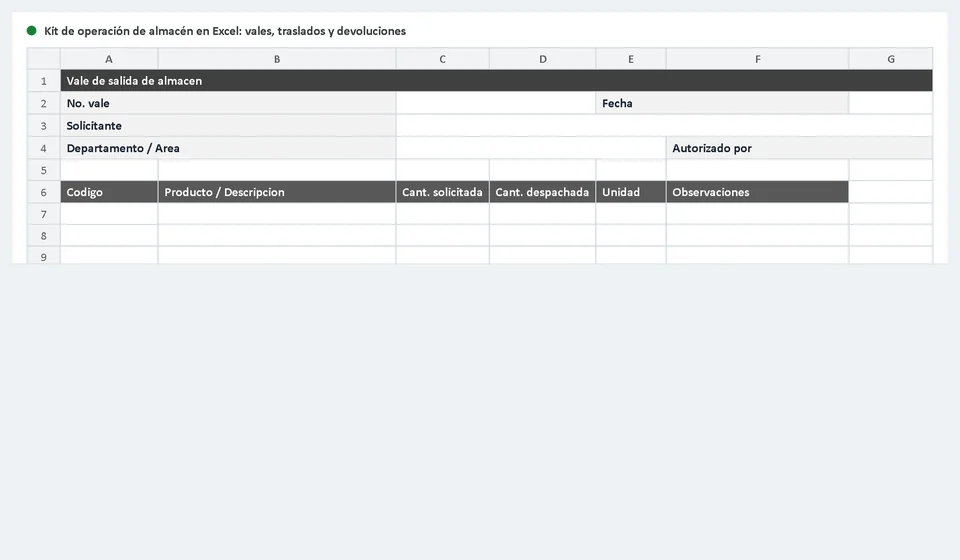
Frequently asked questions
What does the warehouse operations kit include?
Issue slips, transfers and returns: the three daily movements that shift inventory.
Why together?
Because they share the same data —product, quantity, warehouse— so the kardex stays consistent across all three.
Who uses them?
Whoever dispatches and whoever receives. If only one side signs, there is no control: the form exists so both are recorded.