Inventory reconciliation template in Excel

Inventory reconciliation template in Excel
The system says there are 50 units of a product in the warehouse, but when you look at the shelf only 47 are there. Nobody stole anything and nobody made a deliberate mistake; it is simply that when someone asks why units are missing or left over, there is no written answer. That scene repeats every week in warehouses, shops and storerooms of every size. Inventory reconciliation exists precisely for that: to compare what the records say with what is physically there and to write down the explanation of each difference before it turns into a bigger problem.
In this article we explain what reconciling inventory means, which components and columns the downloadable template includes, what a practical example with a real difference looks like, which steps to follow to use it, and when it makes sense to move that control into inventory software like the ones growing businesses use today.
⬇ Download the inventory reconciliation template in Excel (.xlsx)What is inventory reconciliation?
Reconciling inventory means confronting two figures for the same product on the same date: the quantity recorded by your system, stock ledger or control log, and the quantity that is actually on the shelf after a physical count. If both match, the row is closed with no issue. If they do not match, a difference appears: negative when stock is missing, positive when there is extra stock. The goal of reconciliation is not only to detect that difference but to explain it: to know whether it was an unrecorded dispatch, a purchase that came in without being noted, a damaged unit removed from sale, or a simple typing error.
It is worth clarifying that reconciliation is not an external procedure or an imposed obligation: it is an internal control practice that protects the business's own money and merchandise. Whoever reconciles regularly discovers recording problems while they are still small, when they can still be fixed with a phone call, a review of documents or a conversation with the warehouse team. Whoever does not reconcile, on the other hand, discovers the differences months later, when it is impossible to remember what happened and the loss becomes permanent.
What the inventory reconciliation template includes
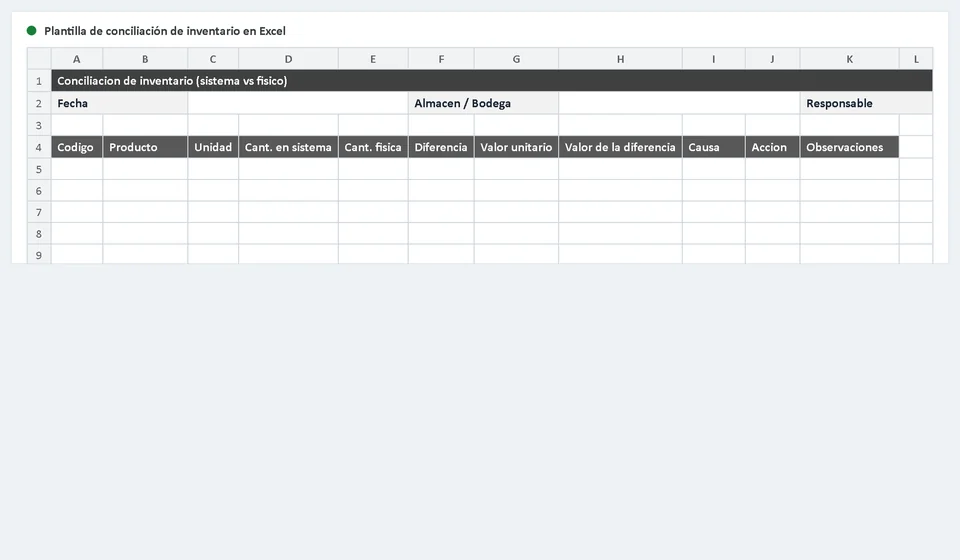
The template is designed as a single worksheet in which each product takes its own row and every piece needed to reconcile is in sight. Its main components are:
| Component | What it is for |
|---|---|
| Product details | Code or reference, name, location inside the warehouse and unit of measure. They identify each row without ambiguity, even when two products look alike. |
| Quantity per system | The stock shown by your stock ledger or control program on the count date. It is the starting point of the comparison. |
| Physical quantity | The units actually counted on the shelf, taking nothing for granted. Here what "should be there" does not count, only what is there. |
| Calculated difference | The result of subtracting the physical quantity minus the system quantity. A negative value means missing stock and a positive value means extra stock. |
| Cause and action | The space to write down why the difference happened and what was decided to do about it. That is what turns a number into a useful explanation. |
| Notes | Supporting comments: number of the document that authorizes an adjustment, name of the person responsible for the count or follow-ups that remain open. |
By keeping everything in one row, the template allows you to reconcile dozens or hundreds of products in a single session and leaves an orderly history you can review weeks later.
Columns of the reconciliation template
The columns of the sheet follow the natural logic of a reconciliation: first you identify the product, then you compare the two quantities, and finally you explain and resolve the difference.
| Product | Quantity per system | Physical quantity | Difference | Value | Cause | Action |
|---|---|---|---|---|---|---|
| The item being reconciled, with its code and name. | What the record says should be there. | What the physical count found. | Automatic subtraction: physical quantity minus system quantity. | Optional reference to the cost of the product, useful for prioritizing the most important differences. | Classification of the origin of the difference: missing, extra, recording error or damaged unit. | The agreed next step to close the row: investigate, adjust with authorization or correct the record. |
Practical example: a reconciliation with a difference
Imagine that you are reconciling the LED lamp line. Your stock ledger records 50 units of reference A-200, but when you count the shelf only 47 appear. This is how that row looks in the template:
| Product | Quantity per system | Physical quantity | Difference | Value | Cause | Action |
|---|---|---|---|---|---|---|
| LED lamp A-200 | 50 | 47 | -3 | To be calculated | Missing | Investigate |
The difference of -3 means that three units are missing: the system says there are 50 and the count found 47. Before adjusting anything, reconciliation forces you to investigate. The three lamps may have been dispatched in an order that was never recorded, they may have been left in another location of the warehouse, or an incomplete box may have been returned to the supplier. Only by reviewing recent movements and the week's documents can you know whether the shortage has a reasonable explanation or whether, after exhausting the search, an adjustment with the proper authorization is the right step.
This example shows the real value of reconciling: the difference stops being a rumor and becomes a concrete case, with its quantity, its probable cause and its follow-up owner.
How to reconcile inventory step by step
- Define the date and the scope of the count. Decide which area of the warehouse or which group of products you will reconcile and write down the cutoff date; every record must be compared against that same day.
- Record the quantity per system. Open your stock ledger or control program and enter the stock that each product reports on the chosen date in the corresponding column.
- Count physically and write it down. Go to the shelf, count unit by unit and record the real quantity. If possible, have two people do the count to reduce errors.
- Compare and review the differences. The template calculates the difference of every row. Mark the rows where the result is not zero and review them calmly before moving on.
- Classify the cause of each difference. Investigate the recent movements of the product and write down the most likely cause: unrecorded dispatch, pending receipt, damage, typing error or another one.
- Decide the action and leave evidence. Close each row with a concrete action. If the stock must be adjusted, do it only with the manager's authorization and note the supporting document in the notes column.
Tips for a reliable reconciliation
- Reconcile after every count. Do not let days pass between the physical count and the reconciliation: the fresher the data, the easier it is to explain the differences.
- Always classify the causes. If the same cause repeats, such as dispatches that are never recorded, you have a clear clue about which process to fix to prevent the problem at its root.
- Adjust only with authorization. Modifying stock without a manager approving it turns reconciliation into a meaningless routine. Every adjustment must have a name, a date and a reason.
- Review the product's recent movements. When a difference appears, look at the receipts and dispatches of the last few weeks before concluding that something was lost.
- Reconcile regularly, not just once a year. Short and frequent sessions, even if they cover only one area, keep the record up to date and prevent differences from piling up.
When it makes sense to move reconciliation to software
The Excel template is an excellent solution when the business is small, the products are few and one or two people handle the control. But when references, daily movements and the people who touch the inventory grow, reconciling row by row starts to cost time: you have to type every quantity, look for documents one by one and hope that nobody mistypes a figure, because a single typing error can hide a real shortage behind a false surplus.
With a program like Kardex Tauro, reconciliation is supported by a record that is already up to date: the system shows the stock of each product, records receipts and dispatches as they happen, and the comparison with the physical count is made over reliable information, without typing the same data twice. In addition, when a difference is explained and authorized, the adjustment stays linked to the product's stock ledger and to the manager who approved it, leaving a clear trail for the future.
Frequently asked questions
What does an inventory reconciliation compare?
The physical count against the system balance, product by product. Totals hide differences that cancel each other out.
What do you do with the differences?
Investigate before adjusting. A difference is information: it says where control is being lost.
Who authorizes the adjustment?
Whoever holds that authority under policy. The adjustment needs support and a signature, not just a change in the system.
The template remains a great ally for keeping reconciliation organized while the business grows. When the volume of products and movements demands it, having kept orderly reconciliations from the start will make it much easier to move to a software like Kardex Tauro, where inventory is controlled in real time and differences are detected before they become losses.
⬇ Download the inventory reconciliation template in Excel (.xlsx)