Cuenta de cobro template in Excel (Colombia)

Cuenta de cobro template in Excel (Colombia)
You delivered the work, the customer is happy, and now comes the least comfortable part: asking to be paid. Without a clear document, every collection turns into a different conversation, with calls to confirm amounts and emails where nobody is quite sure what is being paid. The cuenta de cobro exists to solve that moment: it is the document with which someone who has provided a service tells the customer how much to pay, for what, and under what conditions.
In this article we explain what a cuenta de cobro is and who uses it, how it differs from a sales invoice, what the downloadable Excel template contains, what a worked example looks like with two services and an agreed withholding, the steps to fill it in, the most common mistakes, and how to number and file it so the trail of your collections is never lost.
⬇ Download the cuenta de cobro template in Excel (.xlsx)What a cuenta de cobro is and who uses it
A cuenta de cobro is a payment document between two parties: the person who provided a service or delivered goods, and the person who owes the money. It is a format used in several Latin American countries and it is very common in Colombia, above all among people who work on their own. A single sheet brings together the details of the person charging, the customer, the itemised work, the total and the signatures of both sides.
Three profiles use it the most. The independent professional who charges fees to a company or an individual. The contractor who carries out a job, a consultancy or a maintenance service by periods. And the small business that is not required to issue invoices yet, or that uses this document while it organises its accounting side. In all three cases the goal is the same: to put in writing what was done, how much it is worth and who owes it, so that the customer's accounting team has support for the payment.
Say it from the start: the cuenta de cobro is an internal-control tool between the parties. It is not a sales invoice and it does not replace the documents required by your country's rules. If the customer needs an invoice, the cuenta de cobro serves as support for the work done, but the invoice is issued separately. When the payment has formal effects, the healthy thing to do is check with your accountant.
How it differs from a sales invoice
Both are used to request payment, but they are not the same thing. A sales invoice is a document with formal requirements defined by the authority; a cuenta de cobro is a payment agreement between the parties, without those formalities. This table sums up the practical differences:
| Point | Cuenta de cobro | Sales invoice |
|---|---|---|
| Who issues it | Independent professional, contractor or business that does not invoice | A business or person authorised to invoice |
| Requirements | Whatever the parties agree | Whatever the authority in your country defines |
| Who demands it | It is agreed with the customer | The customer and the tax control may demand it |
| What it is for | Supporting and collecting a service already delivered | Supporting the sale and meeting formal obligations |
| How it is numbered | The issuer's own series | Authorised numbering |
| Typical use | Fees, maintenance, services billed by periods | Sales of goods and services to the public |
What the downloadable template includes
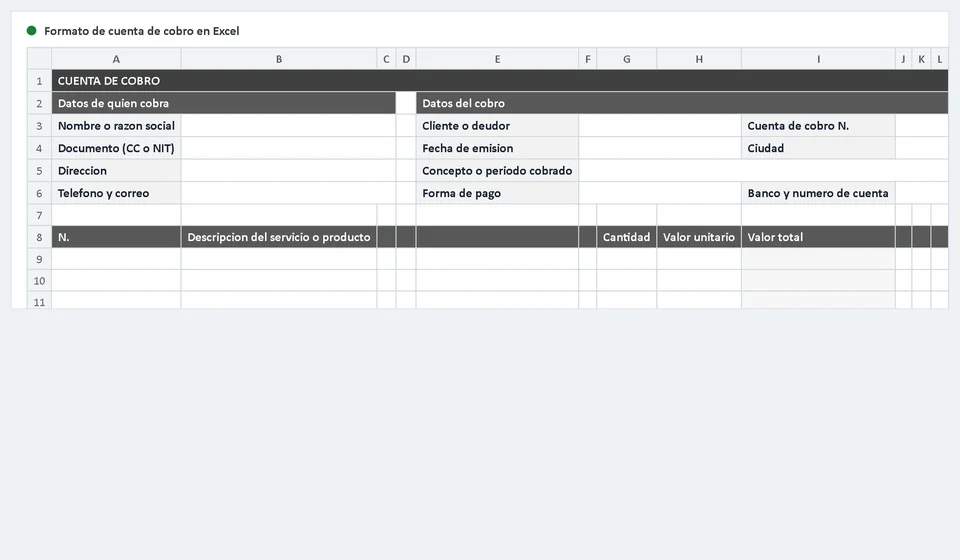
The file is an Excel workbook with two sheets: the statement itself and the instructions. The second sheet repeats the step-by-step guide, the worked example and the common mistakes, so you can consult it without leaving the file. The statement sheet carries these components:
| Component | What you will find |
|---|---|
| Title bar | A heading with the name of the document, ready to print. |
| Details of the person charging | Name or company, ID or tax number, address, phone and email. |
| Details of the charge | Customer or debtor, cuenta de cobro number, issue date, city and concept or period charged. |
| Payment method | A drop-down list with Bank transfer, Cash, Cheque and Online payment, plus bank and account number. |
| Line detail | A 23-line table with No., description of the service or goods, quantity, unit value and calculated total value. |
| Totals box | Subtotal, discount or withholding if any, and a calculated TOTAL TO PAY. |
| Amount in words | A line to write the total to pay in words. |
| Statement and note | A short statement by the person charging and a note clarifying that this is a payment document between the parties and not a sales invoice. |
| Signatures | Signature and ID of the person charging, and a received-by-the-customer area. |
| Instructions sheet | What it is for, step by step, a worked example and common mistakes. |
The layout uses business greys only, in A4 landscape, designed to be printed or sent as a PDF. Amounts are written without a currency symbol: the unit value and total value columns take numbers, and you add the symbol if you need it. The only cells with formulas are the total value column, which multiplies quantity by unit value, and TOTAL TO PAY, which recalculates on its own when you change the subtotal or the withholding.
The line detail: with and without withholding
The heart of the format is the line table. Each row asks for the number, the description of the service or goods, the quantity, the unit value and the total value. The statement can be used without a withholding, when the customer pays the full amount, or with an agreed withholding, when the parties agreed that an amount be deducted from the payment. The table below shows the same services in both cases:
| Item | Statement without withholding | Statement with agreed withholding |
|---|---|---|
| Warehouse maintenance: 12 hours at 45,000 | 540,000 | 540,000 |
| Collection and counting: 4 visits at 80,000 | 320,000 | 320,000 |
| Subtotal | 860,000 | 860,000 |
| Discount or withholding | 0 | 20,000 |
| TOTAL TO PAY | 860,000 | 840,000 |
| Amount in words | eight hundred and sixty thousand | eight hundred and forty thousand |
Worked example
This is how the example statement looks, filled in from start to finish. Use it as a reference for your first attempt; it is also inside the instructions sheet of the file:
| Field in the format | Example |
|---|---|
| Person charging | Servicios y Logística del Norte |
| ID or tax number | 900123456 |
| Phone and email | 300 000 0000 · cobros@ejemplo.com |
| Customer or debtor | Distribuidora El Roble |
| Cuenta de cobro no. | 2026-014 |
| Issue date and city | 12 March 2026 · Barranquilla |
| Concept or period charged | Warehouse and counting services, February 2026 |
| Detail | Warehouse maintenance, 12 hours at 45,000 = 540,000 · Collection and counting, 4 visits at 80,000 = 320,000 |
| Subtotal | 860,000 |
| Agreed withholding | 20,000 |
| TOTAL TO PAY | 840,000 |
| Amount in words | eight hundred and forty thousand |
| Payment method | Bank transfer within 30 days · Banco Andino, account 00012345678 |
| Signatures | Signature and ID of the person charging · received by the customer with name, signature and date |
How to fill it in, step by step
- Open the file and work on the statement sheet; keep the instructions sheet in view while you fill it in.
- Write the details of the person charging: name or company, ID or tax number, address, phone and email.
- Complete the details of the charge: customer or debtor, cuenta de cobro number, issue date and city.
- Write the concept or period charged precisely: what was done, in which period and where.
- Fill in the detail: description, quantity and unit value of each service or item. The total value column calculates itself.
- If you agreed a discount or a withholding, write it on its line; TOTAL TO PAY recalculates automatically.
- Write the total to pay in words and pick the payment method from the drop-down list.
- Save your signature, hand the document over with the supporting documents for the service and ask for the signed received-by copy.
Common mistakes
- Numbering two statements with the same number: the customer can no longer tell which payment belongs to which document.
- Charging for "services rendered" with no period and no detail: the customer's accounting team cannot approve the payment.
- Forgetting the agreed withholding: a deduction arrives that was never written down and the payment takes longer to clear up.
- Typing the total in figures only and leaving the amount in words empty, or sending the statement unsigned and without supporting documents: with no such backup, any later clarification turns into an argument.
How to number and file it so collections never lose their trail
Number with a consecutive series and the year in front: 2026-001, 2026-002, 2026-003. That way you know at a glance how many statements you issued during the year and you spot a repeated number immediately. If you work with several customers, never repeat a number between them: the series belongs to the person charging, not to the customer.
File one copy for every statement issued, in a folder per year, with the file name matching the document number, for example 2026-014. Next to the copy keep the supporting documents for the service, the date you handed it over and the date you were paid. A simple folder with those three things turns each collection into something verifiable and tells you who is late without digging through email.
Keep a control log on a separate sheet as well: number, customer, issue date, total, payment date and status, pending or paid. That log is what prevents the classic "I already paid you" when the payment never arrived, and it is also what shows you how much you still have to collect at the end of the month.
When to move to software such as Kardex Tauro
The Excel template works very well while the volume is low: a few statements a month, few customers and simple charges. The problem appears when the business grows. With twenty or thirty statements a month, the numbering becomes a risk, the withholding is calculated by hand and the control log stops being updated. And in many cases the charge crosses paths with inventory, because those services move goods: maintenance that consumes spare parts, counts that adjust stock or deliveries that leave the storeroom.
Software such as Kardex Tauro covers that jump: it handles consecutive numbering, records inventory entries and exits at the same moment and keeps the history of every movement in one place, without depending on a file that lives on one computer. The cuenta de cobro remains the payment document between the parties; the software makes sure nothing goes unrecorded and that the charge and the inventory tell the same story.
In short
The cuenta de cobro is the simplest document for collecting payment on a service: it brings together who is charging, who is paying, what was done, how much it is worth and the signatures of both sides. With an Excel template, an orderly numbering series and a folder of supporting documents you have enough control to collect without arguments. Remember that it is an internal-control document between the parties and that, when the charge has formal effects, it is worth checking with your accountant. When the volume grows or the charge starts moving inventory, that is the moment to evaluate software.
Frequently asked questions
What is a bill for services (cuenta de cobro)?
The document a self-employed person uses to charge for a service when they are not required to issue an invoice. It carries the provider's details and the detail of what was delivered.
What must it contain?
The provider's name and ID, the service delivered, the amount in figures and in words, the date and the signature. If the payer withholds tax, show the service amount and the net payable.
Can it be done in Excel?
Yes, and it is the practical choice if you bill the same service every month: the file keeps the header, details and totals, and you only change the date and the amount.