Delivery note template in Excel: free download

Delivery note template in Excel: free download
When you hand merchandise over to a customer —whether it is a complete order, a partial dispatch, a spare part replaced under warranty or a transfer between branches—, the proof that the delivery actually happened is not in what was agreed over the phone or in the driver's message: it is in a document signed on the spot. That document is the delivery note, also called a delivery receipt or a dispatch note. It describes which products left your warehouse, in what quantities, in what condition and who received them as conforming. Without it, a difference of three units or a box that arrived damaged turns into an argument with no evidence, and the cost of the mistake ends up falling on whoever cannot prove anything.
Signing the delivery note is not a gesture of distrust: it is a step that protects both parties. For the seller, it confirms that the goods listed on the invoice or the order were delivered and that the customer accepted them in good condition; for the buyer, it records what arrived, how much and in what state, which is useful later for enforcing warranties, claiming missing items or reconciling with the purchasing department. That is why it pays to use an organized format that does not depend on anyone's memory and can be printed at any moment, even on the very day of the dispatch.
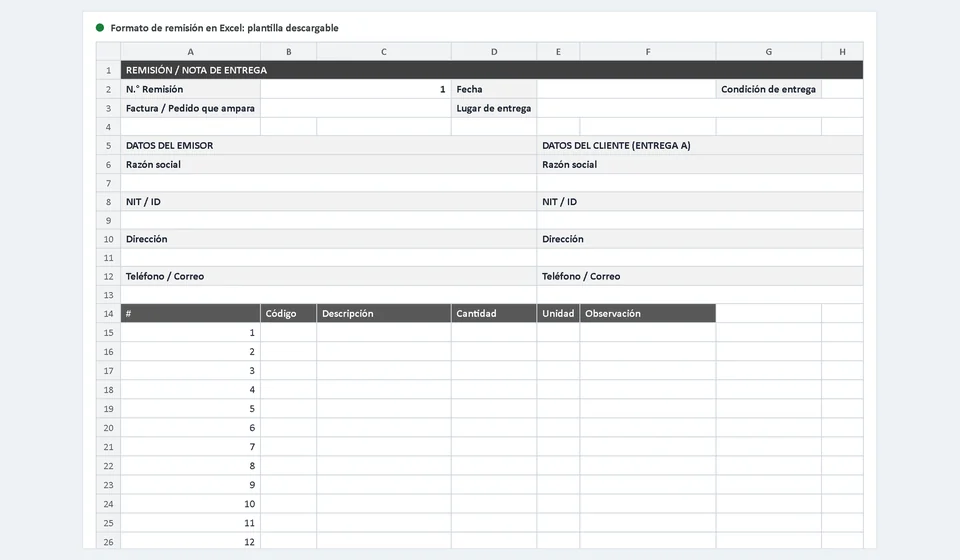
The template you can download here is a delivery note format in Excel, written in English, with two sheets: the Delivery Note sheet, where you fill in the data and print the document, and an Instructions sheet that explains field by field what to type. There are no macros or hidden formulas, it opens in any recent version of Excel or in LibreOffice, and it is set up to print on a portrait A4 page. It is part of the free spreadsheet template collection from Kardex Tauro for managing warehouses, inventory and sales without complications.
⬇ Download the delivery note template in Excel for freeWhat the template includes
The downloadable file is an Excel workbook with the Delivery Note sheet, ready to be filled in, and the Instructions sheet to guide you the first time. The Delivery Note sheet is organized from top to bottom like a real document: general delivery data first, then who delivers and who receives, then the list of dispatched products and finally the signatures. This is what you will find inside:
| Component | What it contains |
|---|---|
| Document header | Title of the form, correlative delivery note number, the date of the day and the delivery condition in a drop-down list with two options: Complete or Partial. |
| Document backing the delivery | Fields to write the invoice or the order that supports the dispatch and the place where the delivery will take place. |
| Issuer and customer blocks | Two facing blocks with company name, tax ID, address and phone or email: one for your business, which delivers, and another for the customer, who receives. |
| Dispatch table | Twenty numbered lines with the columns number, code, description, quantity, unit and note, to record every product that goes out. |
| Total units dispatched | Cell at the foot of the quantity column that automatically adds up everything dispatched, so you can control the handover at a glance. |
| Signatures | A DELIVERED BY block, signed by the warehouse person or the driver, and a RECEIVED AS CONFORMING block, signed by the customer; each with space for name, ID and signature. |
| Notes | Wide area at the end to record delivery issues, including the claim note for missing or damaged items detected at the moment of receipt. |
| Instructions sheet | Step-by-step guide in English for filling in the template, with examples of how to complete each field without doubts. |
| Print setup | Portrait A4 with adjusted margins, ready to print the finished document without having to rearrange columns. |
Delivery note vs invoice: when to use each one
Delivery notes and invoices are often confused because they accompany the same sale, but they perform different functions and cannot be swapped. The invoice is a fiscal document that supports the commercial transaction: it identifies the seller and the buyer, details the products or services sold, applies the corresponding taxes and shows the total amount the customer must pay. The delivery note, on the other hand, does not represent a charge: it is a physical record that the merchandise was delivered and received. It describes what left the warehouse and who received it as conforming, regardless of the amounts involved. Confusing them is more common than it seems, and the mistake shows up when the time comes to prove a delivery or to answer for a shortage.
The most important differences are these:
- Purpose. The invoice proves the sale and works as an accounting and tax record; the delivery note proves the physical handover of the merchandise and supports your warehouse control.
- Content. The invoice details prices, discounts, taxes and totals to pay; the delivery note focuses on codes, descriptions, quantities, units and delivery remarks.
- Moment. The invoice is issued for the sale itself; the delivery note travels with the dispatch, when the merchandise leaves your warehouse or reaches the customer's hands.
- Signature. An invoice does not require a receipt signature; a delivery note does, because its evidentiary value lies precisely in the signature of the person who receives.
- Scope. The delivery note also works for handovers that are not sales: warranty replacements, returns, equipment loans, transfers between locations or material replenishments.
When do you use each one? If the customer buys at the counter and takes the product away, the invoice is enough. If the merchandise leaves your warehouse to be delivered somewhere else —your own driver carries it, a carrier picks it up or the customer comes to collect it—, you should issue a delivery note and have it signed upon receipt. In a sale with dispatch, both documents usually travel together: the invoice supports the transaction and the delivery note supports the handover. When delivery notes and invoices are numbered separately, write on each delivery note the invoice or order it supports, just as this template does, so that anyone can cross-check the documents without searching the whole office.
Example of a completed delivery note
To see the format in action, imagine this situation: a customer ordered 20 liters of washable white paint, 8 flat brushes of two inches and 20 sheets of wood sandpaper. When preparing the order, the warehouse only had 12.5 liters of paint, so the delivery condition is set to Partial and the pending balance is noted down. The dispatch table is filled in like this:
| No. | Code | Description | Qty | Unit | Note |
|---|---|---|---|---|---|
| 1 | PTN-01 | Washable white paint | 12.5 | L | Pending balance to deliver: 7.5 L |
| 2 | BRC-02 | Flat brush, two inches | 8 | u | No issues |
| 3 | LJA-90 | Wood sandpaper, sheet | 20 | u | No issues |
At the foot of the table, the template adds up the quantity column and shows the total units dispatched: 12.5 plus 8 plus 20, which is 40.5. In the notes it is recorded that the customer received 12.5 liters of paint and 7.5 liters remain pending against the original order of 20 liters. The delivery note is printed, the warehouse person signs the DELIVERED BY block and the customer signs RECEIVED AS CONFORMING with name and ID; your business files its signed copy and the customer keeps theirs as proof of what was received.
How to use the template step by step
The first time it will take you a few minutes; afterwards, completing a delivery note will be a matter of seconds. Follow these steps in order:
- Download the file and save it with a clear name. For example, delivery-001 or the customer's name. That way every handover is identified from the start and versions of the same document never get mixed up.
- Open the Instructions sheet the first time. It explains every field with practical examples, so you have no doubts about what goes in each cell and you do not waste time experimenting.
- Complete the header. Write the correlative delivery note number, check that the date matches the delivery day and leave the general data of the document ready.
- Choose the delivery condition. Use the drop-down list: Complete, when the whole order goes out, or Partial, when you only dispatch part of it and a balance remains to be delivered later.
- Write the document that backs the handover. Enter the invoice or order number and the place where the merchandise is delivered, so the note can be traced weeks later without effort.
- Fill in the issuer and customer blocks. Company name, tax ID, address and phone or email for each party. If it is a new customer, this data stays recorded and helps with the next deliveries.
- Record the products in the table. On each line: consecutive number, product code, description, quantity, unit and note. Use one line per product and take advantage of up to twenty lines per sheet; if the order is bigger, split the dispatch into several notes or print a second sheet.
- Check the total units dispatched. The cell at the foot of the table adds the quantities automatically; compare it with what you actually loaded into the vehicle before printing.
- Partial delivery: write down the pending balance. If the condition is Partial, state in the notes how much is still missing and against which order, so the balance is neither lost nor dispatched twice by mistake.
- Have the document signed on the spot. The warehouse person signs DELIVERED BY with name and ID, and the customer checks the quantities against what was received and signs RECEIVED AS CONFORMING. Claims for missing or damaged items are reviewed right there and recorded in the notes.
- File your copy. Keep the signed delivery note in your deliveries folder, ordered by number or by date; it will help you reconcile inventory, handle claims and support warranties.
To print, just select the Delivery Note sheet and use the portrait A4 setup that comes with the file: the finished document fits entirely on a single page, with the signatures visible and no columns cut off.
Common mistakes when handling deliveries
Even though the delivery note looks like a simple form, in practice people make mistakes that later cost time and money. The most frequent ones are these:
- Delivering without a delivery note. Trusting that everything arrived fine and dispatching without a document leaves your warehouse without proof. If the customer later says boxes are missing or the wrong products arrived, you will have no way to show otherwise.
- Not getting the customer's signature. A delivery note that is printed but never signed is useless as a record. It also does not work if the driver signs on behalf of the customer or an unauthorized third party does: the person receiving the merchandise must sign, so that the handover is truly backed up.
- Not filing the copy. Signed delivery notes left loose in the warehouse, in the van or in a drawer get lost exactly when they are needed most. File them by number or by date from day one, even if it feels like a minor task.
- Recording quantities without units or with illegible handwriting. A quantity without a unit cannot be controlled or compared with the order: always write the unit in its column and check that the table total matches what was dispatched.
These mistakes are almost never noticed on the delivery day: they surface weeks later, when a shortage becomes an inventory discrepancy or a claim with no support. A signed and filed delivery note is the only prevention that truly works.
Controlled deliveries with software
The Excel template is a great tool while you dispatch a few orders a day. When volume grows —several daily deliveries, several sellers, products with similar references and an inventory that keeps drifting—, keeping delivery notes by hand starts to demand double work: each dispatch has to be typed into the form and then the exit has to be entered again in your stock control. That is where an inventory system makes the difference. Kardex Tauro is an inventory and sales software for small businesses that integrates exactly this operation: the delivery note is generated linked to the sale or the order that backs it, and the dispatch you record automatically deducts the product stock in the inventory card. That way, the document the customer signs and your warehouse balance always tell the same story, with no double entries or parallel spreadsheets.
This does not mean the template loses value if you ever use software: it is ideal for businesses that are just starting, for occasional deliveries or as a physical backup when the system is not at hand. It is a matter of volume: while Excel is enough for you, use it with discipline and file every signed copy; the day you want inventory to be deducted automatically with each delivery, a program like the one we mentioned does it without extra work and gives you back time to sell.
Frequently asked questions
What is a delivery note?
The document that travels with the goods when they leave the warehouse for a customer or a branch, even if the sale has not been invoiced yet.
What is the difference between a delivery note and an invoice?
The delivery note moves the goods; the invoice charges for them. The delivery note becomes an invoice when the customer receives and accepts the goods.
Does the delivery note get signed?
Yes: whoever delivers and whoever receives sign to record the quantity and the condition the goods arrived in.
Download the format, personalize it with your business details and print a few numbered sets of delivery notes to always keep at hand. Completing every handover in an orderly way and getting the signature on the spot saves you arguments, discrepancies and unsupported claims; it is a small habit that protects the most valuable part of your operation: the confidence of knowing what left your warehouse, how much of it and who received it.
⬇ Download the delivery note template in Excel for free