Goods received note template in Excel: free download

Goods received note template in Excel: free download
When the goods you ordered arrive at the door of your warehouse, one of the moments that causes the most headaches in a small business begins: receiving. That is where you find out whether what you paid for — or what you are about to pay for — is really what showed up. The goods received note is the document that formalizes that moment: it records what merchandise was received, in what quantities, from which supplier, against which purchase order and who received it. It is not an invoice and it does not replace the purchase order: the purchase order says what you asked for, the supplier's invoice or delivery note documents what they shipped, and the goods received note records what actually entered your inventory.
It may look like an extra formality, and many small businesses skip it until something goes wrong: twenty boxes arrive when you ordered twenty-four, the carrier is already gone, the supplier insists they shipped everything and nobody can prove what was counted that day. Without a signed goods received note, it is one person's word against another's, and the inventory ends up recording quantities that never arrived. With a goods received note, every delivery is written down, dated and signed on the spot, and discrepancies are claimed with a document in hand.
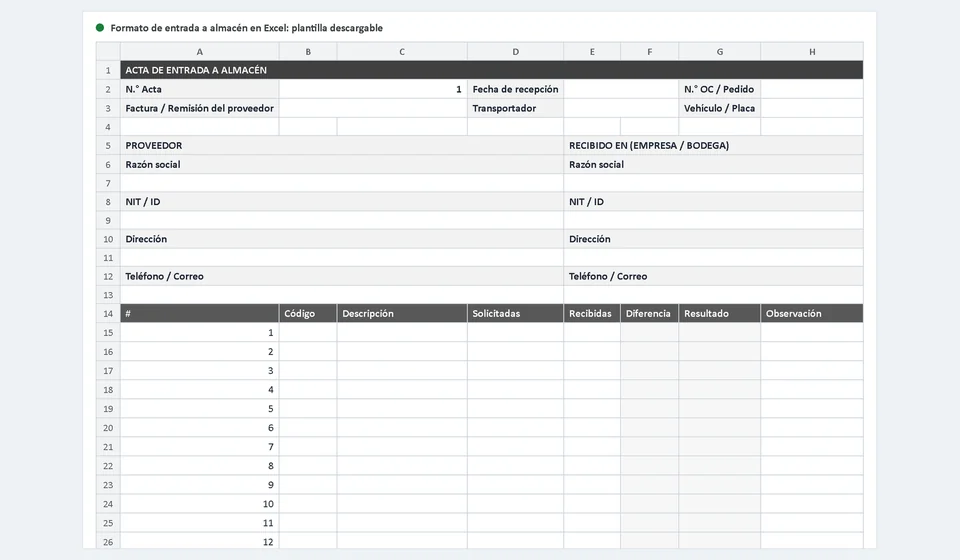
This goods received note template in Excel is ready to download for free and use the same day. The file comes with a main sheet called Goods Received and a second Instructions sheet that tells you what to type in each cell. You only fill in the header data, the supplier details and each line of the table; the difference between received and ordered quantities, the result of each line and the totals are calculated with formulas. It is also set up to print on A4 paper, so you can print it, sign it and file it as the physical record of the delivery. Download it, open it and check the example it includes:
⬇ Download goods received note template in Excel (.xlsx)What the goods received note template includes
The template reproduces the form that any well-run warehouse uses, with the data organized in blocks so it can be completed in a few minutes without relying on memory. Here is what you will find inside:
| Block | What it contains | What it is for |
|---|---|---|
| Receipt header | Goods received note number, automatic date, purchase order number, supplier invoice or delivery note number, carrier and vehicle or plate | To identify the delivery, link it to the order and know how the goods arrived |
| Supplier | Business name, tax ID, address, phone or email | To make clear who is delivering the goods and who to contact if there are discrepancies |
| Received at | Company and warehouse or receiving point | To state where the goods are received and who is responsible for them from that moment |
| Lines table | Line number, code, description, ordered, received, automatic difference, automatic result and observation | To detail what was ordered, what arrived and what is still pending, in excess or missing, line by line |
| Totals | Total ordered, total received and lines with difference | To summarize the receipt at a glance and spot inconsistencies |
| Signatures | DELIVERED BY, RECEIVED BY and PURCHASING APPROVAL | To record who delivered the goods, who received them and who approves them on behalf of purchasing |
| Observations | Free-text area for delivery notes | To write down damage, broken packaging, returns or agreements with the carrier |
| Instructions sheet | Cell-by-cell explanation of the receipt sheet | To answer questions without advanced Excel skills |
The sheet is set up to print on A4, with a layout that fits on a single page when the delivery has only a few lines: the printed document is signed and filed as it is, or exported to PDF to send by email or attach to the conversation with the supplier.
Why you should count against the purchase order
The goods received note only works if quantities are counted against something, and that something is the purchase order: the document you issued yourself when you ordered the goods. Receiving against the purchase order — rather than against the supplier's invoice or the carrier's delivery note — is what lets you spot the three situations every receipt has to resolve: a conforming receipt, a partial receipt and an unauthorized excess.
A partial receipt is not a problem by itself: suppliers ship in stages and it is legitimate for one order to arrive in several deliveries. The problem is not recording it, because then the inventory treats everything as received and the next order is calculated from the wrong quantities. The excess is more delicate: when more than ordered arrives, accepting it quietly means taking merchandise you never ordered, paying for it and throwing the inventory out of balance; those decisions belong to purchasing, not to the person at the door. That is why the receipt table calculates the difference between received and ordered on every line and marks the result: conforming when the difference is zero, excess when it is greater than zero and partial when it is lower than zero. You do not calculate anything: you only count, record and observe.
A worked example: conforming, partial and excess lines
Imagine a delivery of packing supplies backed by purchase order PO-024. The person receiving counts every line against the order and records the ordered and received quantities in the template. The difference and the result of each line calculate themselves:
| Code | Description | Ordered | Received | Difference | Result |
|---|---|---|---|---|---|
| MAT-001 | Clear packing tape, roll | 10 | 10 | 0 | Conforming |
| MAT-002 | Reinforced cardboard box, unit | 24 | 20 | -4 | Partial |
| MAT-003 | Stretch film, roll | 6 | 7 | 1 | Excess |
| MAT-004 | Work glove, pair | 12 | 0 | -12 | Partial |
Read the result of each line and what it means. The first is a conforming receipt: the ten rolls of tape that were ordered arrived, the difference is zero and that line closes without incident. The second is partial: twenty-four boxes were ordered and twenty arrived, so the difference is four units against the order. The twenty are received, the line stays marked as partial and purchasing follows up with the supplier for the four missing boxes.
The third line shows an excess: one extra roll of stretch film arrived. The positive difference marks it as excess, and there the template forces you to decide with purchasing: it is accepted only if the supplier confirms it and adjusts the document, or it goes back with the carrier; what you never do is record it silently. The fourth line is the extreme case of a partial receipt: twelve pairs of gloves were ordered and none arrived. The negative difference leaves it marked as partial — not received — and the note flags that this line must be handled separately, because the order was left incomplete even though the rest of the goods came in.
Notice that the goods received note does not say who is to blame or who pays for what: it says what arrived, what is missing and what is in excess, on the same day and with signatures. With that document, a claim to the supplier or the carrier stops being an argument and becomes a formality.
How to use the template step by step
The golden rule is a single one: merchandise is not added to the inventory until the note has been counted and signed. With that rule in mind, this is the recommended order:
- Download the file and save it under a name that identifies the receipt, for example GRN-001.xlsx, so you do not mix it with other versions.
- Go through the Instructions sheet once to learn every cell; then work on the Goods Received sheet.
- Assign the next sequential number to the note and check that the date was filled in automatically; if the receipt is recorded on another day, correct it so it shows the real date the goods arrived.
- Write the number of the purchase order that backs that merchandise, plus the supplier's invoice or delivery note data.
- Write down the carrier and the vehicle or plate the goods arrived on.
- Fill in the Supplier block with business name, tax ID, address and phone or email, and the Received at block with the company and the warehouse or receiving point.
- Physically count every line against the order before writing anything in the table; if you can, do it with two people: one counts and the other writes.
- Record on every line the quantity ordered according to the purchase order and the quantity you actually counted as received; let the formulas calculate the difference and the result, and write an observation only when the line has something unusual.
- Review the totals and the lines with a difference; if something does not add up, count again before signing.
- Write the general observations in their area: damage, broken packaging, returns or agreements with the carrier.
- Print the note on A4 and collect the signatures: DELIVERED BY, from whoever hands over the goods; RECEIVED BY, from whoever took them into the warehouse; and PURCHASING APPROVAL, from whoever validates the purchase.
- Only then record the merchandise in the inventory, using the signed note as the supporting document, and keep one copy in the supplier file and another with the order.
If a line comes out partial or in excess, do not delete it or adjust it to make it fit: leave it marked with its result and handle the issue with purchasing. A note that shows a discrepancy is worth more than one that hides it, because it turns the problem into a pending item with an owner and a date.
Common mistakes when receiving goods
Even with the template at hand, there are mistakes that repeat themselves in small warehouses and cost money. The three most expensive ones are these:
- Signing without counting. Receiving means checking, not stamping a signature. If you sign the note or the carrier's delivery note without having counted the merchandise, you accept that everything arrived in good order and you lose the right to claim discrepancies later. Count first, sign afterwards, always.
- Adding goods to the inventory without a note. Recording the merchandise straight into the stock card or the system, with no signed receiving document, is the fastest way for the inventory to say one thing and the warehouse to hold another. The entry is registered once and with support: no note, no entry.
- Ignoring discrepancies. Marking a short delivery as conforming, or quietly accepting an excess, only postpones the problem: you end up paying for the missing items or the stock goes wrong, and the excess forces you to pay for merchandise you never ordered. Record the difference on the same day and let purchasing handle it with the supplier.
On top of these three there is a deeper one: not filing the notes. A signed goods received note that is not kept is almost the same as never having made one, because when the claim arrives, weeks later, there is no document to show.
From receiving to inventory with software: Kardex Tauro
The Excel template is an excellent first tool for formalizing receiving: it is free, it works offline, anyone can understand it and it is more than enough when you receive goods a few times a month. If that is your situation, use it with confidence and you need nothing else. The limit appears when receiving stops being an isolated event and becomes part of a cycle: what comes in today must update stock levels, affect the value of the inventory and be available for the next sale or the next purchase order.
For that moment there is Kardex Tauro, management software for small businesses in which the warehouse entry is registered only once: with that record the product's stock is updated, the operation is linked to the supplier and the order, and it feeds the stock card and the availability check without opening a spreadsheet. To be honest: if you are just starting to organize your receiving process, keep the template and master it first; when you notice you are wasting time copying data from the note into the inventory, or that the stock never matches reality, that is the moment to try a tool like this one.
In the end, receiving well is not about tools but about method: count against the order, record on the same day, sign the note and only then give the goods an entry. With this downloadable template you have that method from today, and when the volume grows, the software will be waiting at the next step.
Frequently asked questions
What does a warehouse receipt record?
What arrives, in what quantity, from whom and against which document, and where it is stored. It is the record that updates inventory.
How is it different from goods receiving?
Receiving checks and records the condition; the warehouse entry is what moves the stock.
Is it signed?
Yes, by whoever delivers and whoever receives. Note the condition it arrives in: that is what lets you claim later.
Final note: the goods received note is the record of the physical delivery and does not replace the supplier's invoice or the purchase order; use it as an internal control and support document. Before adopting a format, check the requirements in your country for receiving merchandise and equivalent documents, and consult an advisor if your activity has special rules.
⬇ Download goods received note template in Excel (.xlsx)