Fixed assets register template in Excel: free download

Fixed assets register template in Excel: free download
A fixed asset is a durable item your business uses to operate and that keeps its usefulness for more than one accounting period: a computer, a desk, a printer, an ergonomic chair, a production machine, a shelving unit, a tool, or a delivery vehicle. Unlike stationery, ink, or the internet service, which are consumed on a day-to-day basis, these items stay with the company for years and, in most cases, represent a significant investment of money. That is why they deserve a register of their own: without orderly control you cannot know for certain what your business owns, where each item is, who is in charge of it, how much it cost, what condition it is in, and since when. That lack of information turns into silent losses: equipment that gets lost, duplicate purchases because nobody remembers an identical item already exists, assets that deteriorate in a forgotten storage room, and differences that only surface when it is time to insure the business assets or answer an audit.
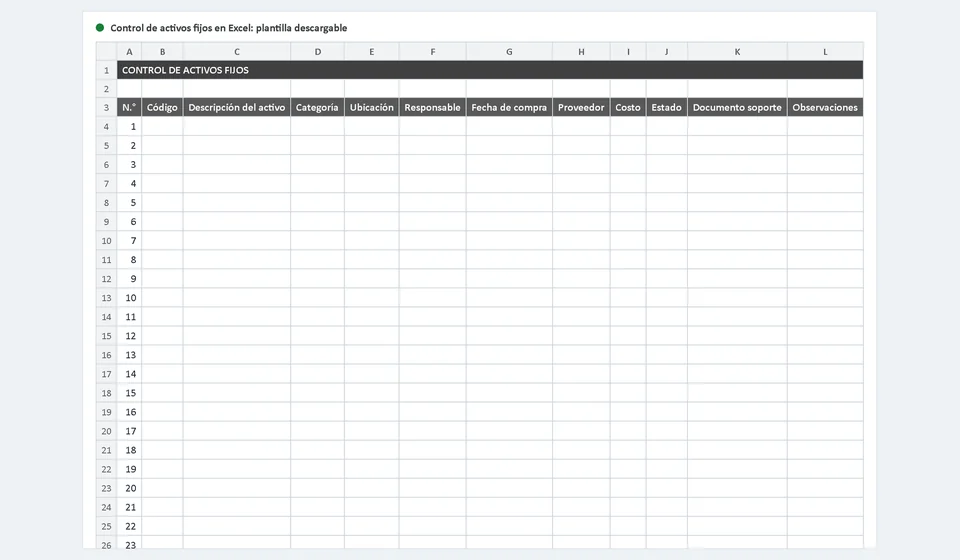
In this article I explain what counts as a fixed asset and what does not, what data a reliable register should include, and the most common mistakes when managing these assets, with a worked example so you can see the result. You can also download the fixed assets register template in Excel for free: a ready-to-use file with the Fixed Assets sheet, a filterable list prepared for one hundred items, drop-down lists for category and status, a total of the acquisition cost, and an instructions sheet with a worked example. All you have to do is open the file, enter your data, and keep it up to date.
⬇ Download fixed assets register template in Excel (.xlsx)What the fixed assets register template includes
The template is an Excel file with two sheets. The first one, called Fixed Assets, is the main register: a filterable list where each row stands for one asset of your business. The second one is an instructions sheet that explains how to fill out each column, with a worked example you can review before you start. This is what you find inside the file:
| Part of the template | What it does |
|---|---|
| Row number and unique code | Each asset is identified with a sequential number and its own code such as AF-001, AF-002, and so on, so that no two assets share a name without being distinguishable. |
| Asset description | The full name and the features that help you recognize the item: brand, model, color, or any detail that makes identification easy. |
| Category with drop-down list | Classifies the asset with ready-made options: Computer equipment, Furniture and fixtures, Machinery and equipment, Vehicles, Tools, or Other. |
| Location and custodian | Where the asset is and which person or position is responsible for it: two fields that prevent lost and ownerless assets. |
| Purchase date, supplier, and cost | When it was acquired, who it was bought from, and for how much, to keep the history of the investment and support the recorded value. |
| Status with drop-down list | Shows the current situation of the asset with uniform options: In use, In storage, Under repair, or Disposed of. |
| Supporting document and notes | The invoice, the delivery note, or the document that backs up the receipt of the asset, plus free space for notes such as the serial number or the reason for a disposal. |
| One hundred ready rows and filters | The list comes prepared for one hundred assets and with filters by category, status, custodian, or location, so you can check in seconds what you have in each place. |
| Total row | At the end of the list the template automatically adds up the acquisition cost of every registered asset. |
| Template note | Reminds you to place a physical label with the code on every asset and clarifies that depreciation is calculated separately, according to the rules of your country. |
What is a fixed asset and what is not
The practical rule for deciding whether an item belongs in this template has two parts. First, the item must last for more than one accounting period, which in practice means a useful life longer than one year. Second, it must be used in the operation of the business, not be intended for sale. The computer you work on every day, the chair at the reception desk, the machine that produces, or the vehicle that makes deliveries are fixed assets. Day-to-day expenses are not: the paper that is printed and consumed, the ink, the electricity bill, the rent, or the minor repair of a piece of equipment becomes an expense of the period and should not appear in this register, because its useful life does not reach one year and it does not represent an item that stays in the company. Here is the difference at a glance:
| Item | Is it a fixed asset? |
|---|---|
| Work laptop | Yes: it is used in operations for several years. |
| Office desk or chair | Yes: they are durable assets of the business. |
| Printer and production machine | Yes: they remain and are used in the business. |
| Reams of paper and ink | No: they are consumed on a day-to-day basis. |
| Internet service and rent | No: they are expenses of the period, not assets. |
| Tools and major spare parts | Yes, when they are durable and used continuously. |
An honest note about depreciation: this template records the acquisition cost and the status of every asset, but it does not calculate depreciation. That calculation depends on the useful life, the method, and the limits established by the accounting or tax rules of each country, and sometimes on the internal policies of each company. That is why the template leaves depreciation out and recommends keeping that calculation in a separate table with the support of your accountant, instead of making up a rule here that may not match your case. With an orderly record of the cost, the date, and the category of each asset, your accountant has everything needed to perform that calculation correctly.
Worked example: five registered assets
So you can see what a well-made register looks like, imagine a small office that bought its first assets during the year. Once the template is filled out, the Fixed Assets sheet would look like this. Notice two details: the printer is under repair but it is still on the list, because the asset still exists and must remain traceable, and the chair is in storage, because it was bought as a replacement and does not have an assigned workstation yet. The amounts are shown in the local currency:
| Code | Asset description | Category | Custodian | Purchase date | Cost | Status |
|---|---|---|---|---|---|---|
| AF-001 | Laptop computer for design work | Computer equipment | Ana Martinez | 02/15/2023 | 4,500,000.00 | In use |
| AF-002 | L-shaped desk with drawer unit | Furniture and fixtures | Carlos Gomez | 03/20/2023 | 1,850,000.00 | In use |
| AF-003 | Laser multifunction printer | Computer equipment | Ana Martinez | 04/05/2023 | 2,300,000.00 | Under repair |
| AF-004 | Ergonomic office chair | Furniture and fixtures | Laura Perez | 06/18/2023 | 950,000.00 | In storage |
| AF-005 | Delivery vehicle | Vehicles | Miguel Rojas | 07/30/2023 | 42,000,000.00 | In use |
| Total acquisition cost | 51,600,000.00 | |||||
In five rows, a significant part of that business's assets was summarized: what it owns, since when, who is responsible for each item, and how much it cost. With that same list, the owner of the office can answer in minutes how much the assets add up to, what is in storage, or which piece of equipment is under repair and since when, without searching through papers or relying on anyone's memory.
How to use the template step by step
Registering fixed assets is not complicated, but it works when you follow a sequence. These are the steps I recommend:
1. Create a unique code and place a physical label. Before registering an asset, assign it a code such as AF-001 and write that same code on a label you stick to the asset. The code is the bridge between the physical item and the row in the template: whenever anyone sees the label, they can look the code up in the list and learn its full history.
2. Record the receipt with its supporting document. When a new asset arrives, fill out the whole row on the same day: description, category, location, custodian, purchase date, supplier, cost, and status. Keep the invoice or the receipt that backs up the entry together with the file; without that document, the recorded value and date cannot be defended.
3. Keep changes up to date. If an asset changes custodian, moves to another site, or goes in for repair, update the row right away and not weeks later. The drop-down lists in the template exist precisely so that the status is always written with the same words and the filters keep working.
4. Authorize disposals. No asset should leave the list without authorization: when an item is sold, lost, or disposed of because of wear, mark the status as Disposed of, explain the reason in the notes, and leave the row in place. A complete history is worth more than a short and tidy list.
5. Check against the physical inventory. At least once a year, walk through the office or the storage room with the printed list and confirm that every labeled asset exists and is in the recorded status. That review turns the template into a real control instead of a decorative document.
Common mistakes when managing fixed assets
Even though the template solves the structure, the result depends on how it is used. These are the mistakes that small businesses repeat the most:
Registering without codes. If the list says computer, computer, and computer, nobody knows which one is which. Without a unique code and a physical label, the register loses its usefulness on the very first day.
Leaving assets without a custodian. An asset with no person or position assigned ends up neglected: nobody claims it, nobody answers for it, and nobody notices when it breaks down or disappears.
Never checking against the physical inventory. The sheet can look perfect while reality is different. If you do not perform a physical count at least once a year, the differences accumulate silently until they become real losses.
Registering without a supporting document. Writing the cost from memory turns the register into a mere list of intentions: without an invoice or a receipt there is no way to prove when the asset was bought or how much it cost.
Mixing day-to-day expenses with fixed assets. Including stationery, services, or minor repairs inflates the total acquisition cost and messes up the information your accountant needs later.
Fixed assets and control with software
The template is an excellent tool while the number of assets is manageable and the business has a single site or few custodians. When offices, equipment, and movements grow, keeping an Excel file up to date starts to demand more discipline than any person can sustain alone. At that point, many companies make the leap to a system where the register no longer depends on a sheet that travels from computer to computer.
An honest option is Kardex Tauro, a general inventory system where you can also register these assets with their code, category, and status, together with the rest of the items your business controls, with movements and custodians recorded in one single place. The template in this article is an excellent first step to organize your fixed assets today, and the software appears when you want to take that same control to the next level with your other inventories included.
Frequently asked questions
What does a fixed asset register track?
Each asset's code, description, location, custodian, purchase date, value and condition. The custodian is what stops assets from going missing.
How is it different from stock inventory?
Assets are used and depreciate; goods are sold. They are tracked in separate lists because they are counted differently.
How often is it checked?
At least once a year with a physical count. With many assets, verify by department or site, rotating.
Download the template, assign the codes, stick the labels, and name a custodian for every asset. With an up-to-date register, your business will always know what it owns, where it is, and how much it is worth.
⬇ Download fixed assets register template in Excel (.xlsx)