Cost center template in Excel
Cost center template in Excel
Tracking spending by area is one of those tasks almost nobody does until the money is already gone. A business may know how much it sold during the month, but it rarely knows how much it cost to run each store, each area or each production line. Without that information the budget stays a wish and decisions are made by feel: cuts land where they are easiest, not where they help. This cost center template in Excel closes that gap with a spending log, a catalog of centers and every formula already in place.
The file is free, works in Excel and in any compatible spreadsheet, and is ready for you to type your own data on top of it. You pick the center code from a drop-down list, enter the quantity and the unit cost, and the workbook does the rest: it calculates each line total, adds up spending per center and shows how much budget is still available. Nothing to install, no formulas to write and no accounting background required.
What a cost center is and why you charge expenses to it
A cost center is any unit of the business you can assign its own expenses to, so you know how much it costs to run. It can be a site, such as the downtown store and the neighborhood store; an area, such as warehouse, production or administration; a project, such as a job, a contract or a season; or a production line, such as each product or family you make. What defines a center is not its size but that it can be identified on its own.
Charging expenses to each center does three concrete things. First, it lets you compare: if site A spent far more than site B on similar sales, that opens a conversation no grand total can. Second, it lets you budget: by setting a monthly ceiling per center, spending stops being an end-of-month surprise and becomes a limit you watch as it is used. Third, it lets you decide: when an area goes over budget, you can see whether the cause is volume, waste or a pricier supplier.
One clarification is worth making: a cost center is not an accounting account or an official document, but an internal control tool that organizes information so you can analyze it. Amounts carry no currency symbol, so the template works with whatever currency you use.
What the template includes
The workbook has three sheets and every formula already solved. This is what you will find when you open it:
| Item | What it brings |
|---|---|
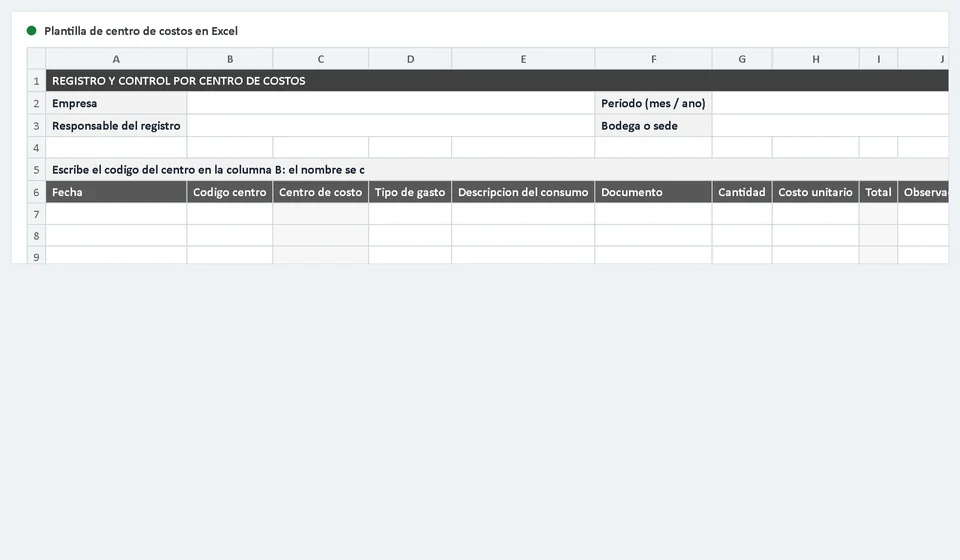
| Log sheet (Cost center log) | A header with Company, Period, Person responsible and Warehouse or site, plus 200 rows ready to record every consumption. |
| Catalog sheet (Cost centers) | 20 rows to define the code, the name and the monthly budget of each center. |
| Instructions sheet | Summarizes what the file is for, the step-by-step, a worked example and the most common mistakes. |
| Code list | As you type in a row, the drop-down list of catalog codes appears, so you never key them from memory. |
| Automatic name | The Cost center column fills itself with VLOOKUP as soon as you type the code. |
| Line total | The Total column multiplies quantity by unit cost. It is never typed by hand. |
| Expense type drop-down | Supplies, Labor, Utilities, Rent, Transport, Maintenance, Small tools and Other. |
| Accumulated per center | A conditional sum walks the log and adds what each catalog center has spent. |
| Available and percentage executed | Compare the accumulated total against the monthly budget: how much is left and how much was used. |
| Print format | Business grays only, A4 landscape sheet, ready to file or take to the meeting. |
The 10 columns of the log sheet
The log sheet is the heart of the file. Each consumption takes one row and is described with ten columns:
| Column | What is entered |
|---|---|
| Date | The day the consumption happened or the service was received. |
| Center code | The catalog code, chosen from the list. It is the only key that links the expense to its center. |
| Cost center | The name of the center. It fills itself with VLOOKUP; do not type or delete it. |
| Expense type | The category of the expense, chosen from the drop-down list. |
| Consumption description | What was used or contracted, in plain words: nitrile gloves, electricity for the month, freight to the north site. |
| Document | The number of the invoice, requisition or internal order that supports the expense. |
| Quantity | The units consumed, in whatever measure you use. |
| Unit cost | The value of each unit or of each service. |
| Total | Calculated by the template as quantity times unit cost. Do not edit it. |
| Notes | Notes for the meeting: whether the expense is shared with another area, whether it was extraordinary or whether it needs review. |
At the bottom of the log, a total row adds up spending for the whole period. That figure is a quick control: if the period total does not match the sum of the catalog accumulations, either a row was mistyped or a center is missing from the list.
The cost center catalog sheet
The catalog is the master list. Define each center there once and the rest of the workbook works from that data. It has twenty rows and six columns:
| Column | What it does |
|---|---|
| Code | The short, unique identifier of the center. |
| Center name | The name everyone knows that site, area, project or line by. |
| Monthly budget | The spending ceiling you assign to the center for the month. |
| Period accumulated | Adds everything recorded for that code in the log sheet. |
| Available | The budget minus the accumulated total: what you can still spend without going over. |
| Percentage executed | The share of the budget already used, expressed as a proportion. |
With those six columns the catalog answers the two questions of every close at a glance: how much have I spent and how much is left. If a center shows a negative available, it went over budget and the reason should be explained before someone else asks.
Worked example
Suppose center CC-02, Production, has a monthly budget of 5,000,000. During the month a consumption of 200 units of a supply at 12,500 each is recorded. The template calculates the line total and accumulates it in the catalog:
| Concept | Detail | Value |
|---|---|---|
| Center | CC-02, Production | |
| Monthly budget | Ceiling assigned to the center | 5,000,000 |
| Recorded consumption | 200 units at 12,500 | 2,500,000 |
| Period accumulated | Log sum for CC-02 | 2,500,000 |
| Share of budget used | One half | fifty per cent |
| Available | Budget minus accumulated | 2,500,000 |
The accumulated total, 2,500,000, is exactly half the budget: the center has used fifty per cent and still has 2,500,000 available. At any point in the month the catalog tells you whether a center is comfortable or near its limit, with no need to add invoices by hand.
How to use the template step by step
Follow this order and the template stays clean from day one:
- Download the file and save it with the period in the name, for example cost-centers-2026-09.xlsx.
- Open the Cost centers sheet and build your catalog: code, name and monthly budget for each site, area, project or production line.
- Go back to the log sheet and complete the header: company, period, person responsible and warehouse or site.
- Record each consumption in a row: date, center code taken from the list, expense type and description. The center name appears on its own.
- Enter the quantity and the unit cost; let the Total column do the multiplication for you.
- Write the supporting reference in the Document column and add any note useful for the meeting in Notes.
- Before authorizing the next expense, check that center's available amount in the catalog.
- At month close, compare the accumulated total against the budget and write in Notes the differences you can explain.
Common mistakes
These four slips are the ones that most muddy the report and spark the most arguments in the meeting:
- Charging a single center for an expense that benefits two areas. The right move is to split it between both and note in Notes how the split was made.
- Leaving the center blank. An expense with no center cannot be analyzed or budgeted, and it also throws off the period total.
- Slimming or padding the budget halfway through the month so the numbers fit. The budget is reviewed at close, not once the expense has already gone over.
- Mixing stock control with the expense record. The quantities in a stock ledger and the value of the expense are two different views; here only what it cost to consume matters, not what is left in the warehouse.
How to use it in the monthly expense meeting
The template looks better in a meeting than in a forgotten file. Before the meeting, open the catalog sheet and look at the available column: the centers with little left are the ones that deserve the conversation. Print the log sheet or project the catalog, and bring the document to the table with the period total already calculated.
During the meeting, walk through the centers one by one. Ask three things of each: what was spent, whether it was budgeted and what can be corrected next month. Expenses that repeat across areas come to light when the log is ordered by center, and decisions stop being a trade of opinions and start resting on data. When you finish, write the agreements in Notes and adjust next month's budget if needed; that way next month's file starts out better than this one.
When to move to software with Kardex Tauro
Excel is a great starting tool, but it has limits that show up as the business grows. If several people need to record expenses at the same time, if you run many sites or many centers, if you want to cross spending with the real inventory in each warehouse, or if you need reports that build themselves, a spreadsheet starts to fall short: files get duplicated, versions get confused and someone ends up adding rows by hand.
That is the moment to consider specialized software such as Kardex Tauro, which centralizes inventory and spending, lets several users work at once and delivers reports without manual tables. The good news is that today's work is not lost: the center catalog and the log you leave in this template are exactly the orderly starting point any system needs to migrate data smoothly.
Download the template, define your center catalog today and take to the next expense meeting a clear figure for each area instead of a total nobody can explain.
Frequently asked questions
What is a cost centre?
A unit that accumulates expenses so you can see what it costs to operate: a department, a site or a project.
What gets allocated to it?
The centre's direct costs plus a proportional share of shared ones: rent, utilities, administration.
What is it for?
To know which area or site consumes the most resources, and to set prices or cut costs with data rather than intuition.