Credit note template in Excel

Credit note template in Excel
A sale rarely goes through from start to finish without a hitch. Sometimes the customer receives a dented item, sometimes a price was mistyped on the invoice, and sometimes a lower amount was simply agreed after the invoice had already been issued. In any of those cases the business needs a document that states in writing that the value of the original sale goes down and why. That document is the credit note, and this Excel template gives you the full structure to issue one and file it without depending on specialised software.
The file has two sheets: the credit note form and an instructions sheet with the step by step and a worked example. It is built only in business greys, with the page set to A4 landscape, and values are written without a currency symbol, so it works with whatever currency your business uses. It is a free internal-control tool: you download it, fill it in with your own data and keep it together with the invoice it affects.
⬇ Download credit note template (.xlsx)
What a credit note is and when you issue one
A credit note is the document that corrects or reverses an invoice you have already issued. It is not a new sales document: it is the adjustment that records in writing that the value of the original sale went down and what the reason was. Until that adjustment exists, your records still show a sale that has already changed in reality, and the warehouse still counts units the customer has already sent back.
In practice you issue one in three situations:
- Return of goods. The customer did not accept the product or received it in poor condition and sends it back. This is the most common case in a warehouse, a spare-parts store or a small shop.
- Billing error. A quantity, a product or a price was invoiced differently from what was actually delivered and the difference has to be corrected.
- Later discount. A lower amount was agreed with the customer after the invoice was issued, for example for a commercial adjustment or for a shortfall found at dispatch.
The template covers these reasons with a drop-down list inside the note block, with the options Return of goods, Later discount, Billing error, Partial cancellation and Other. That way the reason is always recorded with the same wording and can be filtered and counted later without ambiguity.
What the template includes
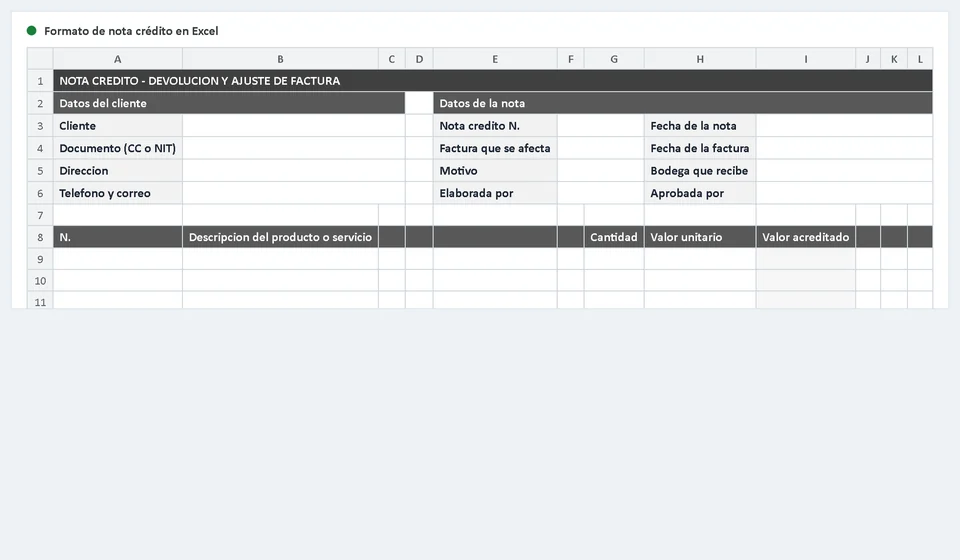
The form sheet is laid out from top to bottom, in the same order in which a real credit note is filled in. Everything you need to support the adjustment lives on a single page.
| Block | What it holds |
|---|---|
| Title bar | The heading of the document, so the sheet is recognised at once when printed or filed. |
| Customer details | Customer, ID or tax number, address, phone and email, that is, who the amount is being credited to. |
| Credit note details | Credit note number, note date, invoice affected, invoice date, reason with a drop-down list, warehouse receiving, prepared by and approved by. |
| Line detail | Twenty rows to describe what is being credited, one per product or service. |
| Total boxes | Total credited, the value of the original invoice and the customer credit balance. |
| How it is settled | Box with a drop-down list: apply to the invoice, cash refund, swap of product or credit on account. |
| Reminder and signatures | The note reminding you that a credit note does not replace the invoice and that the invoice affected must always be kept, plus two signature areas: received in the warehouse and approved by. |
The lines of the detail
The central table has twenty lines and five columns. This is the part that turns the credit note into a document someone can check: each line shows exactly what is being credited and how much it is worth.
| Column | What you write in it |
|---|---|
| No. | The line number, so you can refer to it when the note is reviewed. |
| Description of the goods or service | The same wording that appears on the original invoice, without abbreviations or a changed presentation. |
| Quantity | How many units come back or how much is being adjusted. It must match what actually returned to the warehouse. |
| Unit value | The price from the original invoice, not a new price. If the price changed afterwards, that change belongs in the reason, not here. |
| Amount credited | Worked out by the template as quantity times unit value. Do not type it by hand. |
If you use fewer than twenty lines, the spare rows stay empty and the total is unaffected: the amount credited only shows once the quantity and the unit value hold data, and the total credited is the sum of the lines you did fill in. If the same product comes back in two different presentations, split it into two lines so the description stays clear when you reconcile.
Worked example
Suppose you sold one hundred units at 2,500 and invoiced 250,000. The next day the customer reports that twelve units arrived dented and returns them. This is what the completed credit note looks like:
| Item | Detail | Value |
|---|---|---|
| Original invoice | One hundred units at 2,500 | 250,000 |
| Line for the return | Twelve dented units at 2,500 | 30,000 |
| Total credited | Sum of the detail lines | 30,000 |
| Original invoice (box) | Value of the invoice affected | 250,000 |
| Customer credit balance | What remains in their favour | 30,000 |
| How it is settled | Apply to the invoice | 220,000 remains payable |
| Where the goods go | Twelve units returned to stock | Checked before being sold again |
Notice the link between the two boxes: the total credited can never be higher than the value of the original invoice. Here 30,000 is below 250,000, so the adjustment is valid. If someone tried to credit more than was invoiced, this document would not solve the problem, because you would be giving back an amount that never came into the business.
How it is settled
The "How it is settled" box defines where the credited amount goes. Issuing the note is not enough: you have to decide what happens to that balance, because both the receivables ledger and the physical handling of the goods depend on that decision.
| Option | When to use it |
|---|---|
| Apply to the invoice | The customer still has an outstanding balance. The amount credited is taken straight off what they owe. |
| Cash refund | The customer has already paid the invoice and the money has to be given back. |
| Swap of product | The returned item is exchanged for another article of the same value, with no money moving. |
| Credit on account | The balance stays in the customer's favour for a later purchase. |
On a note with several lines you can combine more than one form of settlement, but write it down in a remark so the person reviewing the customer's account does not have to guess. If the customer asks to apply the amount to the invoice and also returns the goods, record both things: the balance left payable and the entry of the units into the warehouse.
How to fill in the template step by step
- Write down the credit note number and the invoice affected with its date. Without those two facts the document cannot be reconciled later.
- Complete the customer details exactly as they appear on the invoice: name or company name, ID or tax number, address, phone and email.
- Pick the reason from the drop-down list and write the warehouse that receives the goods.
- Record who prepares the note and who approves it. When the approval is missing, the adjustment has no owner.
- Detail each returned product on its own line, with the description and the unit value taken from the original invoice.
- Check that the total credited does not exceed the value of the invoice and that the credit balance matches the sum of the lines.
- Decide how the balance is settled and write it in the box, with any remark that is needed.
- Sign the two areas of the document, keep the file with the invoice affected and hand a copy to the customer.
Common mistakes
- Issuing the credit note without naming the invoice it affects. Afterwards nobody can tie the adjustment back to the original sale.
- Crediting more than the invoice. That mismatch runs through the books and the stock as well, because what comes in does not match the value going down.
- Putting returned goods back without checking them. If the item is dented, incomplete or expired it becomes available again and ends up being sold a second time.
- Leaving the note without deciding how it is settled. The customer waits for their money or their credit balance, and the receivables ledger does not know whether to collect, deduct or refund.
What happens to stock when the return comes in
This is why a credit note is not optional when goods come back. The returned product has to go into the warehouse again, and that entry needs a document backing it. Without the note, the stock never returns to its place and the books still show a sale that no longer exists: on one side you are missing goods that are physically on the shelf, and on the other you carry revenue that will never be collected.
When the goods arrive, the correct procedure is always the same: receive them, count them against what the credit note says, check their condition and decide what to do with them. Whatever is in good condition goes back to its location and becomes available for sale. Whatever is dented, incomplete or expired is set aside at once and recorded separately, because a damaged product that returns to the shelf only creates a second problem: another return, this time from a customer who has already had a bad experience.
It is worth making the person who receives the return the same person who signs the received-in-warehouse area of the note. That way the document proves not only that the value went down, but that somebody physically saw the goods come back and answered for their condition.
When to move to software such as Kardex Tauro
Excel works very well to organise return control while the business is small. Its limits appear as volume grows: when two people issue notes at the same time, when you need every return to update the stock automatically, when you want to see a customer's return history, or when the product catalogue no longer fits in a spreadsheet without duplicated names.
That is the point to consider specialised software such as Kardex Tauro, which records the return once and at the same time adjusts stock, the customer's balance and the reports. The Excel template does not become useless: it works as a checklist of what has to be recorded, and the notes you have already issued are the history you migrate with, without losing traceability.
If you do not need it yet, stay with the template. A credit note properly filled in on Excel is worth more than a system fed with badly recorded returns.
Download the template, fill it in against the invoice affected and keep both documents together: that way every return is supported and your stock and your books tell the same story.
The formal requirements for a credit note differ from one country to another. This template is an internal-control tool and not an official document: before you issue one, check with your accountant what your country's rules require.
Frequently asked questions
What is a credit note?
The document that adjusts an invoice already issued: a return, a discount or a correction of the amount.
What should it include?
The invoice it adjusts, the reason, the amount and the tax being reversed, and the signature of the issuer.
Can it be done in Excel?
It works for internal control and to give the customer a record. If it has tax effects, it is issued through the authorized system.
⬇ Download credit note template (.xlsx)