Supplier scorecard template in Excel

Supplier scorecard template in Excel
Buying from a supplier who lets you down is buying twice: once when you pay, and again when the customer returns the goods, complains or walks away. Yet in most small businesses the decision to keep a supplier or drop it is made from memory, from how likeable the sales rep is, or from the last problem that happened. Deciding that way leaves the business at the mercy of chance: a cheap but unpunctual supplier can cost more than a slightly pricier one that never fails, and without a scorecard that proves it with numbers, the argument turns into one opinion against another. Evaluating suppliers is nothing more than grading them with clear rules that are always the same, so that the decision to keep, renegotiate, look for an alternative or suspend rests on data instead of gut feeling.
In this article we explain why it pays to score suppliers with a scorecard rather than an impression, what the downloadable template includes, which are the eight criteria and how to score each one from 0 to 5, how the final score is calculated and what each rating means, a worked example with its weighted values, how to compare two suppliers of the same product, the step-by-step to use it, the most common mistakes, and when it makes sense to move up to inventory software.
⬇ Download supplier scorecard template in Excel (.xlsx)Why evaluate suppliers with rules instead of gut feeling
A gut feeling cannot be compared, cannot be argued with data and cannot be repeated the same way next period. If the decision to keep buying from someone depends on how you felt about the rep or on what you remember from the last order, any change of mood or memory changes the decision. A scorecard works the opposite way: the criteria are always the same, the weights are always the same, and the result can be shown to the owner and to the supplier without anyone having to take your word for it.
Grading with rules has very concrete effects. First, it forces you to look at full performance and not just price: a cheap supplier that delivers late, invoices badly or ignores an emergency ends up costing more than a slightly pricier one that delivers. Second, it turns a complaint into evidence: when you call the supplier with numbers in hand, the conversation stops being a grievance and becomes an improvement plan. And third, it leaves a record: if you later have to change suppliers, there is a history that justifies the change to the boss, the partner or anyone who asks.
What the template includes
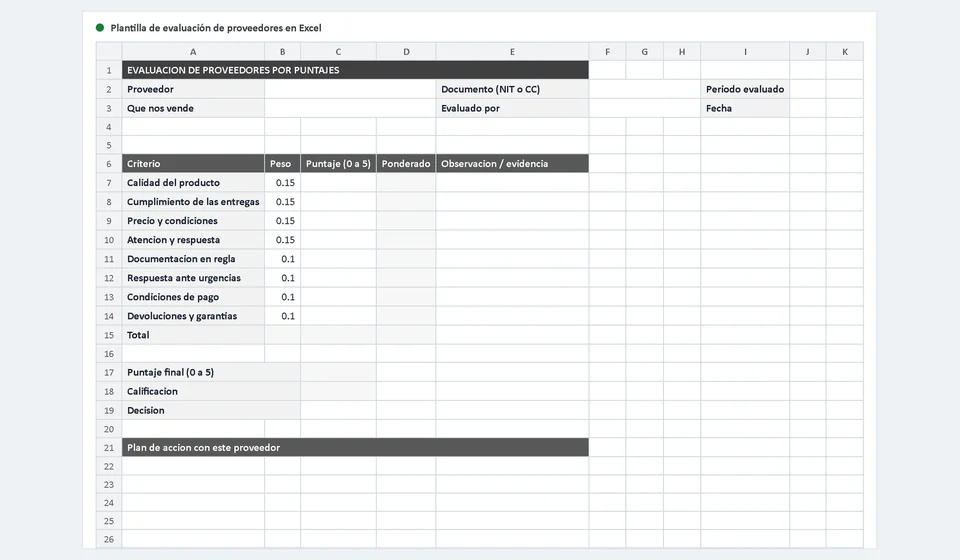
The template is an Excel file with two sheets: one for carrying out the evaluation and one with the instructions. Everything fits on a single A4 portrait page in business grey tones, so you can print it and sign it as part of your internal control. Here is what you find in each part:
| Component | What it is for |
|---|---|
| Header | Fields for Supplier, Document, Period evaluated, What they sell us, who evaluates and the Date of the evaluation. |
| Evaluation table | Five columns: Criterion, Weight, Score from 0 to 5, Weighted (calculated) and Observation / evidence, with one row for each of the eight criteria. |
| Total row | Adds up the weights and must reach one hundred percent; if they don't match, a warning cell reads "check the weights" so you never leave the scorecard unbalanced. |
| Results box | Shows the final Score from 0 to 5, the Rating calculated by bands, and the Decision, which is chosen from a drop-down list. |
| Action plan with this supplier | A block of four rows to write what the supplier must improve and by when. |
| Signature and approval | Space for the signature of the person evaluating and the approval of purchasing or management, so the evaluation is approved and not merely noted. |
| Instructions sheet | Explains what the evaluation is for, the step-by-step to use it and a worked example with figures. |
The eight criteria and how to score each one from 0 to 5
The weights that come with the template add up to one hundred percent and are spread like this: the first four criteria weigh fifteen percent each, and the next four weigh ten percent each. That split is your business policy: you can adjust it, but it is best to keep it the same for every supplier of the same product, because otherwise the scores stop being comparable.
| Criterion | Weight | How to score from 0 to 5 |
|---|---|---|
| Product quality | fifteen percent | Five if the product arrives in good condition and matches what was ordered; lower the score for defects, damage or items that do not match the specification. |
| Delivery compliance | fifteen percent | Five if it always delivers on the promised date and in full; deduct for every late, partial or rescheduled delivery without notice. |
| Price and terms | fifteen percent | Five if the price is competitive against the market and stays stable; lower it if the price rises without notice or is higher than equivalent options. |
| Service and response | fifteen percent | Five if it answers quotes, questions and complaints quickly and clearly; lower it if you have to chase several times to get an answer. |
| Paperwork in order | ten percent | Five if invoices, delivery notes and supporting documents arrive complete and correct; deduct for documents with errors, gaps or late arrival. |
| Response to emergencies | ten percent | Five if it handles an urgent order within the time asked; lower it if it takes longer than reasonable or simply does not react. |
| Payment terms | ten percent | Five if it offers comfortable, stable terms; lower it if it demands prepayment, changes terms from one month to the next or adds charges without notice. |
| Returns and warranties | ten percent | Five if it replaces, credits or repairs without obstacles; lower it if it disputes every return or drags out a warranty claim. |
How the final score is calculated and what each rating means
The calculation is simple and the template does it on its own. Each row multiplies the score you entered by the criterion's weight and shows the result in the Weighted column. The sheet then adds up the weighted values and divides that sum by the sum of the weights; that quotient is the final Score, which always falls between 0 and 5. Since each criterion score runs from 0 to 5, dividing the total weighted value by the one hundred percent of the weights returns the weighted average on that same scale.
With the final score ready, the sheet assigns the rating by bands. The scale that comes with the template is this:
| Rating | Final score | What it means |
|---|---|---|
| Excellent | 4.5 or more | A solid, reliable supplier: it almost always delivers and resolves issues well. Worth protecting and keeping. |
| Good | from 3.5 to less than 4.5 | Delivers with isolated failures. Keep it, but with an agreed improvement plan and follow-up. |
| Acceptable | from 2.5 to less than 3.5 | Usable, but the failures repeat and are already costing money. Negotiate firmly, watch closely and keep a replacement in sight. |
| At risk | less than 2.5 | Fails seriously or constantly. Look for another option or suspend it, depending on the impact on operations. |
A worked example: the supplier who landed on Good
To see the scorecard at work, picture a local business evaluating the supplier that provides one of its fast-moving products. These are the scores the purchasing manager gave, based on the deliveries, invoices and complaints of the period:
| Criterion | Weight | Score (0 to 5) | Weighted |
|---|---|---|---|
| Product quality | fifteen percent | 5 | 0.75 |
| Delivery compliance | fifteen percent | 4 | 0.60 |
| Price and terms | fifteen percent | 3 | 0.45 |
| Service and response | fifteen percent | 5 | 0.75 |
| Paperwork in order | ten percent | 4 | 0.40 |
| Response to emergencies | ten percent | 3 | 0.30 |
| Payment terms | ten percent | 4 | 0.40 |
| Returns and warranties | ten percent | 3 | 0.30 |
| Total | one hundred percent | 3.95 |
Adding the weighted values: 0.75 + 0.60 + 0.45 + 0.75 + 0.40 + 0.30 + 0.40 + 0.30 = 3.95. Because the weights add up to one hundred percent, the final score is simply 3.95 out of 5. That value falls in the band from 3.5 to less than 4.5, so the rating the sheet shows is Good. With that result, the decision chosen from the drop-down list is to renegotiate price terms and improve deliveries: the supplier stays, but with a written action plan and a date to evaluate it again.
Notice what the exercise reveals: the supplier scores five on quality and service, but loses points on price, emergencies, returns and deliveries. Without the scorecard the conversation would be "it's a good supplier" or "it's a bad supplier"; with the scorecard you know exactly what to ask for and in what order.
How to compare two suppliers of the same product
The template pays off most when you have two or more suppliers offering the same product and you have to choose. The rule is simple: use the same scorecard, with the same criteria and the same weights, for each of them, and compare the final scores. It looks like this:
| Supplier | Final score (0 to 5) | Rating | Decision |
|---|---|---|---|
| Supplier A | 4.35 | Good | Keep |
| Supplier B | 2.90 | Acceptable | Look for an alternative |
Watch out for the most common trap: changing the weights for the supplier you like. If you lower the weight on deliveries for Supplier A and raise it for Supplier B, the scores stop being comparable and the scorecard loses all its value. Weights are set once, the same for everyone, and only reviewed when the business's purchasing policy changes — never to favour anyone.
Step by step to evaluate a supplier
Putting the template to work takes a few minutes if you gather the evidence before opening it. The recommended order is this:
- Fill in the header: Supplier, Document, Period evaluated, What they sell us, who evaluates and the Date, so the evaluation is identified and not confused with another one.
- Check that the weights add up to one hundred percent. If the total row does not balance, the warning cell will read "check the weights" and you cannot draw conclusions from the result.
- Gather the evidence before scoring: on-time deliveries, late deliveries, complaints, invoices with errors, returns and claims from the period.
- Score each criterion from 0 to 5 with that evidence in front of you, not with the impression of the last order or how pleasant the rep was.
- Read the final Score and the Rating the sheet calculates on its own, and note in the Observation column the evidence that supports each score.
- Choose the Decision from the drop-down list: Keep, Renegotiate terms, Look for an alternative or Suspend.
- Write the action plan with this supplier in the four rows of the block: what must improve, how it will be measured and by when.
- Sign as the evaluator and get the approval of purchasing or management, so the decision is approved and not merely noted.
Common mistakes when evaluating suppliers
- Scoring without evidence. If the score cannot be backed by deliveries, invoices or complaints, it becomes an opinion and the supplier will argue it down to nothing.
- Evaluating on price alone. A cheap supplier that fails, delivers late or ignores an emergency costs more than a slightly pricier one that always comes through.
- Not telling the supplier the result. If it never learns where it failed, it has no way to improve and the problem repeats period after period.
- Evaluating only once a year. By the time the report lands, the damage is done; such a long period lets problems slip by uncorrected.
How often to evaluate and what to do with the result
For a critical supplier — the one that provides the product your sales depend on, or the only one carrying a key item — evaluate every quarter, and six months at the very most. For suppliers of secondary products, an annual evaluation is enough. The key is not the exact frequency but that it is regular, and that the supplier knows when the next evaluation arrives.
The result is not filed away and forgotten: a concrete decision comes out of it. If the rating is Excellent, keep it and protect the relationship; if it is Good, keep it with a written improvement plan and follow-up; if it is Acceptable, negotiate firmly and start looking for an alternative; and if it is At risk, find a replacement or suspend it, depending on how much the operation relies on that supplier. In every case, the score is shared with the supplier: the evaluation is there to improve the relationship, not to keep secrets.
When to move from the template to software
The Excel template handles supplier evaluation well for a business with few suppliers or that reviews performance from time to time. It falls short when you have dozens of suppliers and want to see how each one evolves over time, when the scores should come from data already in the system — goods received, returns recorded, payments made — instead of being typed by hand, or when several people need to consult the same history without working on different copies of the file.
That is where Kardex Tauro comes in. With inventory and purchasing in the system, much of the data you type by hand today is recorded on its own: what came in, when it arrived, what was returned and how much was paid. On that base, supplier evaluation no longer depends on what someone remembers and starts resting on the real movement of the business, with each supplier's history in view when decision time comes.
Frequently asked questions
What do you assess in a supplier?
Delivery compliance, quality, price, how they respond when something goes wrong and whether their paperwork is current. Those five already separate who to buy from.
What is the assessment for?
To decide who gets more volume, who gets an improvement plan and who is dropped. Without it, the decision is made on likeability.
How often is it done?
Quarterly or twice a year. With many suppliers, assess by category on a rotation so the work stays manageable.
If you currently keep purchasing on loose papers or in several spreadsheets that do not talk to each other, start by downloading this template and leave the first evaluation done and signed. With that orderly habit in place, the move to Kardex Tauro later on will be quick and painless.
⬇ Download supplier scorecard template in Excel (.xlsx)