Food and expiry control kit in Excel: 3 templates

Food and expiry control kit in Excel: 3 templates
If your business works with food —a restaurant, a café, a bakery, a catering service or a hotel kitchen— two silent money leaks show up almost everywhere: goods received without being checked and goods that expire on the shelf. Product that arrives short or damaged is paid for anyway, and product that passes its expiry date becomes waste that nobody recorded. The good news is that both problems are solved with order, not with budget. This kit brings together three free Excel templates designed to close that loop: a checklist for receiving food under control, an expiry label system for storing with order and a shrinkage register that tells you exactly what you lose and why. The three files work in Excel, LibreOffice or Google Sheets, require nothing to install and are ready for your own data from day one.
You can use each template on its own, but the kit performs best when the three work together: whatever one captures feeds the other two. Before we walk through the full flow, download the three files so you have them at hand while you read.
⬇ Download shrinkage and waste control (.xlsx)
⬇ Download expiry date labels (.xlsx)
⬇ Download food receiving checklist (.xlsx)
What the kit is and how information flows
The three templates cover three moments in the life of a food item: receiving, storage and loss. None of them demands accounting knowledge or complicated formulas; they are clean tables with dropdown lists and columns designed to be filled in a few minutes, even while the supplier waits at the door.
Food receiving checklist. This is the first line of control. When an order arrives, whoever receives it records, item by item, what was ordered against what actually arrived: quantities, temperature, packaging condition, lot and expiry date. If something does not meet the requirements, it is written down before it ever enters the pantry, and with the receiver's signature the file becomes the written record of that delivery.
Expiry date labels. Using the receiving data, you print one label per lot showing the product name, quantity, lot and expiry date, and you stick it on the package or container before storing. Anyone who opens the fridge or the pantry then knows what each item is, which lot it comes from and what should be used first, with no reliance on the memory of whoever put it away.
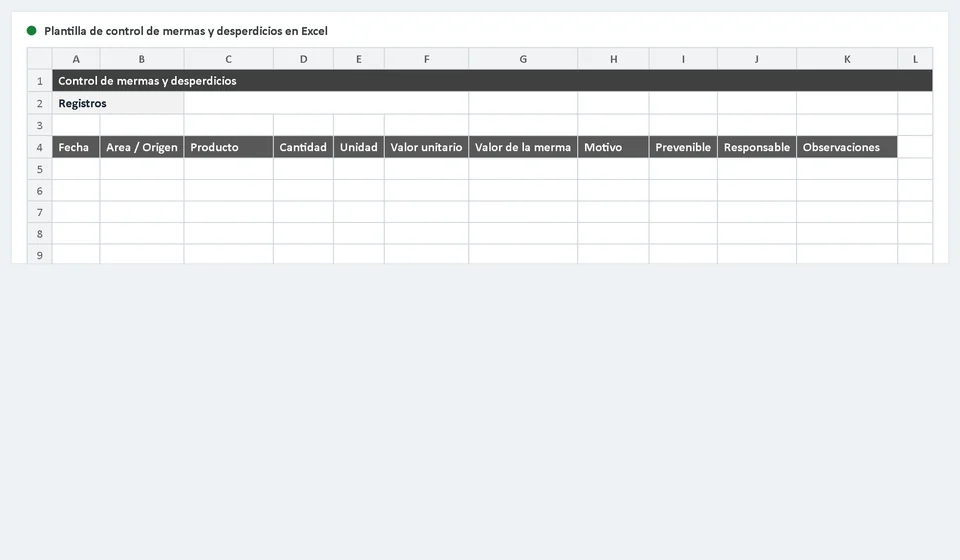
Shrinkage and waste control. This is the register of losses and their cause: expired product thrown away, product damaged on arrival, production leftovers, portioning errors or customer returns. Each loss is recorded with its date, product, quantity, reason and value. Over time, that record shows you where the money is leaking and which supplier or which product is causing trouble.
The flow of the kit is short and any team member can apply it: first you receive the order and approve it with the checklist; second, you label every lot with its expiry date before storing it; third, you record as shrinkage everything that expires, gets damaged or is discarded. Receive under control, store in order and record the loss: that is the whole cycle, and the three templates already bring the columns and the lists to support it, so you do not have to design anything.
What each template includes
Every file arrives with its working sheet ready to use, with defined headers and cells prepared for direct entry:
| Template | What it is for |
|---|---|
| Food receiving checklist | Checks against the order the quantities, temperature, condition, lot and expiry of everything that arrives, and records who received it and what was accepted or rejected. |
| Expiry date labels | Produces printable labels per product and per lot showing the expiry date, ready to stick on packages and containers before storing. |
| Shrinkage and waste control | Records every loss with date, product, quantity, reason and value, so you can measure waste and fix its causes in time. |
The three files are designed to feed each other: the label uses the data captured by the checklist, and the shrinkage control explains why something that entered your pantry never made it to a plate sold to a customer.
The columns of the food receiving checklist
The checklist is designed to be completed in a few minutes, even while the supplier's truck is waiting. Each column answers one concrete question and prevents receiving from depending on memory or on how rushed everyone is:
| Column | What it is for |
|---|---|
| Product | Identifies the food exactly as it appears in your shopping list, so you can compare it with what was ordered. |
| Quantity ordered | What should arrive, according to the order you placed with the supplier. |
| Quantity received | What actually arrived; the difference between the two columns is the day's shortage or surplus. |
| Temperature | For chilled or frozen food, the temperature at delivery time, recorded in degrees. |
| Condition | State of the package and the product: sealed, dented, wet, open or showing signs of spoilage. |
| Lot | The batch code printed by the supplier, essential for traceability and for pulling product out if it is ever needed. |
| Expiry date | The last date for use printed on the package; it defines what must rotate and be used first. |
At the bottom of the checklist, the person delivering and the person receiving both sign. That signed record stays as the day's backup and is the written evidence of what you accepted, what you rejected and why.
A worked example at the receiving point
To see the kit in action, imagine receiving an order with two items. This is how the record would look:
| Product | Quantity | Temperature | Lot | Expiry date | Result |
|---|---|---|---|---|---|
| Whole milk | 10 boxes | 4 °C | L-88 | 15/05/2027 | Accepted: goes into inventory |
| Tomatoes | 2 kg | Room temperature | No legible lot | Expired | Rejected: 12,000 shrinkage |
The milk arrived at the right temperature (4 °C), with a clear lot code (L-88) and a comfortable expiry date (15/05/2027, day/month/year), so it is accepted, labelled and placed in the fridge according to its expiry. The tomatoes, on the other hand, arrived already expired and with no legible lot: they are not accepted, they are set apart from the rest and they are recorded in the shrinkage control with a value of 12,000.
A note on that value: the templates use no currency symbols because they are internal control tools, not tax documents or invoices. The figure 12,000 stands for the cost of the rejected lot in whatever currency your business uses; if you prefer to work with quantities only and no money values, the shrinkage template allows that too.
Setting up the kit step by step
- Download the three templates and keep them in a fixed folder, for example Food inventory 2026.
- Open each file and complete the dropdown lists with your products, suppliers, units of measure and the most common shrinkage reasons in your kitchen.
- From the next delivery on, always receive with the checklist: nothing enters the pantry without its record, even when the supplier is in a hurry.
- Before storing, stick the expiry label on every lot and arrange the fridge or the pantry by date, with the soonest dates at the front.
- Record shrinkage on the same day it happens, with its reason and value; do not save it up for the end of the month, because it loses its usefulness.
- Once a week, review the products with near expiries and decide what will be used first or must leave the inventory before it expires.
- Every month, compare what was recorded as shrinkage against your purchases for the period: the trend will tell you whether the problem is growing or being fixed.
Tips to make the control actually work
- Apply FIFO (first in, first out): always put the oldest lots at the front and use first what expires soonest. It is the cheapest rule and the most effective one against expiry.
- Reject and document: if a product does not meet the expected temperature, condition or expiry, do not accept it out of politeness. Write it down in the checklist with the reason; a documented rejection protects your kitchen and your money.
- Update your inventory only with what was accepted: what was rejected at receiving must never be added to your stock. If you include it, your counts and your future purchases will be wrong forever.
- Train the person who receives: the checklist is only as good as the person who fills it. One well-trained person prevents more losses than any file, however perfect it is.
- Do not trust anyone's memory for expiries: the label exists so that any team member, even a new one, can decide without asking.
- Keep a weekly backup of the three files in the cloud or in an email sent to yourself, so you never lose the history if a computer fails.
When it is time to move from Excel to software
These templates are the right starting point for any kitchen or food business, but they have limits that show up as volume grows. If deliveries arrive daily from several suppliers, if you run more than one location or a large storage area, if several people need to record at the same time, or if you must know in seconds which lot is about to expire, the spreadsheet starts demanding a discipline that a busy business does not always have: duplicated files, different versions and typing mistakes that nobody catches in time.
That is the moment to consider a system like Kardex Tauro, which centralizes receiving, storage and shrinkage in one place, lets several users work at the same time and generates expiry alerts and reports without manual tables. The good news is that the work you do today with this kit is not lost: the data you capture now —products, suppliers, lots and shrinkage reasons— is exactly the organized starting point any system needs to migrate your records without stumbling.
And if you do not need it yet, do not force it: a well-kept spreadsheet beats software that is fed with careless data. When the time comes, Kardex Tauro will be ready to continue from the foundation this kit helps you build. For now, download the three templates and start today controlling what enters, what expires and what is lost in your kitchen.
Download the full kit and bring order to the receiving, the expiries and the shrinkage of your business from the very next delivery.
⬇ Download shrinkage and waste control (.xlsx)
⬇ Download expiry date labels (.xlsx)
Frequently asked questions
What does the food kit include?
Three sheets: inventory, expiry control and counting or shrinkage. Together they cover the product's full cycle.
Why all three together?
Because expiry cannot be controlled without inventory, and counting without expiry does not explain the shrinkage.
In what order are they used?
Inventory, then expiry, and the count closes the cycle. Next month you correct what the count revealed.
⬇ Download food receiving checklist (.xlsx)