Price list with margins template in Excel

Price list with margins template in Excel
Setting a selling price looks like a two-minute job, and it almost never is. Cost moves with every purchase, the margin you want is not the same across product lines, and once the list holds five or six items the arithmetic gets done from memory with slightly different rules each time. That is how you end up with a list where the paper ream earns less than the notebook, where two salespeople quote the same item differently, and where nobody can explain why the published price is what it is. The real problem is not arithmetic: there is no single place where cost and margin meet and produce a number you can defend in front of a customer.
This price list template solves that. You type the unit cost and the target margin for each product, and the sheet returns four linked results: the calculated price using the correct margin formula, a list price rounded to the nearest hundred so it reads as a commercial figure, the profit that rounded price actually leaves, and the margin you really end up with. Five products, nine columns and a totals row are enough to see how rounding nudges profit up or down.
The file ships with a stationery and furniture list that leaves a total profit of 57,200 and shows the two cases people get wrong most often: the rounding that pushes the margin above what was asked for, and the rounding that leaves it below. Understanding those two movements is what separates a price list from a wish list, and it is also what lets you answer with a number when a customer asks why an item costs what it costs.
What the sheet is and what it solves
The sheet is called Prices and it is built like a working list, with no hidden tabs and no macros: company and list name at the top, a table with one row per product underneath, and a totals row at the end that sums profit across the whole list. Everything you see on screen is what the sheet calculates, and any white cell in the input columns can be overwritten without breaking the rest of the workbook or rewriting a formula.
The idea to hold on to is that profit margin is defined against the selling price, not against the cost. That is why you do not get the price by adding a percentage to the cost: you get it by dividing the cost by one minus the margin. A product that costs 10,000 at a 30 percent target prices at 10,000 divided by 0.70, which is 14,285.71. Adding 30 percent to the cost would give 13,000, and at that price the actual margin sits well under the target. That is the most common mistake and the most expensive one, because it repeats on every invoice without anyone noticing.
The second idea is rounding. Nobody publishes 14,285.71; you publish 14,300. The sheet rounds to the nearest hundred, up or down, and then recalculates profit and margin against the price that will actually be charged. That step explains why the ergonomic chair, with a target margin of 35 percent, lands at 34.99 percent, and why the archive box, with 25 percent asked for, closes at 25.44 percent. Neither is wrong: the list price rules, and the actual margin is the consequence.
| Block | Where it sits | What it holds |
|---|---|---|
| Header | Top rows of the sheet | Title, company and the name of the list being published |
| Product table | Middle of the sheet | One row per product with code, name, category, cost, target margin, calculated price, list price, profit and actual margin |
| Totals row | Bottom of the table | Sum of the profit column for every product on the list |
| Instructions sheet | Second tab | What the template does, how to use it, how each column is calculated, the worked example and the usage notice |
The columns, one at a time
Four of the nine columns are inputs and five calculate themselves. That split is what makes the template useful: whoever uses it only has to think about two numbers per product, the cost and the margin they want, and everything else follows. It is worth checking what each column means before typing the first value, because the order in which the columns read is the order in which a price is reasoned out.
| Column | Typed or calculated | What it means |
|---|---|---|
| Code | Typed | Identifies the product on the list; in the example they run from P-101 to P-105 |
| Product | Typed | The name the product is offered under |
| Category | Typed | Groups the list by business line, for instance stationery, filing or furniture |
| Unit cost | Typed | What one unit costs landed in the warehouse, using whichever costing rule the business follows |
| Target margin | Typed | The share of the selling price to be kept as margin, written as a proportion |
| Calculated price | Calculated | Cost divided by one minus the margin, to two decimals, still unrounded |
| List price | Calculated | The calculated price rounded to the nearest hundred, ready to publish |
| Profit | Calculated | List price minus cost, in currency per unit |
| Actual margin | Calculated | Profit divided by list price, the margin that truly remains after rounding |
Rows below the last product keep their formulas, so adding an item means typing code, name, category, cost and margin into the first empty row: the four columns on the right fill themselves in. If a row is only half filled, the formulas return a blank cell instead of a zero, so the list can be built in pieces without phantom prices showing up along the way.
The example that ships with the file
The sample list holds five products from a stationery and furniture business and lets you follow the whole mechanism on round figures. Each row shows the cost, the margin asked for, the calculated price, the price that gets published, the profit it leaves and the margin that comes out at the end. Read top to bottom, it shows why the list price never equals the calculated price, and why that gap, small as it looks, adds up in total profit.
| Product | Cost | Target margin | Calculated price | List price | Profit | Actual margin |
|---|---|---|---|---|---|---|
| Letter paper ream | 10,000 | 30 percent | 14,285.71 | 14,300 | 4,300 | 30.07 percent |
| Black toner | 25,000 | 40 percent | 41,666.67 | 41,700 | 16,700 | 40.05 percent |
| Archive box | 8,500 | 25 percent | 11,333.33 | 11,400 | 2,900 | 25.44 percent |
| Ergonomic chair | 60,000 | 35 percent | 92,307.69 | 92,300 | 32,300 | 34.99 percent |
| Stitched notebook | 4,200 | 20 percent | 5,250 | 5,300 | 1,100 | 20.75 percent |
| List total | 57,200 |
Look at the two extremes. The ream costs 10,000 and at a 30 percent margin should sell for 14,285.71; published at 14,300, profit rises to 4,300 and the actual margin to 30.07 percent, a hair above target. The chair costs 60,000 and at 35 percent the calculation gives 92,307.69; dropping to 92,300 leaves 32,300 profit and a 34.99 percent actual margin, just below. In both cases rounding moved less than a hundredth of a point, but on a list of a hundred items that movement decides whether the month's profit adds up or not.
The notebook is the most instructive case because the calculated price lands on an exact figure, 5,250, and the sheet still takes it to 5,300. Publishing 5,250 is perfectly possible, but a list full of prices ending in fifty reads like a cost sheet rather than a sales sheet. Rounding up lifts profit to 1,100 and the actual margin to 20.75 percent. The archive box shows the same effect pointing the other way on price: from 11,333.33 to 11,400, with 2,900 profit and a 25.44 percent actual margin.
How to use it, step by step
- Open the file and fill in the company name and the list name in the header, so the printed document identifies itself.
- Replace the five sample products with your own, one per row, starting with the code and the commercial name.
- Enter the unit cost using whatever rule the business follows: latest purchase, average cost or landed cost, but always the same rule across the whole list.
- Enter the target margin as a proportion of price: 0.30 for a thirty percent margin, 0.40 for forty, and so on down the list.
- Check the calculated price column to confirm the formula is reading correctly and that no product was left without a cost or a margin.
- Decide the list price: accept the sheet's rounding or overwrite it if you want a psychological price; profit and actual margin recalculate on whatever you leave in the cell.
- Compare the actual margin column against the target, adjust the items that drifted too far, and save or print the list as the version for the period.
Mistakes that cost you profit
- Adding the margin to the cost: 10,000 plus 30 percent gives 13,000, not 14,285.71; margin is measured against the price, not the cost.
- Confusing margin with markup: they are two different calculations, and mixing them means charging less than you think.
- Always rounding down on the theory that a lower price sells more, when on thin-margin products every unit of currency counts.
- Typing 30 into the margin column instead of 0.30, which feeds the formula an impossible margin and produces a price you cannot use.
- Working from an old cost: if the last purchase went up and the list was not updated, the actual margin the sheet shows is imaginary.
- Pasting the list price as plain text and wiping the formula, which breaks the link between cost, price and profit.
- Applying the same margin to the whole list without looking at competition or how fast each item moves, which is how you lose sales on some lines and money on others.
Which programs open it
The file is an ordinary Excel workbook and behaves the same in desktop Excel, Excel on the web, LibreOffice Calc and Google Sheets. The formulas it relies on are about as basic as the program gets, so there is no risk of them turning into values when opened elsewhere. If you plan to work in Google Sheets, open it from disk and save it as a Google sheet so the formulas stay live instead of sitting in a preview. To print the list and hand it to a salesperson, set the print area to the table and keep the company name header on the first page.
The sheet on screen
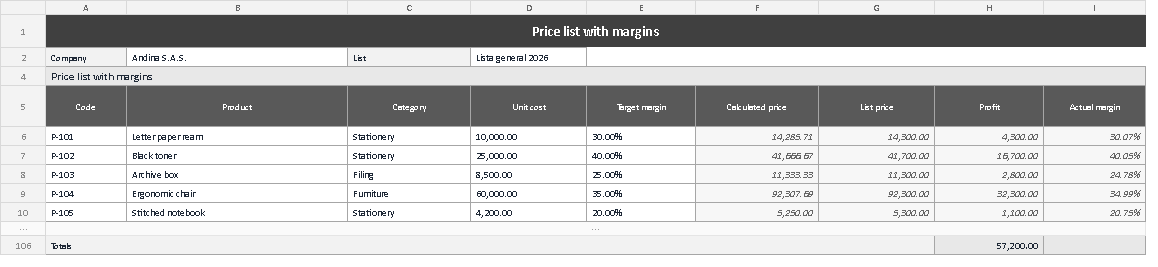
The capture shows the sheet exactly as it opens: the dark title band, the company row and the list name, the grey header over the nine columns, and the five products with their values already calculated. At the bottom, separated by the empty rows kept for more references, sits the totals row with accumulated profit of 57,200. That is the whole sheet: no charts and no dashboards to distract, because the job here is to read a price list, not to interpret a dashboard.
A price list done properly is a document you can stand behind in a conversation. If a customer asks why the ream costs 14,300, the answer is in the same row, with the cost next to it and the margin in plain sight.
This template is part of the management formats collection from Kardex Tauro, built so a small business can put its numbers in order with the same tools a large back office uses, without paying for a full system just to start.