Cash receipt template in Excel: free download

Cash receipt template in Excel: free download
A cash receipt is the document your business uses to record that a payment was received. When a customer hands you cash, when they make a partial payment against an invoice, or when they send an advance for an order, that money needs to be recorded with a date, an amount, a description and the signatures of both parties. Without that support document, any later difference turns into an argument with no proof: the customer says they paid and the cash drawer does not show it, or the drawer shows money that no one recognizes. So the cash receipt is not red tape: it is the reliable memory of every payment that comes into the business and the first thing requested in any review, audit or cash reconciliation.
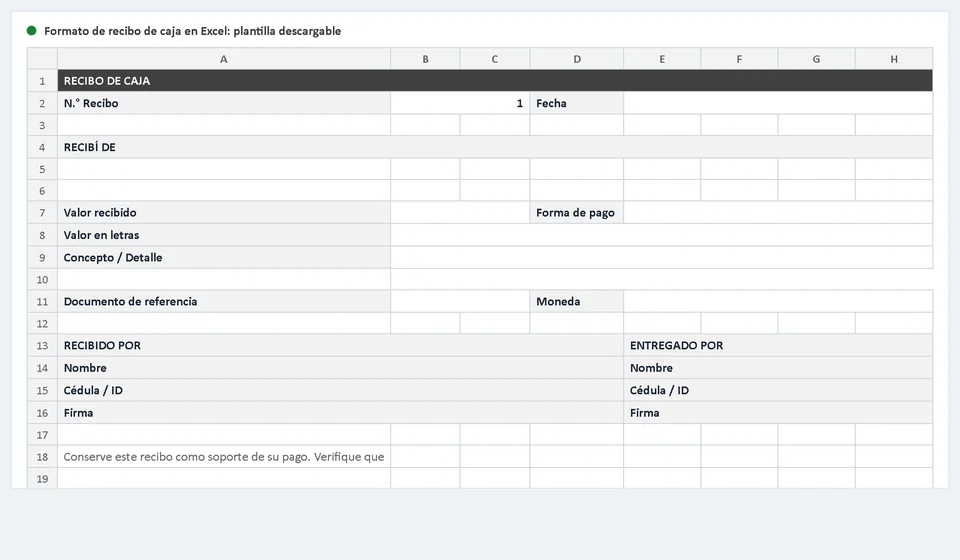
This cash receipt template in Excel brings together everything a well-made receipt needs: a consecutive number, a date, a space for the name of the person paying, the amount in figures and in words, the payment method, the description and signature areas for the person who receives the money and the person who hands it over. Stores and shops use it to document cash sales, service companies use it to support the partial payments made by their clients, and any business that handles advances, installments or deposits will find it useful. Download the template for free, fill it out in under a minute and print as many copies as you need, always with the same clean layout.
⬇ Download cash receipt template (Excel .xlsx)What the cash receipt template includes
The template is an Excel file (.xlsx) organized in two sheets. The first one is the receipt form: a ready-to-use sheet with clearly marked cells for every piece of data and blocks sized just right for comfortable writing. The second one is the instructions sheet, which explains what goes into each field, how to keep the receipt sequence under control and how to leave the file ready to print. No complicated formulas and no macros: open the file, complete the data and the receipt is finished.
The layout follows the classic cash receipt format: the business name and details at the top, the receipt number and date on the right, and below them the blocks for who is paying, the amount, the description and the signatures. The print settings are already configured for portrait A4 paper, so the receipt comes out on a single sheet with reasonable margins, suitable both for handing to the customer and for filing the business copy.
| Template component | What it is for |
|---|---|
| Receipt sheet | Form with the business header and the receipt blocks ready to fill in. |
| Instructions sheet | Step-by-step guide: what goes in each field, how to manage the sequence and printing and filing tips. |
| Receipt No. | Cell for the unique consecutive number that identifies the receipt within the business series. |
| Date | Fills in by itself with the =TODAY() formula when you open the file; if the payment is recorded on another day, change it by hand to the real date. |
| Received from block | Wide space for the full name of the person or company making the payment. |
| Amount received and currency | Numeric cell for the amount in figures plus a cell to indicate the currency the payment is made in. |
| Payment method | Dropdown list with the options: cash, bank transfer, check, debit card, credit card and other. |
| Amount in words | Cell to write the amount out in words; it must match the figure written in numbers exactly. |
| Concept or details | Tall block to describe what is being paid: a cash sale, an invoice, a period, a reference or the reason for the payment. |
| Reference document | Cell for the invoice, order, contract or document number that supports the payment. |
| Received by and Delivered by blocks | Two blocks with name, ID number and signature: one for the person receiving the money and one for the person handing it over. |
| Footer note and printing | Reminder to keep the receipt as proof of payment and a sheet configured for A4 printing. |
When to use a cash receipt
A cash receipt is issued every time money comes into the business cash drawer and a written record of that payment is needed, signed by the person handing the money over and the person receiving it. The most common situations are these:
- Cash sale. The customer pays for the goods or the service at the moment they receive it, and the receipt supports that immediate payment.
- Partial payment on an invoice. The customer does not pay the whole amount at once but makes a partial payment; the receipt records how much they paid and leaves the invoice with a lower balance.
- Customer advance. The customer pays money in advance to reserve an order or secure a job; the receipt supports that advance until the product or service is delivered.
- Installment or deposit. Recurring payments such as plan installments, monthly charges or agreed deposits that are collected at the business cash drawer.
- Small payments. Low-value sales or services collected directly in cash that do not go through formal invoicing but still need to be supported.
- Other cash income. Refunds, security deposits, cash returned by a supplier or any other payment that needs to be identified with a date, an amount and a responsible person.
One important clarification: a cash receipt does not replace an invoice. The invoice is the proof of the sale and the receipt is the proof that the payment was received. In many transactions both documents are issued: the invoice for the operation and the receipt when the payment arrives in cash or through a method that is worth documenting.
How to fill out the template step by step
With the file open in Excel, this is the recommended order for filling out the receipt:
- Check the sequence number. Every receipt has a unique number. Before writing, confirm which number was used last and assign the next one; never repeat a number and never leave gaps in the series.
- Verify the date. The cell fills in by itself with the =TODAY() formula, which shows the current date. If the payment happened on another day, write the date on which the money actually came in, because that is the one that matters for control purposes.
- Complete the Received from block. Write the full name of the person or company paying, with no nicknames or abbreviations, so there is no doubt about who made the payment.
- Write the amount in figures. Enter the exact amount in the numeric cell and indicate the currency in its cell.
- Write the amount in words. The written amount must match the figure in numbers. If the two do not agree, the receipt loses its validity because no one knows the true value; in that case, void the receipt and issue a new one.
- Choose the payment method. Pick the right option from the dropdown list: cash, bank transfer, check, debit card, credit card or the other option when it applies.
- Describe the concept. In the details block explain what is being paid: a cash sale, a partial payment on an invoice, an advance, a period or a reference. Write it as if another person were going to read it in the future, because someone probably will.
- Write the reference document. If the payment applies to an invoice, an order or a contract, enter its number in the designated cell. That piece of data lets you link the receipt to the transaction that gave rise to it.
- Both parties sign. In the Received by block, the person receiving the money writes their name, their ID number and their signature; in the Delivered by block, the person handing the money over does the same. Without the signatures, the receipt proves nothing.
- Review and file. Before handing over the receipt, check that no field is left empty and no corrections remain. Hand a copy to the customer and file the signed receipt (the original) in order, by month, so you can reconcile the cash drawer and answer any question.
Common mistakes when filling out a cash receipt
Most receipt problems do not appear on the day the receipt is filled out, but weeks later, when someone tries to reconcile the cash drawer or settle a claim. These are the mistakes that happen most often and how to avoid them:
| Common mistake | Why it matters | How to avoid it |
|---|---|---|
| Receipts without a sequence number or with repeated numbers | Without a unique number the series cannot be sorted and no one can tell which receipt belongs to which payment when the cash drawer is reviewed. | Always assign the next number in the series and note in the instructions sheet which one was used last. |
| Amount in figures different from the amount in words | The receipt ends up with two different amounts and no one knows which one is true, so it loses its value as a support document. | Write the amount in words right after the figure and compare the two before signing. |
| Not filing the signed receipt | Without the filed document there is no way to prove the payment, reconcile the cash drawer or answer a customer who claims to have paid. | Hand a copy to the customer and keep the signed receipt in a folder organized by month or by customer. |
| Leaving blank spaces | An empty field can be completed later with another figure, another date or another description, and the receipt stops being trustworthy. | Fill in every field and draw a line across the spaces that remain free before signing. |
| Writing a date other than the real payment date | It throws cash control and reconciliations off, because the payment appears on a day that does not match. | Always use the date on which the money actually came in, even if the receipt is generated days later. |
Example table: a properly filled-out receipt
This is what a complete cash receipt looks like when it is filled out carefully, ready to hand to the customer and to file:
| Receipt field | How it was filled out |
|---|---|
| Receipt No. | 0042 |
| Date | August 15, 2026 |
| Received from | Laura Mendez |
| Amount received | $250,000.00 |
| Payment method | Bank transfer |
| Concept | Partial payment on invoice F-0128 for goods delivered on August 3, 2026. |
| Signature | Laura Mendez signs in the Delivered by block and the business owner signs in the Received by block. |
In the amount-in-words cell of the receipt, two hundred fifty thousand was written out, which matches the figure $250,000.00 exactly. That match, together with the date, the concept and the signatures, is what turns a filled sheet into a valid proof of payment.
Receipt control: from paper to software
Printing and filing receipts solves the support document for each payment, but it does not solve control. With a drawer full of paper receipts, at the end of the month no one can tell you at a glance how much you have collected, which invoices still have an outstanding balance or whether a customer paid the same item twice. To know that, you have to move the data into a separate record, and that manual step is exactly where receipts get lost, payments get duplicated and cash differences appear.
That is why the next level is recording receipts in a system. With Kardex Tauro, for example, when you enter a cash receipt the payment is saved with its date, its payment method and its amount, and if the receipt is linked to an invoice, the system automatically deducts the amount paid from that invoice balance. The customer is up to date without anyone subtracting by hand, the receipt history stays organized and searchable by customer, date or value range, and reconciling the cash drawer no longer depends on the memory of whoever kept the paperwork.
The Excel template is the perfect starting point: it is free, it adapts to the size of the business and it can start being used today. When the number of receipts grows and the first difficult reconciliations appear, that is the natural moment to move to software that does the heavy lifting. In the meantime, a well-filled and well-filed receipt is already more than many businesses have.
Frequently asked questions
What is a cash receipt?
The document that records money coming in: how much, from whom, for what and with what support. It is the proof that backs the movement for accounting.
What is the difference between a cash receipt and an invoice?
The invoice charges and triggers tax; the receipt records the payment received. They often go together: the invoice is issued and the receipt confirms the money arrived.
Should it be printed or used on the computer?
Either. The file is an .xlsx: print it to sign, or fill it in and keep it when the department already tracks everything in files.
Download the cash receipt template in Excel, try it with the next cash sale, the next partial payment or the next advance you receive, and see the difference it makes to have every payment supported by an orderly document. Filling it out takes less than a minute, but that minute saves you arguments, cash differences and headaches down the road.
⬇ Download cash receipt template (Excel .xlsx)Final note: the cash receipt supports the payment received, but it does not replace the tax documents required by the legislation of each country. Check the formal requirements that apply where you operate, such as the sequence number, the identification data and the mandatory documents for each type of transaction, and adapt the template to those requirements.