Petty cash template in Excel: free download

Petty cash template in Excel: free download
In almost every business, small expenses pop up from one day to the next: the printer runs out of ink, an urgent delivery has to be paid for, coffee is needed for the waiting area, boxes are needed for an order or the parking for the delivery van has to be covered. Raising a full invoice or making a bank transfer for each of those amounts would be slow and impractical, which is why many companies run a petty cash fund: a fixed amount of cash assigned by management to cover exactly that kind of small day-to-day expense, replenished whenever it falls below the agreed level. The mechanism is simple, but if that cash is not controlled it can disappear without a trace and turn into a headache when the month's expenses have to be reconciled.
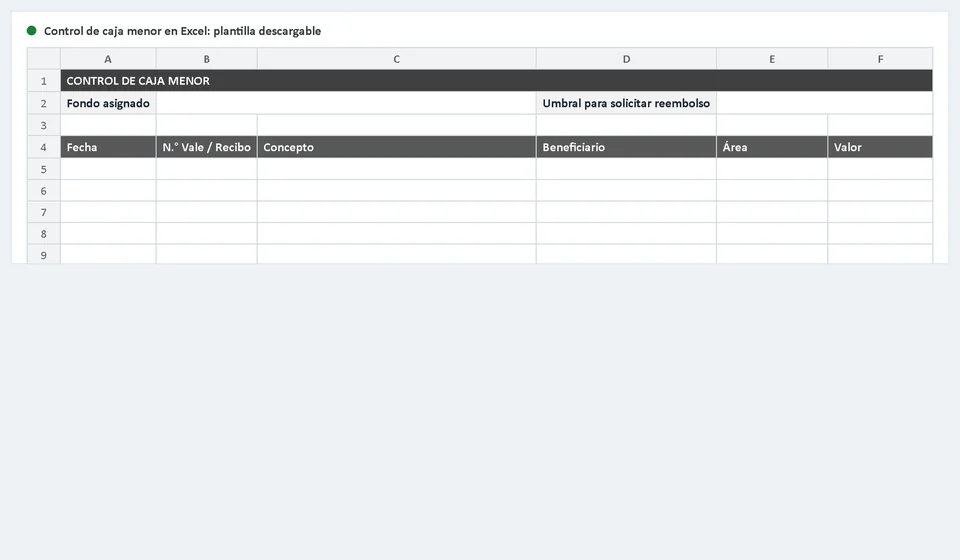
Petty cash control means keeping a record of every outflow: who received the money, how much, on what date, for what reason and which voucher or receipt backs it up. The petty cash template in Excel that you can download for free in this article automates that record: you set the amount of the fund and the threshold at which you want to request a reimbursement, you enter each expense into a table prepared with two hundred rows and the sheet calculates the total spent, the reimbursement to request and the available balance on its own. It is part of the free spreadsheet collection from Kardex Tauro, built to help you run a small business without complications.
⬇ Download the petty cash control template in Excel (.xlsx)What the petty cash control template includes
The downloadable file is an Excel workbook with two sheets: the main sheet, called Petty Cash, where the fund is managed, and an Instructions sheet that explains every cell and shows how to use the file with an example. There are no macros and no formulas for you to write: only cells for your data and cells that the sheet calculates for you. This is what you find when you open it:
| Component | What it is for |
|---|---|
| Fund amount cell | Space to type the fixed amount of cash that management assigns to the petty cash fund. You fill it in once and the sheet uses it as the base for every calculation. |
| Reimbursement threshold cell | Shows the balance level at which you should ask to replenish the fund. You can adjust it to match how fast your business spends. |
| Expense table | Log with two hundred rows ready for the date, voucher or receipt number, description, payee, area and amount of every cash outflow. |
| Area dropdown list | Per-row menu with the options Administration, Sales, Warehouse, Delivery and Other, so every expense is classified without typing the same word twice. |
| Automatic summary cells | Total spent, reimbursement to request and available balance: three values that the sheet updates by itself every time you enter a movement. |
| Fund status | Automatic message that shows OK while the balance is above the threshold and Request reimbursement when the balance is equal to or below it. |
| Notes area | Space to record clarifications: pending advances, receipts that have not arrived yet or anything you want to remember at the next cash count. |
The Instructions sheet also reminds you of a rule that allows no exceptions: every petty cash expense requires its voucher or receipt, and without that support the expense is not reimbursed. That rule is what keeps the fund tidy no matter how many rows are filled in.
How a fixed petty cash fund works
Petty cash works through a cycle of three moments that repeats over and over: you spend, you support and you replenish. First, management assigns a fixed amount of cash and names a custodian, usually the person who receives the money, keeps it under lock and key and hands it out on request. When someone needs to pay a small expense, the custodian gives out the cash and asks for a signed voucher or the supplier's receipt in return; without one of the two, the money does not leave the fund.
Second, every outflow is recorded on the same day in the expense table of the template: the date, the voucher or receipt number, the description, the payee, the area the expense belongs to and the amount. The supporting documents are filed in consecutive order, in an envelope or folder used only for petty cash, so that every peso can be shown whenever someone asks for it. If an expense has no receipt, it is simply not reimbursable: that is the rule that prevents abuse.
Third, when the available balance falls to the threshold you set, the sheet shows Request reimbursement and it is time to replenish the fund: the custodian puts together a list of the expenses with their receipts, presents it to management or accounting and receives back, in cash, exactly the total amount spent. With that reimbursement the fund returns to its original amount and the cycle starts again.
In the middle of the cycle it is wise to do periodic cash counts: count the physical cash left in the fund, add up the vouchers and receipts that have not been reimbursed yet and compare the result with the fund amount. If both figures match, everything is in order; if they do not, there is a shortage or an overage that must be explained right away. The template makes that count easy because it shows the expected balance instantly.
Petty cash example in Excel
Imagine a business with a petty cash fund of 200,000 and a threshold of 50,000 for requesting reimbursement. During the first week of the month, these five expenses are recorded:
| Date | Voucher No. | Description | Payee | Area | Amount |
|---|---|---|---|---|---|
| Jun 02 | 001 | Printer paper, folders and pens | Centro Stationery | Administration | 12,000 |
| Jun 03 | 002 | Transport to deliver an order to a customer | L. Ortega | Delivery | 8,500 |
| Jun 05 | 003 | Cardboard boxes and tape for the week's orders | Southern Packaging | Warehouse | 25,000 |
| Jun 06 | 004 | Coffee, sugar and cups for the waiting area | Corner Supermarket | Administration | 6,000 |
| Jun 08 | 005 | Repair of the point-of-sale calculator | Rios Technical Service | Sales | 15,500 |
| Total spent | 67,000 | ||||
During the week, 67,000 was spent. If we subtract that total from the assigned fund, the available balance is 133,000, still comfortable compared with the 50,000 threshold, so the fund status keeps showing OK and no replenishment is needed. If the business kept spending the following week until the balance dropped to 50,000 or less, the sheet would switch to Request reimbursement: at that point you present the list of expenses with their receipts and ask for the total amount spent so the fund goes back to 200,000.
How to use the template step by step
Getting petty cash control running takes less than ten minutes. The recommended order is this:
- Set the fund: type in the Fund amount cell the cash that management assigns, for example 200,000.
- Set the threshold: type in its cell the balance at which you want to replenish the fund, for example 50,000.
- Give the custodian a numbered voucher book or pad, so every outflow is identified by its consecutive number.
- Record every expense on the same day it happens: date, voucher or receipt number, description, payee, area and amount.
- Check the fund status before authorizing new payments: if it says Request reimbursement, replenish the fund first.
- Request the reimbursement when it is due: gather the vouchers and receipts, put together the expense list and receive the cash that brings the fund back to its original amount.
- Do a cash count at least once a week: count the physical cash and compare it with the balance shown by the sheet.
- File the receipts by month and keep a copy of the log, printed or in the file, for the accounting close.
Common petty cash mistakes
Even though petty cash is a simple mechanism, the same oversights repeat in many businesses. Knowing them helps prevent them:
Expenses without a voucher or receipt. This is the most serious mistake: when money goes out without support there is no way to prove what it was spent on or to reimburse it. The golden rule is that without a receipt there is no reimbursement, and the custodian must ask for the voucher or receipt before handing out a single peso.
A single custodian with no oversight. When one person receives, hands out and records the money and nobody reviews their work, discrepancies or irregularities can go unnoticed for years. It is wise for someone other than the custodian to do periodic cash counts and review the expense list.
Skipping cash counts. If the cash is only counted when the fund runs out, shortages are discovered too late and it is impossible to know when or why they happened. A ten-minute weekly count avoids month-end surprises.
Using petty cash for what it is not for. Paying large expenses, purchases that must be invoiced or personal spending out of the fund distorts the mechanism and messes up the books. Petty cash is only for small, authorized and properly supported expenses.
Petty cash and expense control with software
The Excel template is an excellent starting point, but as the business grows, every petty cash outflow should be connected to the rest of the financial information. That is where Kardex Tauro comes in: a management application designed for small businesses where you record expenses and cash outflows in a traceable way. Every movement is linked to its date, its responsible person and its receipt, and at any moment you can check how much has been spent, on what and who authorized it, without depending on sheets that get filed away and forgotten.
You do not have to choose between the two: the template helps you keep the day-to-day cash in order and the software consolidates the complete history of the business's expenses. Many managers start with the Excel format and move to the software when the volume of operations justifies it, taking with them the well-ordered records the template helped them build.
Petty cash does not have to be a black box. With a defined fund, numbered vouchers, filed receipts, periodic cash counts and an up-to-date log, the small cash of the business becomes transparent: anyone can see where every peso came from and where it went. That transparency, which may look like a minor detail, protects the custodian, management and the whole business.
Frequently asked questions
What is a petty cash fund and what is the sheet for?
It is a fixed cash float for small day-to-day expenses. The sheet records every payment with its receipt and the balance left, so the numbers add up when the fund is replenished.
How much money should a petty cash fund hold?
There is no single figure: it follows the small expenses the business makes over a period and is reviewed when the float always runs short or always has money left. What matters is that the amount is fixed and approved.
How is the fund replenished?
For the total of the expenses backed by receipts, not for what is left in the box: add up the receipts, request a refund for that amount and the float returns to its original size.
Download the template, set your fund and start controlling petty cash today with a clear, automatic record.
⬇ Download the petty cash control template in Excel (.xlsx)