Purchase requisition template in Excel: free download

Purchase requisition template in Excel: free download
In a small business, most purchases do not start with a document but with a conversation: someone mentions that a supply is running out, another person says it should be restocked, and the person in charge ends up buying from memory, sometimes without even knowing who asked for it or what it was for. That disorder has a real cost: quantities are over-ordered, things that could wait get bought in a hurry, the trail of what was approved gets lost, and when the bill arrives nobody remembers why the purchase was made. The problem is not the purchase itself but the lack of a formal request behind it.
A purchase requisition solves exactly that. It is the internal document through which an area of the company formally requests a purchase before it happens: who is asking, what they need, how much, by when and what for. It is not an invoice or any kind of tax document: it is an internal purchase request that brings order and control to the process. With an approved requisition, nobody buys on impulse or from memory: purchases happen because there is a documented and authorized need.
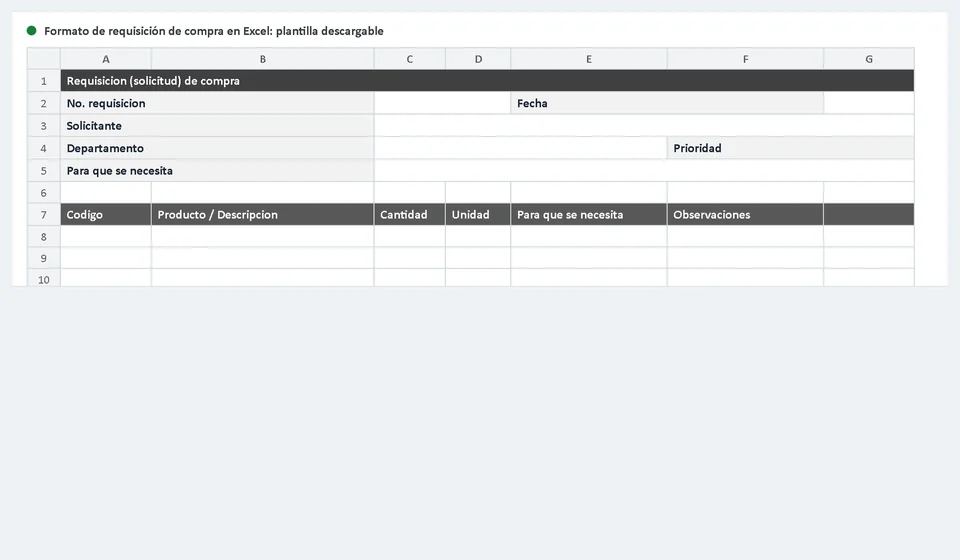
So you can put it into practice today, we prepared a purchase requisition template in Excel, free and ready to download. The file includes the main worksheet with the form ready to fill in, an instructions sheet that explains what to write in every cell, and a complete example so you can see how a well-completed requisition looks. Download it with the button below and open it while you read the rest of the article:
⬇ Download purchase requisition template in Excel (.xlsx)What is a purchase requisition and how is it different from a purchase order
The purchase requisition is the internal purchase request: it is raised by the area that needs the good or service and addressed to whoever authorizes and carries out purchases inside the company. The warehouse asks for packing boxes, maintenance asks for spare parts, production asks for raw materials, the office asks for stationery. The requesting area describes what it needs and why, and a manager reviews the request, approves it or sends it back with comments. All of that happens inside the company and never reaches the supplier.
The purchase order is a different document: it is issued by the purchasing area, once the requisition has been approved, and it is addressed to the supplier. It confirms the product, quantity, price, delivery date and agreed terms. It is a purchasing commitment with a third party. In one line: the requisition is requested by an internal area, while the purchase order is issued by purchasing to the supplier. The requisition decides whether the need is valid and authorized; the purchase order decides how, from whom and under what conditions it will be met.
Why keep them separate? Because they play different roles: the requisition prevents unauthorized purchases, and the purchase order prevents misunderstandings with suppliers. If a small business can implement only one control first, that control should be the requisition: it is the one that guarantees nobody buys something nobody asked for.
What the purchase requisition template includes
The template is organized in blocks so it can be completed in minutes, without relying on memory, leaving all the information needed by whoever approves and whoever buys clearly visible. This is what you will find inside:
| Block | What it contains | What it is for |
|---|---|---|
| Header | Requisition number, date, requesting area, requester name and position | Identify who is asking, from which area and when the request was created |
| Justification | Description of the purpose: what need is covered and how the good or service will be used | Give the approver clear reasons to approve or reject with good judgment |
| Requested items | Table with code, description, quantity, unit, required date and priority per line | Describe precisely what and how much is needed, item by item |
| Priority | Urgency level of the purchase | Sort purchases: handle the urgent ones without neglecting scheduled ones |
| Approval | Space for the manager's signature or approval | Leave a record that the request was reviewed and authorized |
| Notes | Free notes: suggested supplier, special conditions or clarifications | Communicate details that do not fit in the previous blocks |
The columns of the requisition detail
The heart of the worksheet is the detail table, where the requested products or services are listed. Each line is one item, and its columns are designed so that whoever approves understands the purchase without having to ask. These are the columns and what goes in each one:
| Column | What to write |
|---|---|
| No. | The line number within the requisition |
| Code | The internal product code, if the company already uses codes; otherwise it can be left blank or use the supplier's reference |
| Description | What is needed, with enough detail: name, material, size or presentation |
| Quantity | How many units are required |
| Unit | The unit of measure: units, boxes, meters, liters, hours of service or another |
| Needed for | The use the good or service will be given: the justification of each line and the detail that matters most when approving |
| Required date | The deadline by which the area needs the item |
| Priority | Urgency level: normal, medium or urgent |
| Notes | Any clarification useful for the approver or for the purchasing area |
With these columns completed, the purchasing area knows exactly what to look for, how much to quote and when it must arrive. And if the approver has doubts about a line, the answer is already written in the same document.
An example: the warehouse requests 50 packing boxes with urgent priority
To see the form in action, imagine this typical situation: this week's orders keep growing, the warehouse is about to run out of packing material and needs to restock before the next shipment. The warehouse manager fills out the requisition like this:
| Field | Example |
|---|---|
| Requesting area | Warehouse |
| Requester | Warehouse manager |
| Product | Corrugated cardboard boxes for order packing (40 × 30 × 30 cm) |
| Quantity | 50 |
| Unit | Units |
| Needed for | Packing this week's orders; the current packing material covers only part of them |
| Required date | Before the next shipment |
| Priority | Urgent |
With this requisition, the manager checks that the purchase is justified and approves it; purchasing gets the best quote, chooses the supplier and issues the purchase order. The warehouse did not buy directly: it asked in writing, with a clear purpose, and the request was recorded and authorized before committing the company's resources.
How to use the template step by step
Using the form is simple if you respect the three moments of the purchasing process:
- Whoever needs something requests it in writing. The area that requires the good or service fills out the requisition in detail: which product it needs, in what quantity, what it will be used for, when it is required and its priority. The clearer the purpose, the easier the approval.
- The manager approves. The owner, the administrator or the purchasing manager reviews each line: checks that the need is real, that budget is available and that the quantity is reasonable. If they agree, they approve and sign; if not, they return the requisition with comments.
- Purchasing turns the requisition into a purchase order. With the approved request, the purchasing area looks for a supplier, confirms price and terms, and issues the purchase order. The approved requisition is filed as the backing of that purchase.
Tips to make the control actually work
- Do not buy without an approved requisition. It is the golden rule of the process: no signed requisition, no purchase. This eliminates purchases made from memory and surprises when it is time to pay.
- Separate the urgent from the scheduled. An urgent purchase is handled immediately; the rest can wait their turn or be grouped with other orders from the same supplier to save time and freight.
- Be specific in the description and the purpose. Writing spare part is not the same as writing oil filter for the machine that is failing; the more precise the detail, the fewer purchasing mistakes.
- File every requisition together with its purchase order. Numbered and stored, they let you answer at any time who asked, who approved, how much was bought and why. A simple file or a physical folder is enough at the beginning.
- Review from time to time what is being requested. If the same supply is requested every week, there may be a leak, a poorly calculated consumption or an opportunity to buy in volume.
When to move from the template to purchasing software
The template works very well when purchases are few and handled by one person. But when several areas start requesting at the same time, when you need to know how many requisitions are waiting for approval, which ones became purchase orders, whether the supplier has shipped and whether the goods entered inventory, keeping everything in Excel becomes a job by itself.
That is the moment to rely on a system like Kardex Tauro, which connects the whole cycle: the area that needs something records its requisition, the manager approves it inside the system, purchasing turns it into a purchase order and the goods receipt updates inventory in the same place. With Kardex Tauro, the requisition stops being a loose sheet and becomes the first link of a traceable process, from the request to the item being recorded in the warehouse.
Frequently asked questions
What is a purchase requisition?
The internal document a department uses to ask for something to be bought. It starts inside the company and is what authorizes issuing the purchase order.
What should it include?
What is needed, what for, the quantity, the date it is needed by, the requesting department and the approver's sign-off.
How is it different from a purchase order?
The requisition is internal and commits no money; the purchase order goes to the supplier and does commit payment.
Meanwhile, start with the simplest and most effective control: download the template, decide who approves purchases in your business and do not allow anyone to buy without an approved requisition. The difference shows from the first week.
⬇ Download purchase requisition template in Excel (.xlsx)