Personal expense tracker template for Excel

Personal expense tracker template for Excel
Somewhere near the end of every month the numbers stop agreeing. The banking app shows one balance, the card statement shows another, and nobody can say where the gap came from. Small purchases — the delivery order, the phone top-up, the shop on the corner — leave no trace, and added together they weigh more than the rent. Without a record, closing the month is guesswork, and guesswork is expensive.
The problem is rarely discipline. It is the absence of a place to write things down. A notebook lasts a fortnight; a spreadsheet lasts the year, provided it was built for the job. This template keeps a simple daily log — one row per purchase — and builds two summaries on its own: one by category against the budget the household sets, and one by payment method, so you can see how much leaves in cash, on debit, on credit or by transfer.
It suits anyone running a home on a fixed income who would rather not be surprised on the last day of the month, couples who need to agree on limits for each area, and the small business owner who wants personal spending in a file of its own, separate from the shop's books. It is free, opens in Excel, contains no macros or passwords and asks for nothing to be installed.
⬇ Download the template (Excel .xlsx)What the format is and who it is for
It is a workbook with two sheets. Everything you type goes into «Expenses»: the month you are tracking at the top, then a table of one hundred rows; below it, separated by a few blank rows, the two summary blocks. «Instructions» holds the how-to, the meaning of each column, the worked example and the list of common mistakes, so the file can be handed to someone else and still make sense.
The logic is that of a cash book, with one difference that changes everything: category and payment method are picked from drop-down lists. The restriction feels clumsy during the first week and is exactly what makes the summaries work. Type a category by hand, with a different spelling or in lower case, and the formula will not match it: the purchase drops out of the total and the sheet says nothing.
The file is built for a household, not a company. A family budget has few categories, repeating amounts and a single person in charge, which is why the sheet fits on one screen and can be printed for the fridge door or reviewed over coffee. It also works as a starting point for a small venture that does not need a system yet: rename the categories and the structure still holds.
What the file contains
| Part | What it holds | What it calculates |
|---|---|---|
| «Expenses» sheet | The month's log and both summary blocks on the same sheet | Month total, summary by category and summary by payment method |
| «Expenses for the month» block | One hundred rows for date, category, subcategory, description, payment method, amount and notes | Adds the month total in a single cell at the foot of the table |
| «Summary by category» block | Eight categories, each with an editable budget | Spent per category, available and share spent |
| «Summary by payment method» block | Five payment methods with their totals | How much went out through each method and across how many purchases |
| «Instructions» sheet | How to use it, what each column means, the worked example and common mistakes | Nothing: it documents the workbook for whoever receives it |
Both summaries sit below the table, with a few deliberately empty rows between them. That gap matters. Add an expense row in the middle of a summary and the formula that adds up the month stops seeing it. When the log fills up and you need more room, insert rows inside the table, never underneath it.
The columns, one by one
| Column | What you type | What is calculated |
|---|---|---|
| Date | The day of the purchase, in date format | Nothing: it orders the log and lets you review by half-month |
| Category | Picked from the list: Housing, Food, Transport, Utilities, Health, Education, Leisure or Other | Decides which summary line the purchase lands on |
| Subcategory | Free text: rent, groceries, fuel, electricity, school | Nothing: it is the detail that explains the expense |
| Description | What was paid for, in your own words | Nothing: it lets you recognise the entry later |
| Payment method | Picked from the list: Cash, Debit card, Credit card, Transfer or Other | Decides which payment-method line the purchase lands on |
| Amount | The figure, with no currency symbol and no separators typed by hand | Feeds the month total and both summaries |
| Notes | Optional: receipt number, who paid, whether the cost is shared | Nothing: it stays as a memory of the entry |
Only two columns need real care: category and payment method. The rest will take any sensible text. The amount, on the other hand, has to go in as a clean number, with no currency symbol and no full stops or commas typed by hand. If the figure lands as text, the sum ignores it, the month total comes out short and no warning appears anywhere.
How the calculation works, figure by figure
The example shipped with the file covers March and a household of three. The budget is typed once, in the summary block; spending is never typed, because a formula walks the table and adds every amount recorded under each category. The result is this table.
| Category | Budget | Spent |
|---|---|---|
| Housing | 1,200,000 | 1,200,000 |
| Food | 800,000 | 600,000 |
| Transport | 300,000 | 150,000 |
| Utilities | 450,000 | 305,000 |
| Health | 200,000 | 0 |
| Education | 300,000 | 180,000 |
| Leisure | 250,000 | 0 |
| Other | 200,000 | 60,000 |
| Month total | 3,700,000 | 2,495,000 |
Spending adds up to 2,495,000 and the budget to 3,700,000. The figure that matters is the subtraction: 1,205,000 still available. Housing alone takes 1,200,000, close to a third of the total budget, which is why it deserves a look before any other commitment is signed. Food spent 600,000 of the 800,000 set aside, and the detail shows two grocery runs, one per half-month, that the formula adds without anyone grouping them by hand. Utilities gathers electricity and water on separate rows and the category total appears just the same.
Categories with no movement — health and leisure this month — show zero spent and their whole budget still available. That is not a mistake, it is information. A household that never spends on health is building up risk rather than savings, and seeing it written down helps decide whether that budget should stay put or move somewhere else. The template holds no opinion; it only shows where the money is.
The share spent comes from dividing the category's spending by its budget, and the cell is formatted to display it as a percentage. No rate has to be typed anywhere. Leave a category budget empty and both the percentage and the available figure stay blank instead of throwing a division error, which is what lets you budget only the areas you actually want to watch.
The second summary carries no budget, because a payment method is not something you cap: it is something you observe. It reports how much left through each route and across how many purchases, using two formulas that scan the payment-method column. This is the block that exposes what the total hides. A month can close inside budget and still end with the credit card loaded, which means the next month starts in debt. Seeing that early is half of the control.
Step by step, starting today
- Type the month you are tracking into the «Month» cell, in the format the file already uses. It is only a label, there to help you file the workbook when the month ends.
- Log each purchase on the day it happens, on the first free row. Wait until Friday and rebuilding the week from memory costs more than writing the line did.
- Pick category and payment method from the drop-downs. Do not type them: the formula matches the exact text, and any variant drops the purchase out of the summary.
- Enter the budget for each category in the summary block, once, at the start of the month. With no figure in mind, use the average of the previous three months.
- Read the summary once a week. The available column says what is left per category; the percentage says how fast the month is being consumed.
- Check the payment-method summary before reaching for the card again. It shows whether spending is piling onto credit or is already covered by cash and debit.
- When the month closes, save the file under the month's name and start a fresh one. Two or three months side by side are what turn a log into a budget.
Mistakes that wreck the log
- Typing the category by hand. «Food» in lower case or «Groceries» under Food is not the list entry: the formula misses it and the purchase vanishes from the summary without a word.
- Recording a credit-card purchase twice. Once when bought and once when the statement is paid. The entry belongs to the day of the purchase; paying the card is a debt movement, not a new expense.
- Logging only the big items. Rent and utilities are easy to remember; transport and snacks are not. Those are precisely the ones that explain why the month does not balance.
- Mixing home and business. If one file carries personal spending and venture costs, neither the family budget nor the business result means anything.
- Leaving categories without a budget and reading the total as complete. No budget means no available figure and no percentage, and the month's comparison stays half done.
- Inserting rows below the table. New rows belong inside the log range; added after the last line, the month total never picks them up.
When it is time to move to software
The sheet holds up fine for a household of two or three, one person in charge and thirty or forty purchases a month. It starts to strain when several people record into the same file and different versions of the same month appear; when every purchase needs its receipt attached; when bank reconciliation is done by hand each week; or when the business and the home share suppliers and accounts.
At that point a system such as Kardex Tauro takes over the log without version conflicts and keeps the history searchable. It is not needed for a home that is only starting to get organised: the template covers that stretch at no cost and with no learning curve. The order is the sensible one — first the habit of writing things down, then the tool that sustains it.
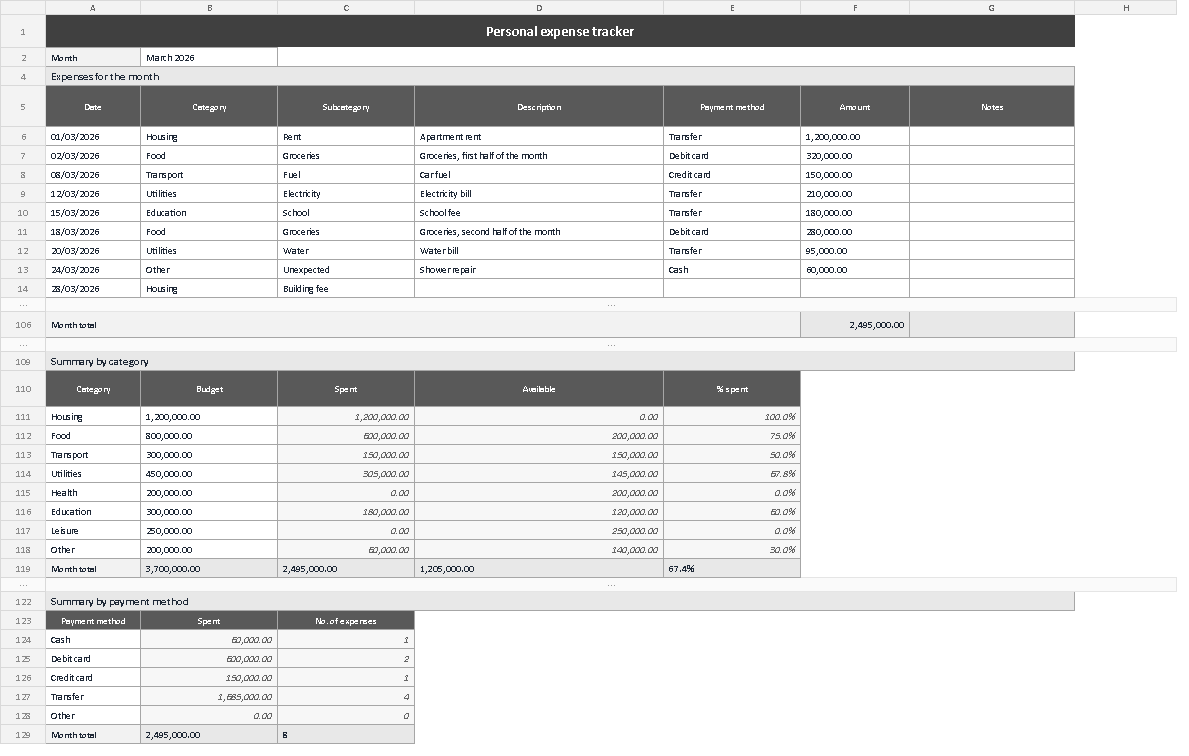
The screenshot shows the «Expenses» sheet exactly as the file opens: the month at the top, the log with its seven columns, the month total at the foot and the two summaries further down. Before typing anything, check three things: that the category names in the summary match the drop-down entries word for word, that the total row agrees with the sum of the table, and that the available column carries no unexplained negative signs. When something does not add up, the cause is almost always a category typed by hand.
A budget is not a list of things you forbid yourself. It is a way of deciding with information. Knowing that 1,205,000 is still available halfway through the month blocks no purchase at all; it only changes the order in which you make them. That is the whole promise of the template, and it is kept with one small habit: a row per purchase, every day, for a month.
⬇ Download the template (Excel .xlsx)