Cash count sheet template in Excel: free download

Cash count sheet template in Excel: free download
If your business takes cash payments, at the end of the day you need to answer one question: does the money physically in the register match what your records say? A cash count is exactly that check. You count the bills and coins left in the register, add up the other payment methods received during the day (debit and credit cards, checks, gift certificates or credit notes) and compare that total against the sales or income recorded in your system, at the point of sale or in the day's receipts.
Doing a cash count every day, at closing time or at the end of each shift, is one of the cheapest and most effective internal control practices there is. If a difference is caught the same day it happens, the cause is easy to find: change given incorrectly, a sale that was never recorded, a card payment that was left pending confirmation. If you let it slide for a week, nobody remembers what happened, responsibility fades, and the difference becomes a silent loss. A daily count also protects the cashier: it leaves written evidence that the money handed over was complete and that any issue was reported on the spot.
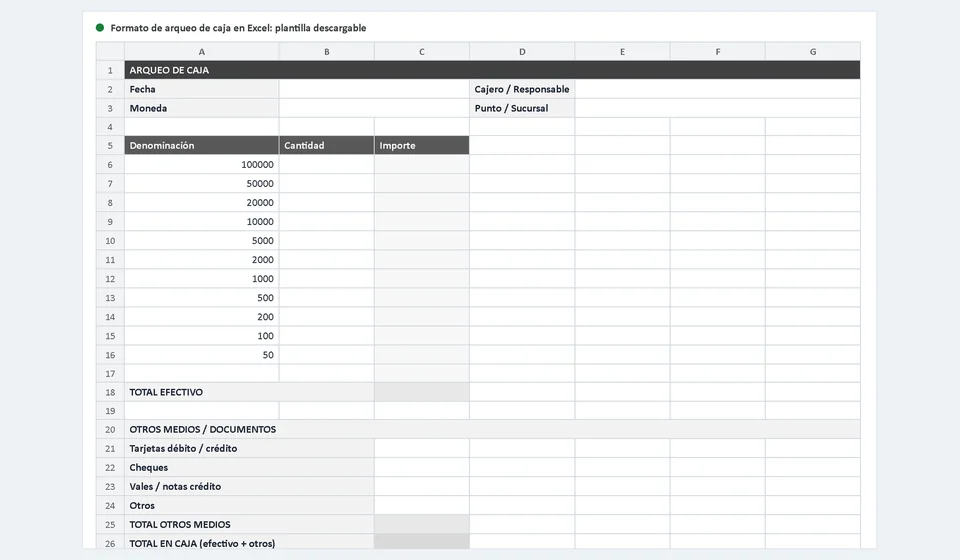
This cash count sheet template in Excel does the heavy lifting for you: you type the quantity of bills and coins for each denomination and the amounts calculate themselves, the difference appears automatically marked as overage or shortage, and at the end you have space for notes and the three required signatures. It is a free template, ready to download and use today:
⬇ Download cash count sheet template (Excel .xlsx)What the cash count template includes
The file has two sheets: the cash count sheet, which is the one you fill out and print or keep as evidence, and an instructions sheet explaining what the form is for and how to complete it in five steps. Inside the cash count sheet you will find:
| Section | What it contains and how it works |
|---|---|
| General information | Date (a cell that shows the current day automatically), cashier or person in charge, currency and register location or branch. |
| Denomination table | Editable bills and coins from 100,000 down to 50: you enter the quantity of each denomination and the amount is calculated as quantity x denomination value. |
| Total cash | Automatic sum of the amounts of every denomination counted. |
| Other payment methods and documents | Rows for debit and credit cards, checks, gift certificates or credit notes and others, with their amounts, plus the total of other methods. |
| Total in register | Sum of the total cash plus the total of other payment methods. |
| Recorded sales and difference | A cell to enter total recorded sales or income and automatic difference calculation: a positive result is an overage and a negative result is a shortage. |
| Notes and signatures | Space to write down any issue from the shift and the signatures of the person who prepared the count (cashier), the reviewer and the accountant or manager. |
Everything that comes from a sum or a multiplication is done with formulas: you only count, type quantities and record the other payment methods. The only cell filled with data that is not inside the register is the one for recorded sales or income, which you take from the system, the point of sale or the day's cash receipts.
How to do a cash count step by step
The procedure takes no more than ten minutes when you do it methodically and at a quiet moment, preferably once there are no more customers. These are the steps:
- Prepare the sheet: check that the date is correct and write the cashier's or responsible person's name, the currency and the register location or branch.
- Count the bills by denomination, from largest to smallest, and enter in the quantity column how many there are of each one. If a denomination has no bills, leave it at zero.
- Count the coins the same way and enter their quantities. The amount of each row calculates itself.
- Record the other payment methods: the total of sales paid by debit or credit card, checks received, gift certificates or credit notes and any other document that represents value inside the register.
- Enter in the corresponding cell the total of recorded sales or income for the shift, exactly as it appears in the system or in the receipts.
- Check the difference result. If the form shows an overage or a shortage, verify the count once more before signing and write any issue in the notes.
- The person who prepared the count, the reviewer and the accountant or manager sign, and the document is filed as the record for the day.
Two details make a real difference: the count is always done with the cashier present, and one full shift is closed before the next one starts. Never count a register that holds money from two mixed shifts, because if something is missing you will not be able to tell which shift is responsible.
Cash count example
Imagine a store closing for the day while the cashier does the count. In the register there are the following bills and coins, plus a batch of sales paid by card that the system reports at 380,000. The count sheet would look like this:
| Denomination | Quantity | Amount |
|---|---|---|
| 50,000 bills | 10 | 500,000 |
| 20,000 bills | 15 | 300,000 |
| 10,000 bills | 12 | 120,000 |
| 5,000 bills | 20 | 100,000 |
| 1,000 coins | 30 | 30,000 |
| Total cash | 1,050,000 | |
| Sales paid by card | 380,000 | |
| Total in register | 1,430,000 | |
| Recorded sales for the day | 1,425,000 | |
| Difference (overage) | 5,000 |
The count gives a total cash figure of 1,050,000. Adding the card sales of 380,000, the total in the register is 1,430,000. When the cashier compares that value against the day's recorded sales, which were 1,425,000, the result is a positive difference of 5,000: there is an overage. The form shows it automatically as an overage, and the right thing to do is to document it in the notes, explaining the likely cause (for example, a customer who never claimed their change) and reporting it to the person in charge.
If the result had been the opposite, with a register total lower than the recorded sales, the form would show a shortage and you would need to review the count, the change given and the payments received before signing. The advantage of this template is that Excel does the math: the only room for error left is the physical count, not the addition.
What to do with overages and shortages
When there is an overage, the first step is to count again to rule out a mistake: many overages appear because a bill was left inside a receipt, under the till tray or mixed in with the gift certificates. If the overage is confirmed, record it in the notes with its likely origin (unclaimed change, a payment recorded for less than its value, a seller's mistake in favor of the register) and handle it according to the business policy: most companies record it as income or cash overage for the period, and some use it to cover previous shortages, always with the accountant's or manager's approval.
When there is a shortage, the procedure is more delicate. Verify the count, review the change given during the day, compare the tickets or invoices against the cash received and confirm the card payments and checks. If the shortage stands, it is documented in the notes and signed by everyone, and the person in charge covers it if the business policy says so. What you should never do is hide the shortage or pay it from the cashier's own pocket without leaving a record, because then you lose valuable information about how the point of sale is really operating.
Repeated overages and shortages are both warning signs: they point to a process problem (badly calculated change, discounts applied wrongly, sales that never get recorded) that you should fix before it becomes a steady loss.
Common cash count mistakes
Knowing the most frequent mistakes helps you avoid them from day one. The three most common ones are:
- Counting without the cashier present: if someone else counts with no witnesses, any difference creates doubt and friction. The count is a verification, not a sign of distrust, which is why it is done with the shift's person in charge right there.
- Mixing shifts: counting a register that holds money from both the morning and the afternoon shift without closing the first one makes it impossible to know who is responsible for each difference. Every shift is closed, counted and signed separately.
- Ignoring small differences: a small shortage that nobody investigates will repeat and grow. If the form shows a difference, no matter how small, document it and look into it.
Add one simple habit: besides the daily closing count, run surprise counts at random times of the day. When the team knows the money can be counted at any moment, register handling improves by itself.
Cash counts and register control with software
The Excel template is the right tool to get your cash control organized today, and it works very well in businesses with few registers and low document volume. But it has a built-in limit: the form lives apart from your sales. Every night someone has to type the recorded sales total by hand, and that manual step is exactly where typing errors and forgetfulness appear. When the business grows, with several registers, several shifts and hundreds of sales a day, balancing each register on a spreadsheet becomes slow and fragile. That is where software such as Kardex Tauro changes the game: the cash reconciliation comes connected to sales and payments, because the system already knows how much was sold in cash, by card and by other methods, so you only enter the physical count of bills and coins and the difference is calculated instantly, with no totals to transcribe.
To be honest: if your operation is small, the template is enough and will serve you well for a long time. The decision to move to Kardex Tauro is made when manual balancing starts to cost more time than it saves, when you need every register location reconciled with the system's sales without manual work, or when you want to see the overages and shortages of all your registers in a single report, with their history and the people responsible.
Frequently asked questions
What is a cash count?
The physical count of the money —notes, coins and receipts— compared with what the system says should be there. The result is the real cash balance at that moment.
How often is it done?
At the end of every shift and at the end of the day, and whenever the person in charge of the till changes. That way a difference is found while it can still be explained.
What is done with the difference?
It is recorded on the same form: shortage or surplus, how much, and the explanation of whoever counted. The person in charge signs it and it is reviewed before any decision is taken.
Download the template, do your first cash count tonight and see in five minutes how simple it is to know exactly how much money is in your register. Control does not need to be complicated: it needs to be done every day and left on paper.
⬇ Download cash count sheet template (Excel .xlsx)