Warehouse issue slip template in Excel: free download

Warehouse issue slip template in Excel: free download
Keeping track of what leaves your warehouse does not require an expensive system or complicated paperwork: a well-designed issue slip, filled out consistently, is enough to know what went out, who requested it, who dispatched it and who received it. In this guide you will find a warehouse issue slip template in Excel, ready to download, explained field by field and accompanied by a worked example so your team can start using it the same day.
The file is an internal-control tool designed for businesses of any size. It does not use currency or monetary values: it records quantities and the people responsible, so it works the same regardless of country, currency or exchange rate. It is also not a fiscal document: it does not replace an invoice or other sales documents required by law, but complements the physical control of your inventory on a daily basis.
⬇ Download warehouse issue slip template (.xlsx)What an issue slip is and what it is for
The issue slip, also called a stock issue voucher or warehouse issue note, is an internal document used to authorize and record that certain merchandise leaves the storeroom. It captures the area or person requesting the material, who hands it over, who receives it and the exact quantity of every item. In short, it is the supporting record behind each outbound inventory movement.
Its main purpose is to protect stock. When any employee can take products without leaving a trace, the warehouse loses traceability: nobody knows what was consumed, where it was used or who is responsible if something goes missing. With one slip per issue, on the other hand, three questions can always be answered: what went out, how much went out and who has it now. That evidence is the foundation of a healthy inventory and turns stock discrepancies into problems solved in minutes rather than days.
The slip is used in everyday situations such as issuing materials to production, office or maintenance supplies, transfers to another branch, tools or samples leaving the premises and internal orders between departments. In sales to customers, the slip accompanies the invoice or delivery note but does not replace it: the invoice documents the commercial transaction and its value, while the slip documents the physical movement of the goods and who received them.
It also supports the stock card. Each signed and archived slip makes it possible to record the units leaving in the inventory sheet with verifiable backing, avoiding entries from memory and reducing last-minute adjustments at count time.
Segregation of duties is a sound internal-control practice: whoever requests, whoever dispatches and whoever receives should be different people whenever the size of the business allows it. When the same person asks for, hands over and signs, the slip loses its evidentiary value, because an error or a loss can hide behind a single signature. In small companies separating the roles is not always possible, but it is enough for the owner or someone outside the warehouse to review the slips periodically and reconcile them against stock. The key point is that no issue should be recorded by a single person with no supervision at all.
What the template includes
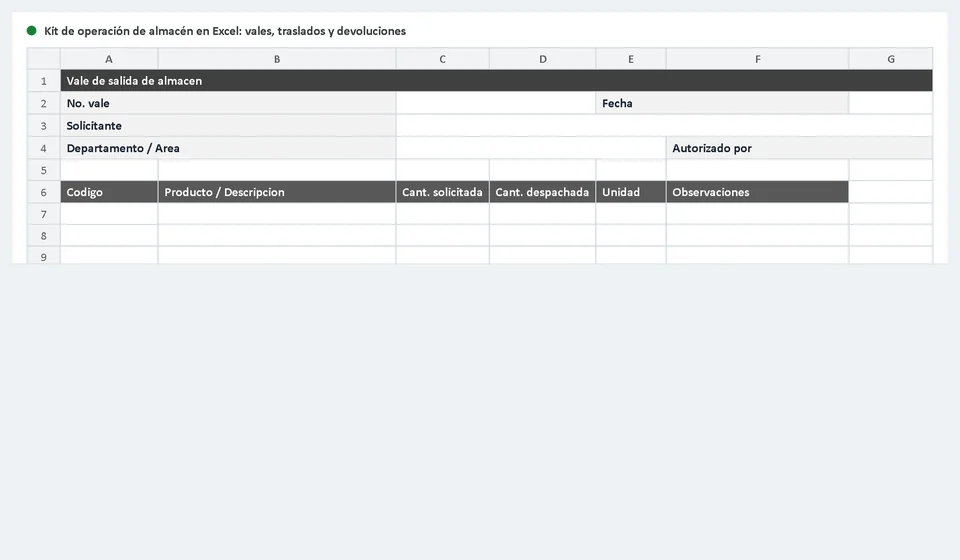
The Excel workbook is organized so that anyone in the warehouse can use it without prior training. The main sheet reproduces the issue slip format with every area ready to print, and an additional sheet explains how to fill it out step by step, with a solved example.
The format is designed to be printed on letter or legal paper in landscape orientation so that the columns read comfortably. It includes blank rows for recording several items in a single issue, and if you need more space you can print as many sheets as the order requires and number them as a continuation of the same slip.
| Component | What it contains | What it is for |
|---|---|---|
| Slip header | Company details, consecutive number, date and requesting area | Identifies the issue and lets you file it in order |
| Items table | Code, description, unit and quantities of each item | Details which merchandise leaves and in what quantity |
| Responsible parties | Fields for requested by, authorized by, dispatched by and received by | Records who is accountable for each stage of the issue |
| Notes block | Space for remarks and pending balances | Clarifies partial dispatches and special cases |
| Instructions sheet | Step-by-step guide, column map and worked example | Prevents filling errors across the whole team |
Issue slip columns
Each column of the format serves a specific purpose, and the whole team should understand it the same way. Here is the quick reference:
| Column | What you write | Example |
|---|---|---|
| Slip no. | Consecutive number identifying the issue | 0147 |
| Date | Day on which the dispatch takes place | 04/15/2026 |
| Requesting area | Department or process that requests the merchandise | Production |
| Requested by | Name of the person placing the request | Ana Gomez |
| Authorized by | Name of the person approving the issue when required | Warehouse manager |
| Dispatched by | Warehouse keeper who hands over the goods | Carlos Ruiz |
| Received by | Person who receives and signs the acknowledgment | Luis Perez |
| Code | Product identifier in the inventory | TOR-006 |
| Description | Item name as it appears in the catalog | M6 screws, box of 100 units |
| Unit | Unit of measure used for the dispatch | Box |
| Qty. requested | How much the requesting area asked for | 10 |
| Qty. dispatched | How much was actually delivered | 10 |
| Notes | Remarks, pending balances or clarifications | Full dispatch |
Worked example: an order for 10 boxes of screws
The production area requests material for the assembly line. The order asks for 10 boxes of screws and 4 boxes of washers; the warehouse checks the stock, confirms there is enough on hand and dispatches everything in a single delivery. The slip looks like this:
| Code | Description | Unit | Qty. requested | Qty. dispatched | Notes |
|---|---|---|---|---|---|
| TOR-006 | M6 screws, box of 100 units | Box | 10 | 10 | Full dispatch |
| ARN-021 | M6 flat washers, box of 200 units | Box | 4 | 4 | Full dispatch |
In this example the requested and dispatched quantities match because there was no pending balance: 10 boxes of screws were requested and 10 were dispatched. Notice that the format has no price or value columns: the slip controls units and responsibilities, while the valuation of the movement is done separately, on the stock card, using the cost that applies to each issue. That is why the document works for any business regardless of its currency.
How to fill out the issue slip, step by step
- Complete the header. Write the company name, assign the next consecutive slip number, record the actual delivery date and state the area or process requesting the merchandise. If the format includes an authorization field, make sure it is signed before any item is moved.
- Detail the items. Enter in the table the code of each product, its description exactly as it appears in the inventory, the unit of measure and the requested quantity. When stock is not enough, write the quantity that is actually dispatched and note the pending balance in the remarks so it can be followed up.
- Collect the signatures. At delivery time, the person requesting, the person dispatching and the person receiving all sign and date. The receiver's signature closes the cycle: without it, the slip does not prove that the merchandise changed hands.
- File by consecutive number. Keep the original or a scanned copy in numerical order, in a physical or digital folder. That organized archive backs every stock card movement and is the first tool to reach for when a discrepancy appears.
Tips for effective control
- Keep a consecutive numbering with no gaps or repeats; if you void a slip, keep it in the same file marked as void so the sequence explains itself.
- Never dispatch without a signed slip. It is the golden rule of the warehouse, and every exception must be documented the same day, not days later.
- Reconcile the slips against the stock card periodically, for example weekly or at each closing: compare them with the issues recorded and correct any difference immediately.
- Use one slip per issue and group all the items of a single order on it; splitting a delivery into several slips duplicates numbering and confuses the records.
- Control partial dispatches with discipline: a dispatched quantity lower than the requested one must show its pending balance clearly in the notes.
- Protect the documents: keep backups or scans organized by year, because a lost slip is a movement without support.
When it makes sense to move to software
The paper slip works very well while the volume of issues is low and the team is small. But there comes a point when it is worth asking whether the manual operation is still efficient: if time is spent hunting for a filed slip, if stock card discrepancies keep recurring, if nobody knows real-time stock levels or if you need to know which area consumes the most material, manual control starts costing more than it saves.
That is the moment to rely on an inventory program. With Kardex Tauro, for example, each issue is recorded once: the system deducts stock immediately, keeps the full movement history and lets you check availability per product without waiting for the physical count. The issue slip does not disappear: it is still printed and signed as physical support, and its number is written on the movement to keep complete traceability between paper and system.
Frequently asked questions
Who should sign a warehouse issue slip?
The form carries the requester, the department and the authorisation. At dispatch, add the signature of whoever hands over the goods and of whoever receives them: that pair is what turns the paper into proof.
Can the issue slip be used as accounting support?
Yes. It is the document that backs the goods leaving the warehouse and the one that lets you match the movement against the stock ledger and the cost of consumption or sale.
Should it be printed or used digitally?
Either. The file is an .xlsx: print it to sign by hand, or fill it in and keep it on the computer when the department already works with files.
Download the template today, try it with your team for a week and see how the warehouse becomes more organized. When volume grows, you will already have a solid documentary base for the next step.
⬇ Download warehouse issue slip template (.xlsx)