Preventive maintenance schedule template for Excel

Preventive maintenance schedule template for Excel
Ask the person running a small shop when the compressor was last serviced and you rarely get a date. You get a shrug, a story about the technician who used to come around, and a search through a drawer for an invoice that may or may not still be there. Ask a second question — when is it due next? — and the answer becomes a guess.
The missing piece is almost never the equipment list. Every shop owner can name every machine on the floor, where it sits and what it does. What goes missing is the interval and the date: which unit is due this week, which one has already slipped, and which one can wait until the quiet season. Without that, preventive maintenance quietly turns into breakdown maintenance with a nicer name, and the bill arrives as idle hours, emergency parts and customers who were promised a delivery.
This sheet handles that one piece and nothing else: a date-driven schedule per machine, with the interval for each activity, the last service, the next due date, the days left and a status that colours itself. It does not schedule production, issue work orders or track spare parts. It is the page you open on Monday morning to decide which unit gets the attention first.
⬇ Download the template (Excel .xlsx)What the format is and who it is for
It is a spreadsheet with one row per combination of equipment and activity. Each row holds the bare minimum needed to answer three questions: how often, when last, and when next. Everything downstream — the next due date, the days left, the status — is calculated. You supply names, dates and intervals; the arithmetic is not your job.
The template is built for an operation with somewhere between five and fifty machines of its own, kept running by in-house staff or by a technician who comes when called: machine shops, bakeries with ovens and mixers, small delivery fleets, food plants, laundries, dental and medical rooms with an autoclave, print shops, warehouses with forklifts. The pattern is identical in all of them: if the machine stops without warning, the work stops with it.
It does not replace the equipment manual; it turns the manual into a calendar you can review and argue with. When the maker asks for a component to be checked after a certain number of running hours, that instruction becomes an interval in days here, written against an activity name anyone can understand. The sheet does not make the decision for you. It stops the decision from being forgotten.
What the template contains
| Block | What it holds | What it is for |
|---|---|---|
| Parameter header | Review date, alert threshold in days and the name of whoever owns the plan | Sets the date everything is measured against and decides when a service counts as due soon |
| Schedule sheet | One row per equipment and activity, across the eleven columns of the format | The body of the calendar: this is where you write and where you read |
| Next service | A calculated column driven by the last date and the interval | Removes the hand addition and the month-end error that lingers for half a year |
| Days left | A calculated column measured against the review date | This is the number that sets the priority for the week |
| Status | A calculated column with three possible values | Turns the number into a signal: overdue, due soon or up to date |
| Footer summary | Three counts by status plus the row total | Shows at a glance how many machines sit in each situation |
| Conditional formatting | Colours applied over the status column | Lets the sheet be read from across the room, without looking at the numbers |
| Status list | Data validation on the status column | Blocks variants that would break the footer count |
The header is the first thing to adjust: the review date and the alert threshold, meaning how many days of warning you want. A shop that orders parts from out of town will set a wide threshold; a bakery that fixes things the same afternoon will keep it short.
There are no hidden blocks and no macros. If a number looks wrong, select the cell and read where it comes from.
The columns, one by one
| Column | What you type | What is calculated |
|---|---|---|
| Equipment | The name everyone on the floor actually uses, not the catalogue name | — |
| Code | The asset tag or internal inventory number | — |
| Location | The area, line or room where it stands | — |
| Activity | Exactly what gets done: oil change, belt inspection, filter cleaning | — |
| Frequency (days) | How many days apart the activity falls due | — |
| Last service | The date it was last performed | — |
| Next service | Nothing: left empty | Last service plus frequency |
| Days left | Nothing: left empty | Next service minus the review date |
| Status | Nothing, unless someone wants to force it | Overdue, due soon or up to date, from the days left and the threshold |
| Owner | Who performs or coordinates the work | — |
| Estimated cost | What is budgeted for that intervention | —, because the figure moves with the part and the supplier |
The three calculated columns are the ones nobody types into. The moment someone overwrites them, the row stops answering and the footer starts lying.
The activity column deserves care. "General maintenance" is not an activity, it is an intention. A row reading "oil and air filter change" can be scheduled, budgeted and checked off; a row reading "general check" ends in an argument about what was actually done. Two routines on different intervals belong on two rows, even when they share a code and a location.
How the next service and the status are calculated
The next service is never typed; it is added. The sheet takes the date in the last service column and adds the number of days in the interval column. A date plus a number of days is another date, and that is the whole formula: it counts calendar days, with no months of different length and no leap years to remember.
Days left is the subtraction that turns a calendar into a priority list: the review date is taken away from the next service. A positive result means the service is that many days out. Zero means it falls today. A negative result means the machine is exactly that many days late, and the sign is the most useful thing on the sheet — a unit three days overdue and one three months overdue look identical in a column of dates, and completely different as a negative number.
The status is not an opinion, it is a threshold. The sheet compares days left against the alert cell in the header and sorts the rows into three groups: overdue once the number is negative, due soon while there is little margin left, and up to date when there is still room. Because the threshold is an editable cell, the same file works for a critical machine that needs a month of notice and for a secondary one that can be handled in the same week.
| Frequency (days) | Next service | Days left on the day of service | Status that day |
|---|---|---|---|
| 60 | Last service plus 60 | 60 | Up to date |
| 90 | Last service plus 90 | 90 | Up to date |
| 180 | Last service plus 180 | 180 | Up to date |
| 365 | Last service plus 365 | 365 | Up to date |
Read that table backwards, because that is how it behaves in practice: on the day the work is done the counter starts at the interval and drops by one for every day that passes. At a 60-day interval, once 45 days have gone the counter reads 15 and the machine is still up to date; at 61 days it reads minus one and the status has already flipped to overdue. At 365 the mechanism is identical, only slower: months of quiet, then the alert. The sample sheet carries five machines across four different intervals, which is exactly why the same formula has to hold at both ends of the range.
Here is the detail that keeps the template usable two years from now: it holds no hand-written dates and no fixed "today" buried in a cell. The review date is a header input, and every date in the plan comes from a service that was actually performed. When the technician finishes a job, you replace the last service date and the whole row re-sorts itself: the next service moves out, the counter refills and the status returns to the quiet zone. Nothing expires, because nothing was written as if it were today.
The footer does not count rows, it counts situations. It totals how many rows are overdue, how many are due soon and how many are up to date, and shows the row count alongside. The sample sheet has five machines, so the three boxes must add up to five. If one day they add up to four or six, a status was typed by hand, a date was mistyped or an interval is blank — and that is the first place to look before trusting the summary.
Step by step
- Open the sheet and start at the header: enter the review date and the alert threshold in days. Without those two values the colour coding means nothing.
- List equipment and activities. One row per combination: a compressor with an oil change and a filter change is two rows, not one row with two jobs.
- Enter the interval in days — from the manual where one exists, from the technician's experience where it does not, from the breakdown history where there is one. An invented interval only postpones the problem.
- Enter the last service date exactly as it appears on the invoice or in the logbook. If nobody is sure, use the last known inspection and say so: an approximate date that is admitted beats an invented one that is believed.
- Check that the three calculated columns are filled on every row. A row with no next service is a row that will never warn anyone.
- Sort by days left, smallest first. The top row is what gets attention; the rest of the order is a conversation.
- After every intervention, update the last service date and the real cost. The row re-sorts on its own and the plan stays alive without being rebuilt.
Common mistakes
- Entering the interval in months when the column asks for days. The whole schedule stretches out and nobody can work out why it never warns.
- Recording the date the service was scheduled instead of the date it was done. A job that was planned and never performed moves the calendar forward without maintaining anything.
- Leaving out the machines that "hardly get used". Those are precisely the ones nobody inspects and the ones that fail on the worst day.
- Typing over the status to fix a row. That breaks the footer count and throws away the only cross-check the file has.
- Writing activities so vague that nobody can tell what was done or how the finished work gets verified.
- Forgetting to move the review date forward and trusting a colour that is a week old. A dashboard read with last week's date is a dashboard that misleads.
When to move to software
This sheet works well up to a few dozen machines, with one owner and one site. When the plan grows in any of those three directions it starts costing more than it gives: two people editing the same file end up with two versions of the truth, and a machine that moves between sites loses its history on the way.
The jump makes sense when you need history per machine — what was changed, when, with which part — and not just the next date; when work orders have to be issued and closed; when you need to know whether the spare is on the shelf before scheduling the stoppage. At that point a sheet is short by design, not for lack of formulas. Kardex Tauro covers that ground once maintenance becomes a process with owners, parts and costs that have to be reconciled against inventory; while the plan still fits one person and one screen, this template does the job.
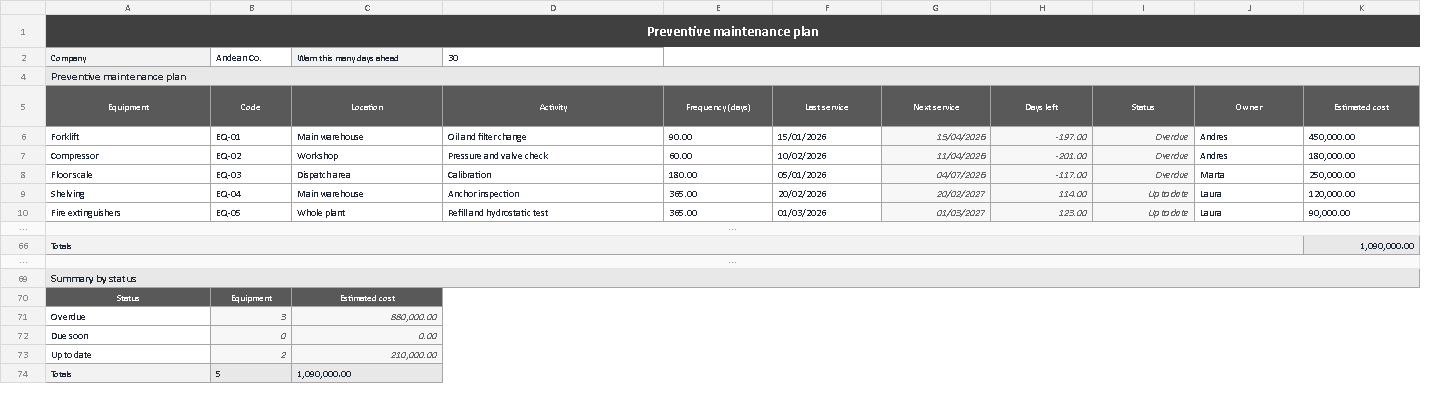
The screenshot shows the sheet as it ships: the parameters across the top, the equipment rows with their intervals and last service dates, and on the right the three columns that fill themselves in, with the status colour sitting over the last one. Check two things before loading your own data: that the days left column runs from smallest to largest, so the first row is the one to act on, and that the three footer boxes add up to exactly the number of rows in the table. If both checks pass, the plan is sound and all that is left is to use it.
A maintenance plan does not stop a machine from failing; it stops you from finding out late. With an interval written down, a last service date and a day counter, the Monday conversation moves from "I think the compressor is about due" to "the compressor has fifteen days left". Repeated every week, that difference is what separates a shop that improvises from one that keeps the work running.
⬇ Download the template (Excel .xlsx)